How to Design a SaaS Set Up Wizard That Converts

The popular advice is simple: make your SaaS set up wizard shorter, add sensible defaults, and reduce the number of screens. That advice is incomplete. A short wizard can still fail when it hides progress, loses state, or gives users no useful path after a Stripe connection breaks.
A setup wizard is more than a sequence of onboarding screens. It's the user-facing entry point to installation, configuration, product analytics, segmentation, and lifecycle messaging. The teams that get the most from it treat every completed step as an operational event, not merely a form submission. They also design for the moment when the user leaves, makes a mistake, or needs to find information elsewhere.
Table of Contents
- Why Most SaaS Setup Wizards Underperform
- The three failure modes
- The right mental model
- Deciding What Your Wizard Should Ask Versus Infer
- When asking is the better choice
- When inference is better
- Designing Wizard UX That Survives Interruptions and Errors
- Make every failure actionable
- Design interruptions into the flow
- Instrumenting Your Wizard With the Right Events
- Connect setup events to product reality
- Audit the event stream
- Connecting Wizard Milestones to Lifecycle Email Automation
- Hold messages before release
- Protect the sending identity
- Measuring Setup Wizard Success and Iterating
- Read slow completion as a design signal
- A Prioritized Approach to Improving Your Wizard
Why Most SaaS Setup Wizards Underperform
A longer wizard doesn't automatically create better onboarding. In fact, usability guidance from Nielsen Norman Group's research on wizards warns that unnecessary wizards increase cognitive load and can lead to abandonment. The practical implication is uncomfortable: each question must justify the interruption it creates.
Teams still add steps because every question seems reasonable in isolation. Asking for company size, role, use case, preferred tone, integrations, goals, and reporting preferences can look like thoughtful personalization. To a new user, it can feel like unpaid research before the product has delivered any value.
The historical success of the wizard pattern explains why this mistake persists. Guided setup emerged as a multi-step interface for first-time configuration, with Microsoft's early work predating Microsoft Access, which shipped in November 1992. Excel 4.0 for Mac added wizards in 1992, Office 95 introduced the Answer Wizard, and Windows later used wizards for tasks such as adding printers, configuring internet connections, and installing applications. By 2001, the pattern was commonplace in most consumer-oriented operating systems, while Apple used a similar onboarding pattern called Setup Assistant in Mac OS 8.0. The history of software wizards) shows why the pattern became a standard way to make complex setup approachable.
The three failure modes
Asking too much is the first problem. A question belongs in the initial flow only when its answer changes the user's immediate path, prevents a likely configuration error, or enables the first meaningful action. Everything else can be inferred, deferred, or requested at the moment it becomes relevant.
Hiding progress is the second. Users need to understand whether they're making a quick configuration choice or entering a long implementation process. A progress model should reflect real work, not decorate the interface. If the final step still requires external verification, the wizard must say so before the user commits.
Ignoring recovery is the third, and it's the most expensive. A user can complete every happy-path screen and still fail to activate because an event source is empty, a webhook is delayed, or a sending domain hasn't been verified. Useful EmailScout onboarding insights are a helpful complement here because onboarding quality depends on what happens after the initial prompt, not only on the prompt itself.
The right mental model
Judge the wizard by four questions:
- Value: Does each step move the user closer to a meaningful product outcome?
- Clarity: Can the user tell what's required, optional, completed, and still blocked?
- Recoverability: Can the user return after an interruption without repeating work?
- Continuity: Do milestone events trigger relevant product and lifecycle actions?
A wizard that satisfies only the first two is a polished form. A wizard that satisfies all four becomes part of the product's activation system.
Deciding What Your Wizard Should Ask Versus Infer
The most consequential design choice often happens before the first screen is built. You need to decide which context the user must provide and which context the system can collect or infer without asking.
The rule I use is direct: ask only for information that changes the next experience. If the answer doesn't affect the first action, the first recommendation, the required integration, or the user's permissions, it probably doesn't belong in the initial wizard.
| Ask the user | Infer or default |
|---|---|
| The outcome they want first | Company description available on the website |
| The lifecycle priority they want to address | Product category and positioning |
| A preferred communication voice when it changes generated output | Existing language in the website and past emails |
| A required technical choice that only the user can authorize | Basic account and workspace metadata |
When asking is the better choice
Ask when the information is high signal and unavailable elsewhere. A lifecycle product might ask whether the user's priority is activation, feature adoption, or churn reduction. It might also ask whether emails should sound concise, conversational, or highly technical if that choice immediately changes the draft copy.
Keep those questions close to the first useful output. If the user chooses activation, the wizard can show an activation journey, request the relevant product event, and explain what will happen after the connection succeeds. The answer earns its place because it changes the path.
The risk is collecting context too early. An onboarding study reported a 41.45% completion rate for wizard-based onboarding and found that wizards had the longest completion time among the tested approaches, so additional questions can create friction even when users still finish the flow. The onboarding strategy comparison supports a useful design question: does this answer improve downstream relevance enough to justify the time it adds?
When inference is better
Infer information when the product already has a reliable source. An AI-driven email tool can read the customer's website, codebase, and past emails to establish a starting point for positioning, vocabulary, and voice. It can then ask the user to confirm or correct the result instead of forcing them to restate information the product could access.
That approach works particularly well for descriptions, industry labels, likely use cases, and draft tone. It works less well for authorization, compliance choices, billing decisions, or a business priority that isn't visible in public material.
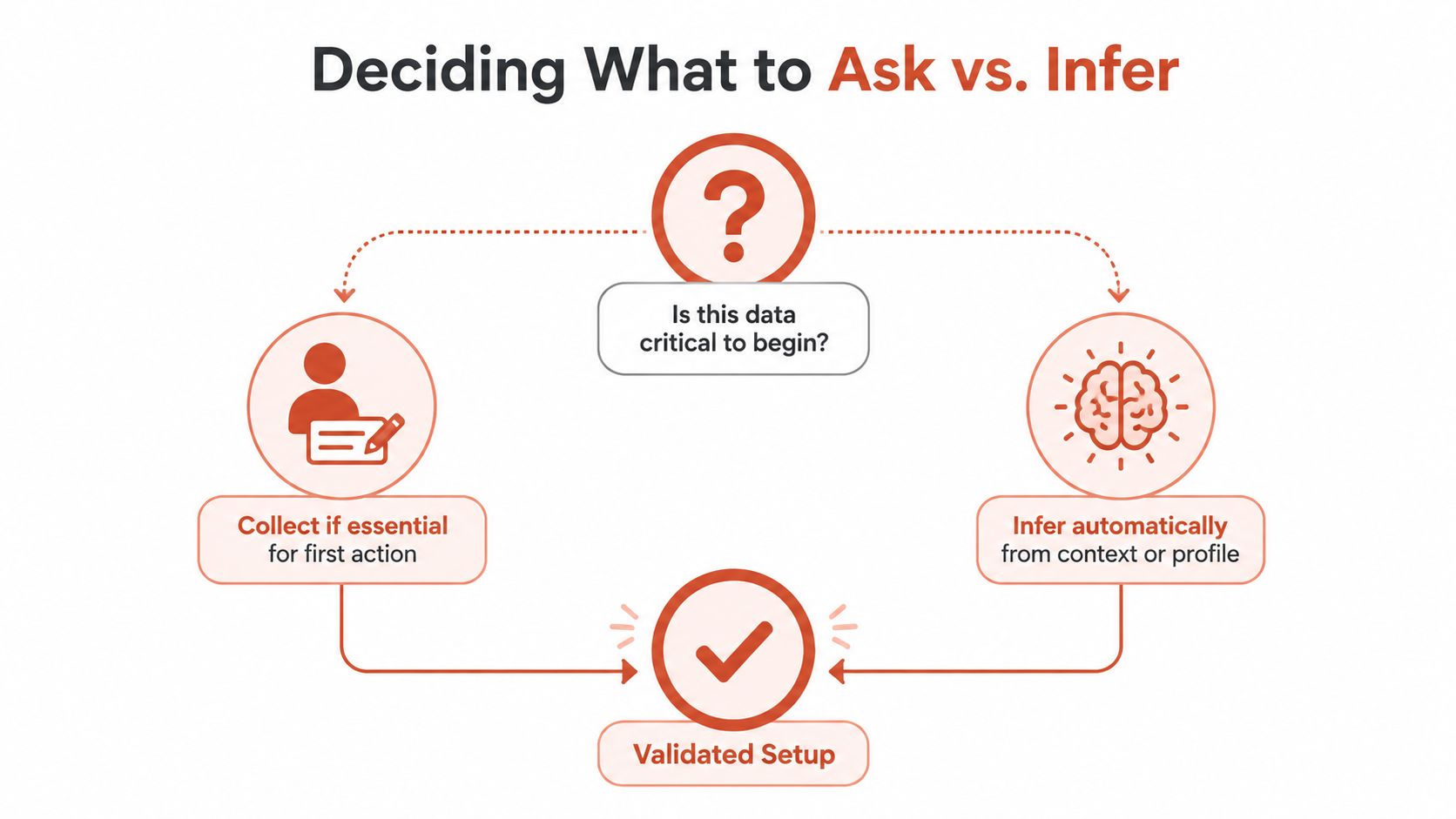
Run a question audit by writing down every field in the wizard. For each one, record its source, the next experience it changes, whether it can be defaulted safely, and what happens if the user skips it. Remove fields that have no immediate consequence, move later-use questions into the relevant feature, and turn uncertain inferences into reviewable suggestions.
Practical rule: Ask for intent. Infer description. Confirm anything that can materially change what the product does.
Designing Wizard UX That Survives Interruptions and Errors
The happy path is the least interesting part of a setup wizard. Users submit empty forms, click back, close tabs, lose network access, wait on slow servers, and leave the flow to find documentation. A production wizard must treat those actions as normal behavior, not exceptional misconduct.
Start with state. Save progress after every meaningful change, not only when the user clicks the final button. Store the current step, completed values, connection status, and any validation result so a returning user sees the exact point that needs attention. If sensitive credentials require different handling, save the safe metadata and show a clear reconnect action rather than discarding the entire setup without notice.
Make every failure actionable
An error message should answer three questions:
- What failed? Name the specific connection, field, or server operation.
- Why does it matter? Explain what the failure prevents.
- What can the user do next? Offer retry, correction, documentation, or support.
“Connection failed” is not a recovery path. “Stripe connected, but no payment events have been received. Check the selected workspace, send a test event, or continue and return later” gives the user choices and preserves momentum.
For third-party integrations, distinguish between a temporary failure and a configuration failure. A slow server may deserve a retry with preserved input. An invalid authorization may require reconnecting. A missing event source may require setup outside the wizard. Clear states prevent users from repeatedly clicking a button that can't succeed.
The operational mechanics behind retry and circuit breaker strategies are relevant here. The interface doesn't need to expose every implementation detail, but it should reflect whether the system is retrying, has stopped retrying, or needs user action.
Design interruptions into the flow
Progress indicators should tell the truth. If setup has four visible stages but the final stage waits for domain verification, show that dependency. If users can skip an integration and return later, label the action as “Set up later” rather than implying completion.
Test these cases before launch:
- Empty submission: The user submits without entering a required value.
- Slow response: The server takes long enough that the user might click again.
- Back navigation: The user goes back and forward without losing valid data.
- Expired authorization: A third-party token is no longer valid.
- Missing external data: The connection succeeds but events haven't arrived.
- Mid-flow exit: The user closes the browser and returns later.
- Documentation detour: The user leaves to find a key or configuration detail.
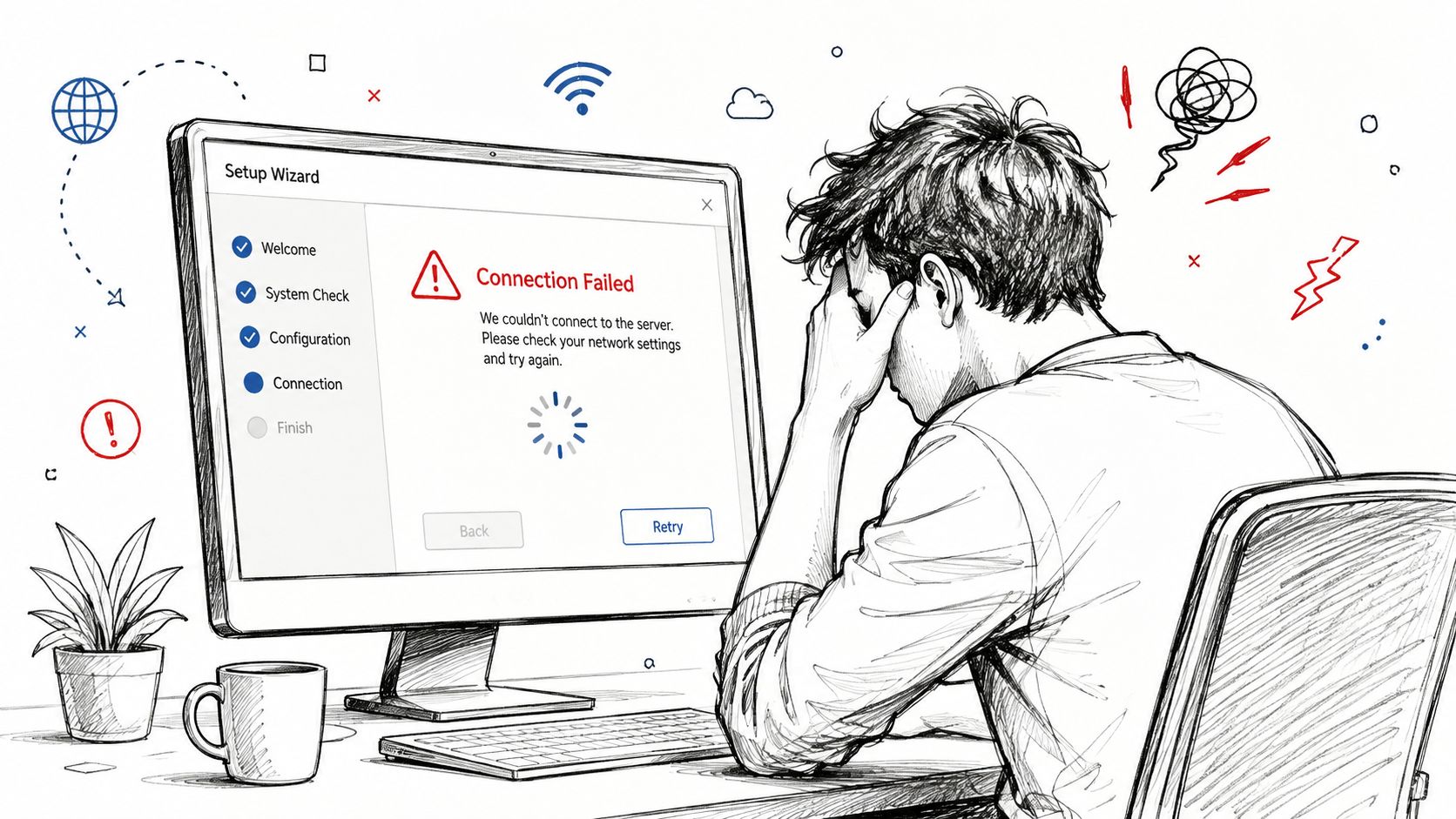
The best wizard isn't merely short. It's interruption-tolerant. A user who returns after a failed connection should see what remains, what was saved, and what action will unblock the next milestone.
Instrumenting Your Wizard With the Right Events
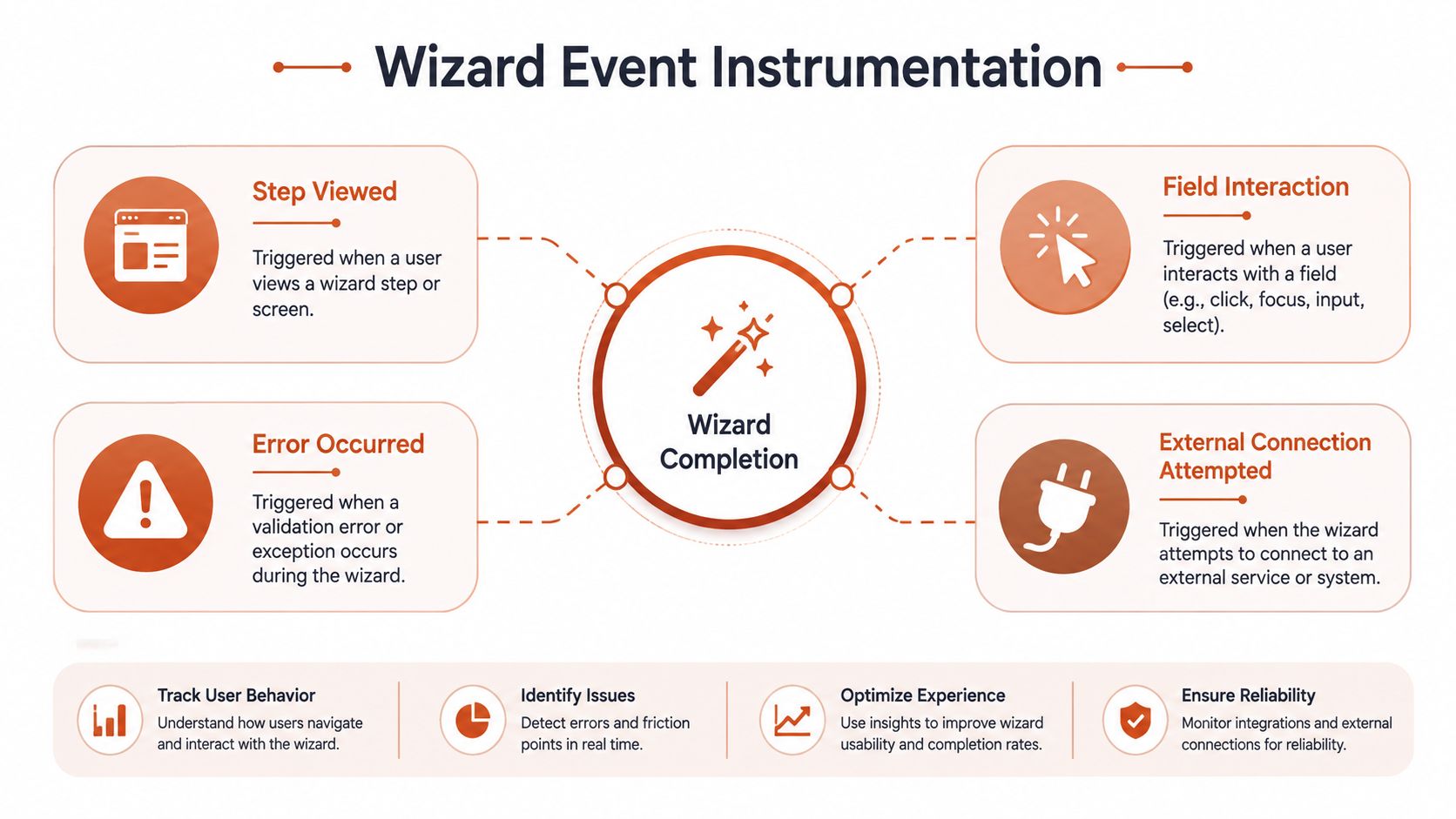
A wizard that saves state but emits no useful events leaves product teams guessing. Instrument milestones so you can distinguish a user who never started from one who reached an external connection, failed validation, and abandoned after repeated errors.
Begin with a stable event vocabulary. Use names that describe what happened, not what a button is called:
wizard_startedwizard_step_viewedwizard_field_updatedwizard_step_completedwizard_external_connection_attemptedwizard_external_connection_succeededwizard_error_occurredwizard_completedwizard_resumed
Each event should carry properties that make the record useful without requiring a screen replay. Capture the workspace or user identifier, wizard version, step name, selected method, timestamp, and failure reason where relevant. For connection events, add the provider and connection state. For errors, preserve a safe machine-readable code and a human-readable recovery category.
Connect setup events to product reality
A completed wizard isn't necessarily activation. Connect wizard milestones to the events that prove the product is working. For a lifecycle platform, those might include a successful GitHub connection, a verified sending domain, an event ingestion test, a drafted journey, an approved email, or a first lifecycle send.
Payment and product sources need a consistent identity model. Whether events arrive from Stripe, webhooks, a direct Events API, or providers such as Clerk and Supabase, the wizard should know which account and workspace each event belongs to. Otherwise, the interface can report a successful connection while downstream segmentation remains empty.
Event-based segmentation follows naturally from this model. Behavioral events can move users between welcome, activation, feature adoption, and re-engagement journeys without requiring a marketer to maintain static lists or build queries manually. This guide to data-driven marketing solutions provides useful context for treating product behavior as the input to marketing automation.
Audit the event stream
During testing, compare the interface state with the event stream. A user should not appear as wizard_completed if a required domain is still pending. A retry should not create duplicate connections. A resumed session should preserve its relationship to the original wizard version so later analysis doesn't mix materially different flows.
The important measurement question is not “did the button fire?” It's “can we reconstruct the user's path and explain why setup stopped?”
Connecting Wizard Milestones to Lifecycle Email Automation
The setup wizard becomes substantially more useful when its milestones trigger relevant lifecycle journeys. A completed connection can start activation guidance. A stalled event source can trigger an email explaining what data is missing. A user who reaches setup, leaves, and never returns can enter a re-engagement path instead of receiving a generic newsletter.
Useful journey states include:
- Welcome: The account exists, but the user hasn't reached the first meaningful configuration step.
- Activation: Required setup is complete and the product can guide the user toward a first outcome.
- Feature adoption: The user has connected one capability but hasn't used a related feature.
- Churn-save: Product or billing signals indicate that an existing customer may need help.
- Win-back: A dormant or canceled account receives context-aware reactivation messaging.
- Dunning: A payment event requires clear, timely communication.
The wizard should emit the facts. The email system should decide which journey applies, subject to business rules and approval controls. An AI email marketer such as Mara can draft messages in the company's voice, propose journeys from product and billing events, and work with sources including Stripe, Polar, webhooks, and a direct Events API. It can also generate variants and support behavior-based segmentation without requiring a manually maintained query builder.
Hold messages before release
Automated email needs a controlled release path, especially when a setup event can create a customer-facing message. A practical approval workflow intercepts the outbound item before delivery and places it in a held state. The system notifies an approver, who can release or discard the message.
Every transition should append to an immutable audit log. Record queued, notified, approved, rejected, sent, and discarded events, along with the actor, timestamp, IP address, and message hash. This creates an accountable history instead of relying on a dashboard that only shows the final send state. The approval workflow pattern for AI-agent email describes this stateful model in practical terms.
Protect the sending identity
Wizard integration can create deliverability debt if the team connects automation to an unprepared domain. Deliverability guidance recommends using a dedicated sending subdomain for a specific mail stream rather than mixing product lifecycle messages with unrelated mail on the primary domain. The setup sequence should cover SPF for the envelope domain, DKIM signing under the brand, DMARC policy, and consistent tracking and bounce-handling identity. This dedicated-subdomain guidance explains why separation improves operational control.
For a fuller operating model, this lifecycle email automation workflow is a useful reference. The key design principle is simple: wizard milestones should create precise customer context, while approval and sending controls prevent that context from turning into careless automation.
Measuring Setup Wizard Success and Iterating
Completion rate matters, but it can mislead you when viewed alone. Track completion rate, time-to-complete, drop-off by step, error frequency, resume rate, and downstream activation. A user who completes the wizard quickly but never connects a real event source hasn't necessarily reached value.
A controlled onboarding study found that an interactive walkthrough had the highest completion rate among the tested methods, at 52.43%, or 97 of 185 users. The same study found that the setup-wizard approach had the slowest average completion time among users who finished onboarding, at 15.37 days, compared with 5.85 days for chatbot, 7.28 days for gamified, and 7.52 days for nudge-based onboarding. The full controlled onboarding study gives the comparison important context: completion and speed can point in different directions.
Read slow completion as a design signal
Slow completion usually means users are waiting, researching, returning later, or encountering uncertainty. Break time-to-complete into active interaction time, external waiting time, and resumed-session delay. That decomposition tells you whether to shorten the flow, improve instructions, fix integration latency, or make save-and-resume more visible.
Use a wizard performance report to review product and email behavior together. If users finish setup but ignore activation messages, the problem may be journey relevance rather than wizard UX. If users abandon at the domain step and email bounce or complaint indicators worsen after launch, investigate both the setup instructions and sending configuration.
Variant testing can help once the event schema is reliable. A multi-armed bandit can shift traffic toward stronger wizard or email variants while reducing exposure to weaker ones, but it shouldn't compensate for ambiguous errors or broken state persistence. Optimization works after the fundamentals are trustworthy.
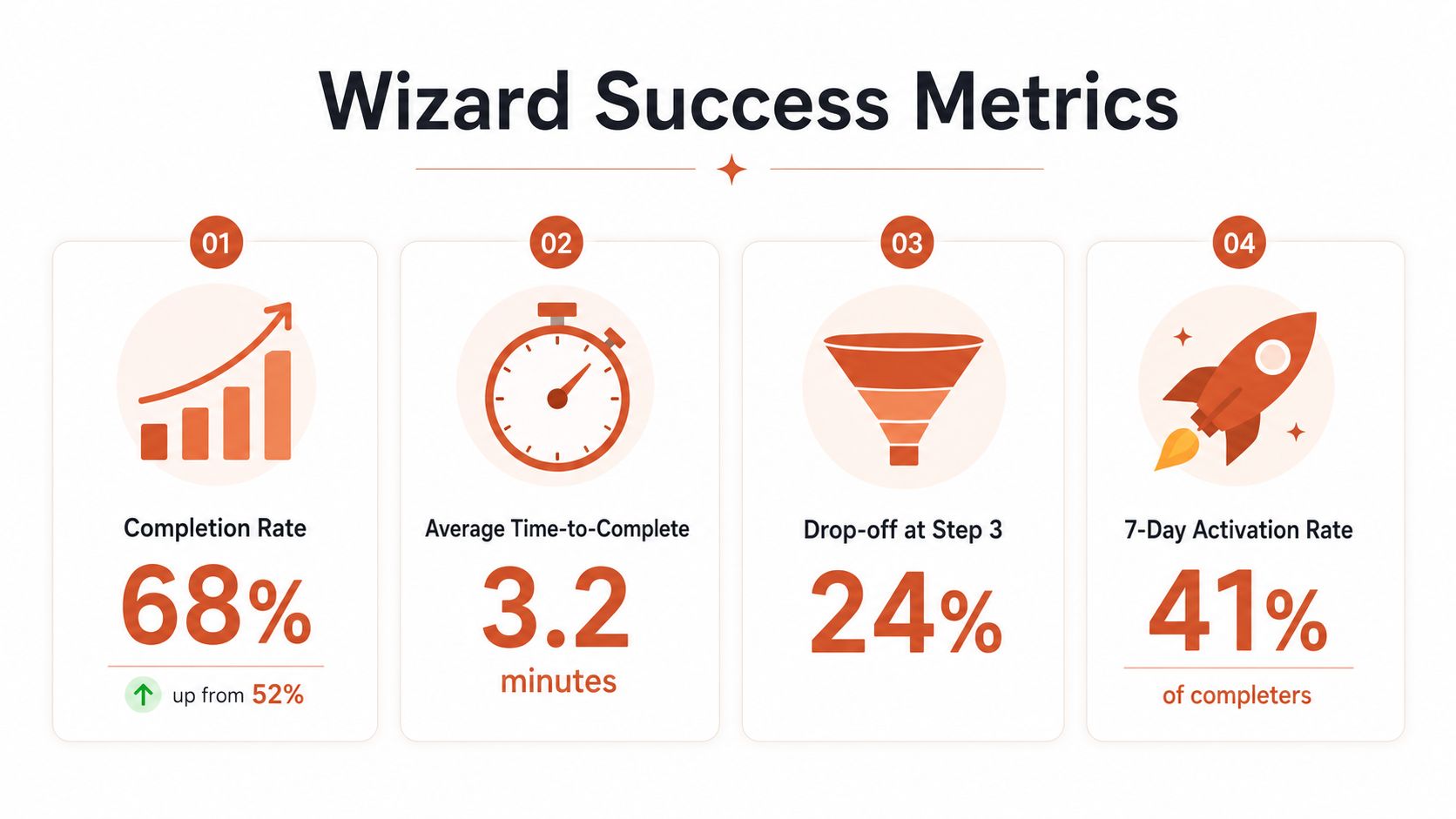
Review the flow weekly. Look at the highest abandonment step, the most common failure reason, resumed sessions, activation after completion, and the lifecycle emails triggered by each state. Then choose one change that removes friction and one change that improves the quality of the resulting customer data.
A Prioritized Approach to Improving Your Wizard
Start with changes that improve both user experience and operational visibility. Don't begin by redesigning every screen or adding personalization logic. Fix the points that stop users from completing meaningful setup.
-
Remove low-signal questions. Keep only the answers that change the immediate path. Move preference collection closer to the feature where it matters, and infer context from reliable product sources when possible.
-
Add save-and-resume. Persist safe progress after each meaningful action. On return, show the last completed milestone, the blocked action, and a clear way to continue.
-
Rewrite failure states. Replace generic errors with a specific cause and next action. Cover empty submissions, slow responses, expired authorizations, missing events, and third-party connection failures.
-
Instrument milestones. Emit stable events for step views, field interactions, connection attempts, successes, failures, resumes, and completion. Include enough properties to explain behavior without reconstructing it from raw logs.
-
Wire milestones to lifecycle journeys. Use completed, stalled, and failed states to trigger welcome, activation, feature adoption, re-engagement, churn-save, win-back, or dunning communication. Keep approval gates in place until the event logic and copy are dependable.
-
Monitor the sending system continuously. Dedicated-domain checklists recommend checking SPF, DKIM, and DMARC propagation, then watching bounce rate, spam complaint rate, inbox placement, and blocklist status weekly. One checklist gives benchmark targets of under 2% for bounce rate and under 0.1% for spam complaints, so use those thresholds as operational warning signs rather than treating domain setup as a one-time task. The email deliverability checklist covers the monitoring cadence and benchmarks.
Wizard improvement is iterative. Reduce questions, protect state, explain failures, measure behavior, and connect the resulting events to controlled lifecycle messaging. That sequence usually creates more durable gains than adding another clever screen.
Mara drafts lifecycle emails in your company's voice and proposes journeys from setup, product, and billing events, with approval controls before messages are released. Visit Mara to connect your wizard milestones to practical activation, re-engagement, churn-save, and other lifecycle workflows.