Customer Data Activation: A Practical Guide for SaaS
You have signup events, payment records, product usage, and a dashboard full of charts. Yet a trial user can stop logging in, hit a payment problem, or reach a valuable feature without receiving a relevant message. Your team sees the behavior later, discusses it in a meeting, and sends another broad campaign.
That delay is the customer data activation problem. The data exists, but it hasn't become an operational response. For a SaaS company, the practical question isn't whether you can collect more signals. It's whether a useful signal can trigger the right email, product prompt, or sales task while the customer's situation still matters.
Table of Contents
- What Customer Data Activation Really Means
- The operational distinction
- The Data Sources Behind Activation
- Match each source to a decision
- Integration Patterns That Make Data Actionable
- Native events for product behavior
- Webhooks for state changes
- Reverse ETL for deliberate batches
- How Activation Powers Lifecycle Email
- Welcome and activation
- Expansion and win-back
- A Practical Walkthrough for SaaS Teams
- From raw event to decision
- Production safeguards
- Why Activation Breaks Between Insight and Action
- Three failure points
- Operationalizing Activation Without Rebuilding Your Stack
- A focused operating checklist
- Keep the stack proportional
What Customer Data Activation Really Means
A founder often discovers the problem during a lifecycle review. The product team tracks signup and feature events, finance owns payment status, and the CRM contains account notes. Marketing can analyze each source, but no system turns those signals into timely customer action. The result is a welcome sequence that runs on a fixed schedule, an activation campaign sent to everyone, and a win-back email that ignores what the customer did.
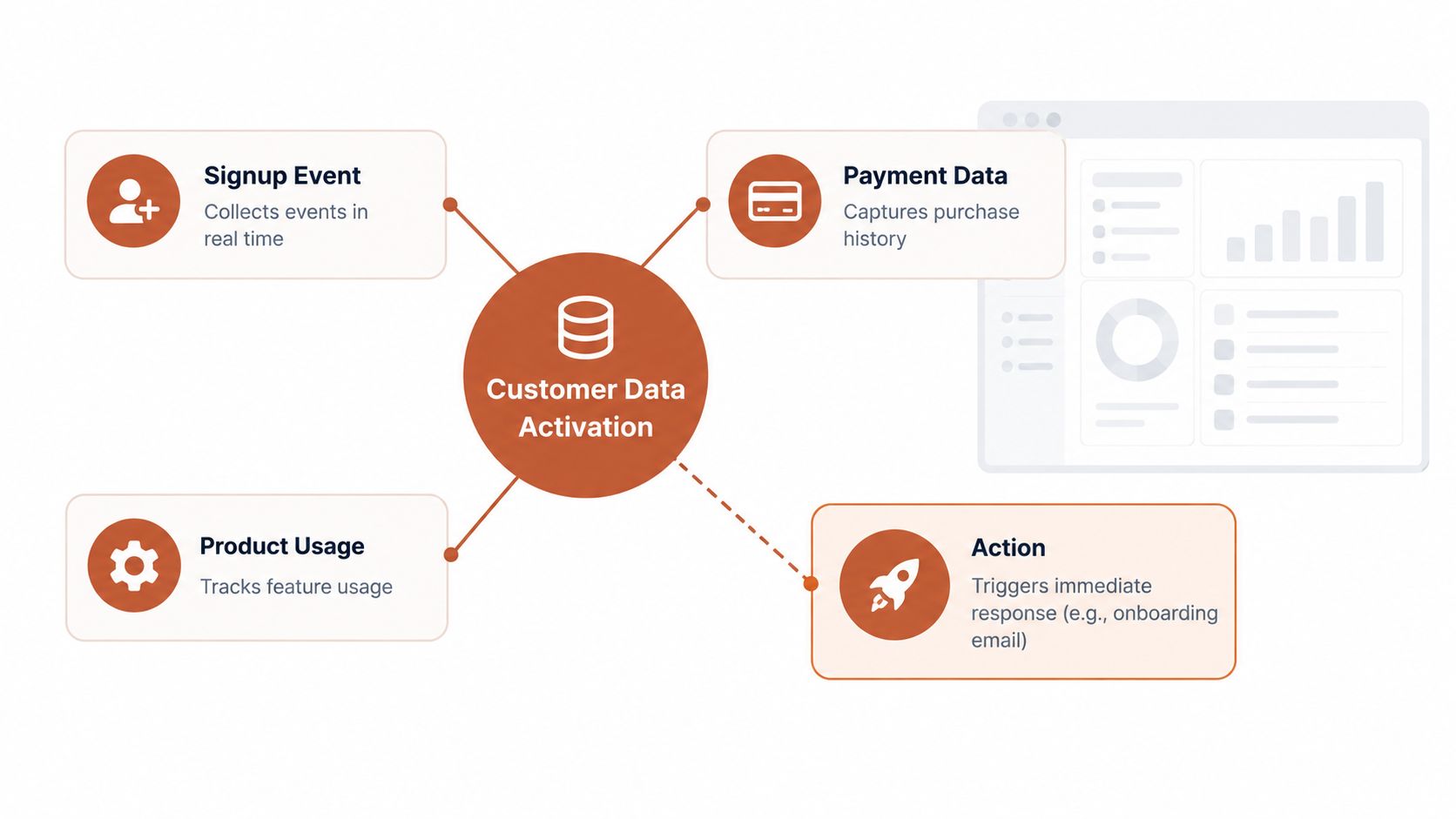
Customer data activation is the discipline of converting customer signals into specific, timely actions. Collection captures an event. Storage keeps it. Analysis explains what happened. Activation makes something happen next, such as sending an onboarding email after signup, showing an in-product prompt after a missed milestone, or notifying sales when an account reaches a meaningful threshold.
The operational distinction
A dashboard might tell you that trial users who invite a teammate tend to retain longer. That insight is useful, but it isn't activation. Activation begins when the system can identify a trial user who hasn't invited anyone, apply the correct eligibility and suppression rules, and send a message that helps them take that action.
Lifecycle email is where most SaaS teams feel this distinction first. A static audience says, “These people signed up.” An activated event says, “This person signed up through a partner page, hasn't created a project, and should receive the next onboarding message.” The second approach uses the customer's current state rather than treating a list as a permanent truth.
Practical rule: If a signal can't change an email, product experience, or human follow-up, it remains analysis rather than activation.
The market has also formalized around this operating model. In a 2022 Forrester evaluation of customer data strategy and activation services, Forrester identified eight significant providers and evaluated them across 27 criteria. That milestone shows that activation had become a defined service category, not just an informal segmentation tactic.
For a small SaaS team, this doesn't mean buying an enterprise platform immediately. It means defining a reliable path from event to decision to action. First-party signals, including consented product behavior and customer-provided details, are especially valuable as privacy expectations change. A plain-language overview of that foundation is available in this guide to first-party data.
The Data Sources Behind Activation
Most SaaS companies already have enough raw material to begin. The difficulty is deciding which signals deserve a response and making their meaning consistent across systems. A useful event has a clear actor, a clear time, and a clear implication for the next customer interaction.
Product events usually provide the richest behavioral context. Signup, project creation, teammate invitation, feature use, feature abandonment, and session activity can reveal where a user is in the journey. “Feature viewed” may be interesting, but “first report exported” could be a stronger activation signal if it represents a meaningful product outcome. The event should describe a behavior that changes what you want to say next.
Payment data adds urgency and commercial context. A renewal approaching, a failed charge, a trial expiration, or a plan upgrade can launch a message that a product event alone can't support. Total revenue is useful for reporting, but a failed renewal event is much more actionable because it tells you that a specific customer may need an immediate billing reminder or support path.
Match each source to a decision
CRM information gives the event a business context. Lead stage, account owner, support tickets, and contract status can determine whether marketing should send an email, sales should follow up, or a message should be suppressed. Identity data connects anonymous browsing or device activity to a known user, but teams should only use that connection when the identity relationship and consent are reliable.
| Data Source | Example Signal | Activation Use Case |
|---|---|---|
| Product events | Created a first project | Send setup guidance or an activation nudge |
| Product events | Stopped using a key feature | Offer a focused tutorial or assistance |
| Payments | Renewal or failed charge status changed | Send a billing reminder or route to support |
| CRM | Account stage or owner changed | Coordinate marketing and sales follow-up |
| Support | Open ticket or unresolved issue exists | Suppress promotional messaging |
| Identity | Anonymous activity linked to a known user | Personalize the next owned-channel interaction |
Source quality matters more than source volume. One event called workspace_created with a stable definition is more useful than many loosely named events that different teams interpret differently. The same principle applies to data contributed directly by the customer, such as role, use case, or preferred workflow. A practical primer on zero-party data can help teams separate volunteered information from observed behavior.
Identity can also affect seemingly small creative details. If an email includes a company logo or account context, a consistent source for that asset prevents broken or generic experiences. Teams evaluating this part of their stack may find the #1 logo api useful as a reference for retrieving brand assets in an automated workflow.
Before adding another source, write the decision it should support. If you can't finish the sentence “When this changes, we will...”, the signal probably belongs in analysis for now, not in an activation trigger.
Integration Patterns That Make Data Actionable
The plumbing should fit the decision. A real-time product behavior, a billing failure, and a weekly account cohort don't need the same integration pattern. Small teams get into trouble when they build a broad data system before choosing the customer action it must support.
Native events for product behavior
An in-app SDK or analytics tool can send events such as signup, login, project creation, and feature use as they happen. This pattern suits activation nudges because the email system can respond to a missing or completed behavior while the user is still onboarding.
The event payload should include a stable user identifier, event name, timestamp, and any property needed for the decision. Keep the schema small at first. A clean event with a plan identifier and lifecycle state is easier to trust than a large payload containing properties nobody uses.
Webhooks for state changes
Billing systems are a natural fit for webhooks. A failed payment, subscription change, invoice event, or trial expiration can push a message to your event endpoint as soon as the state changes. Your handler should validate the payload, map it to your internal naming convention, and prevent duplicate processing.
Webhooks are especially useful when an event carries financial or access consequences. An email about a failed charge shouldn't wait for a scheduled warehouse sync if the billing provider can notify your system directly.
Reverse ETL for deliberate batches
Reverse ETL moves modeled warehouse rows into an email or CRM destination on a schedule. It's a good fit for cohort journeys, account reviews, and segments that depend on several historical attributes rather than one immediate event. It can also be the lightest option when the warehouse already contains trusted customer logic.
The tradeoff is latency. Architecture guidance for governed event pipelines describes true real-time activation as under 300 milliseconds from capture to activation, while batch reverse-ETL syncs commonly run at 15 to 60 minute intervals, with 1+ hour effective latency after movement, processing, and campaign execution are included. These figures come from the governed event pipeline reference architecture.
| Pattern | Latency | Engineering Effort | Best For |
|---|---|---|---|
| Native product events | Near-immediate when configured for streaming | Moderate | Behavioral onboarding and feature journeys |
| Billing webhooks | Near-immediate after a provider state change | Moderate | Failed charges, renewals, and plan changes |
| Reverse ETL | Scheduled | Lower when warehouse models already exist | Cohorts and periodic account journeys |
A team doesn't need a CDP to close the insight-to-action gap. It needs a trustworthy path from source to policy to destination. Good data harmonization strategies can help when names, identifiers, and formats differ across systems, but harmonization should serve a defined journey rather than become an open-ended infrastructure project. For broader planning, connect the work to a data-driven marketing solution that ties instrumentation to decisions and measurable customer outcomes.
How Activation Powers Lifecycle Email
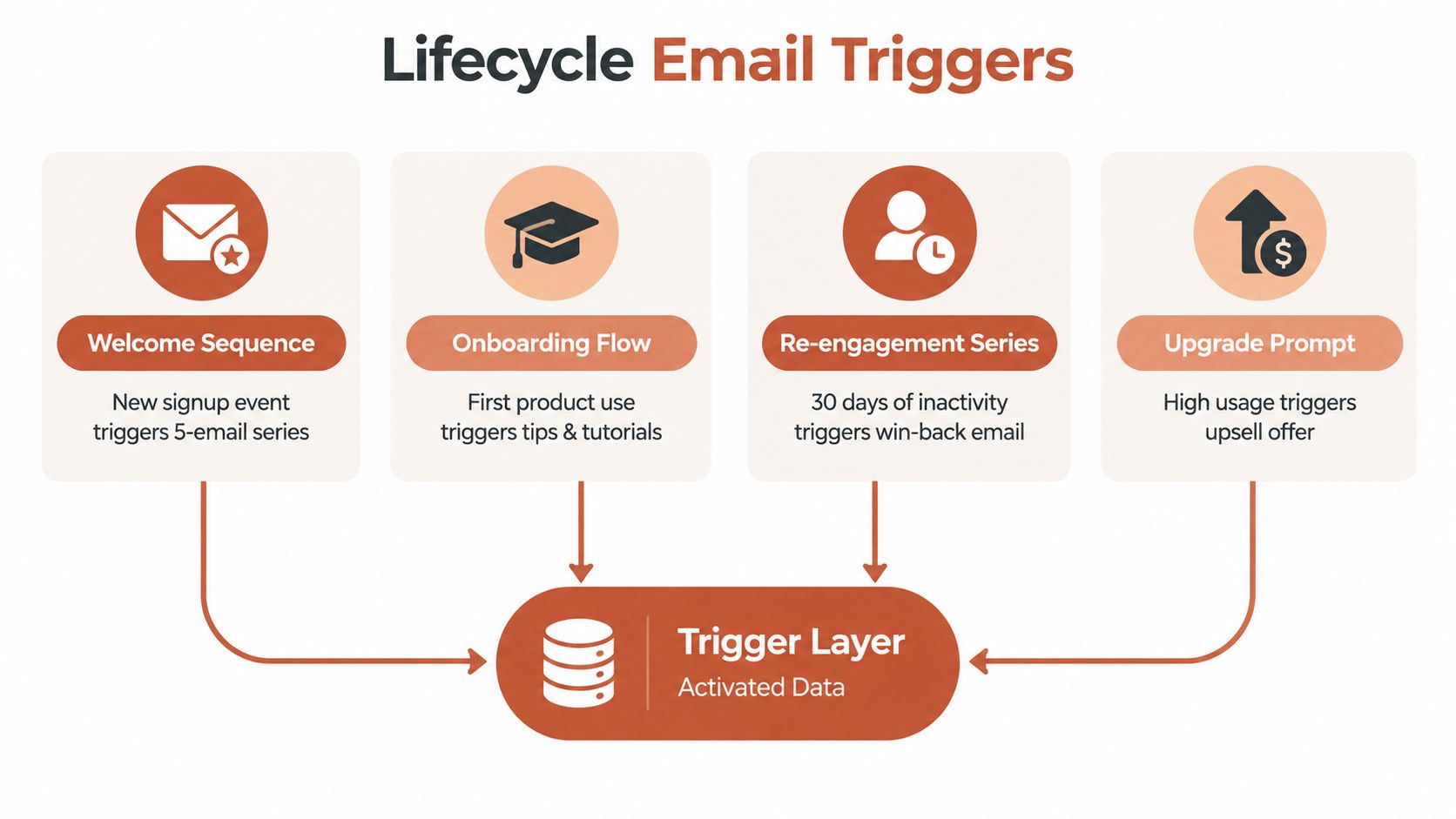
Activated data becomes the trigger layer for lifecycle email. The audience isn't a spreadsheet that someone exported last week. It's a set of rules that responds to what the customer just did, failed to do, or is about to experience.
Welcome and activation
A welcome sequence should begin when a signup event arrives, not when a daily campaign runs. The first message can use signup source, role, or stated use case to make the introduction relevant. If the user hasn't reached the product's first value moment within a defined window, the next message should name the missing action, such as creating a workspace or inviting a teammate.
For onboarding, define one meaningful activation event and keep the rule stable. Benchmark guidance recommends measuring activation as the share of new signups that reach one product-specific value moment within a fixed window, typically 7 days for PLG self-serve products and 14 days for B2B SaaS, using signups rather than visitors. The guidance also recommends choosing the event most closely associated with day-90 retention and segmenting by signup source from the beginning. See the customer onboarding activation benchmark for the measurement framework.
Expansion and win-back
Expansion messages should respond to product value, not merely calendar timing. Repeated use, rising seat activity, or a plan change can indicate that a customer is ready for a larger package. The email should explain the relevant benefit and, where appropriate, show the usage context that made the offer timely.
Win-back journeys rely on declining engagement or a paused subscription. A message can reference the last meaningful action, offer help with the obstacle, or present a clear return path. Lifecycle frameworks commonly group SaaS programs into onboarding, activation, expansion, and win-back, powered by events such as signup, activation milestone, key feature use, usage frequency, billing changes, and last-active time.
The design choice is the trigger. "All trial users" is a broad audience. "Trial users who signed up from organic search, haven't created a project, and are eligible for onboarding email three" is an operational audience. That specificity lets the email match the customer's state and gives the team a clear reason to suppress, delay, or change the message.
A Practical Walkthrough for SaaS Teams
Consider a usage-based SaaS product with a plan limit. The team wants to send an upgrade prompt when a customer reaches 80% of the plan limit. That threshold is a product rule, not a marketing guess, so it belongs close to the event-processing logic.
From raw event to decision
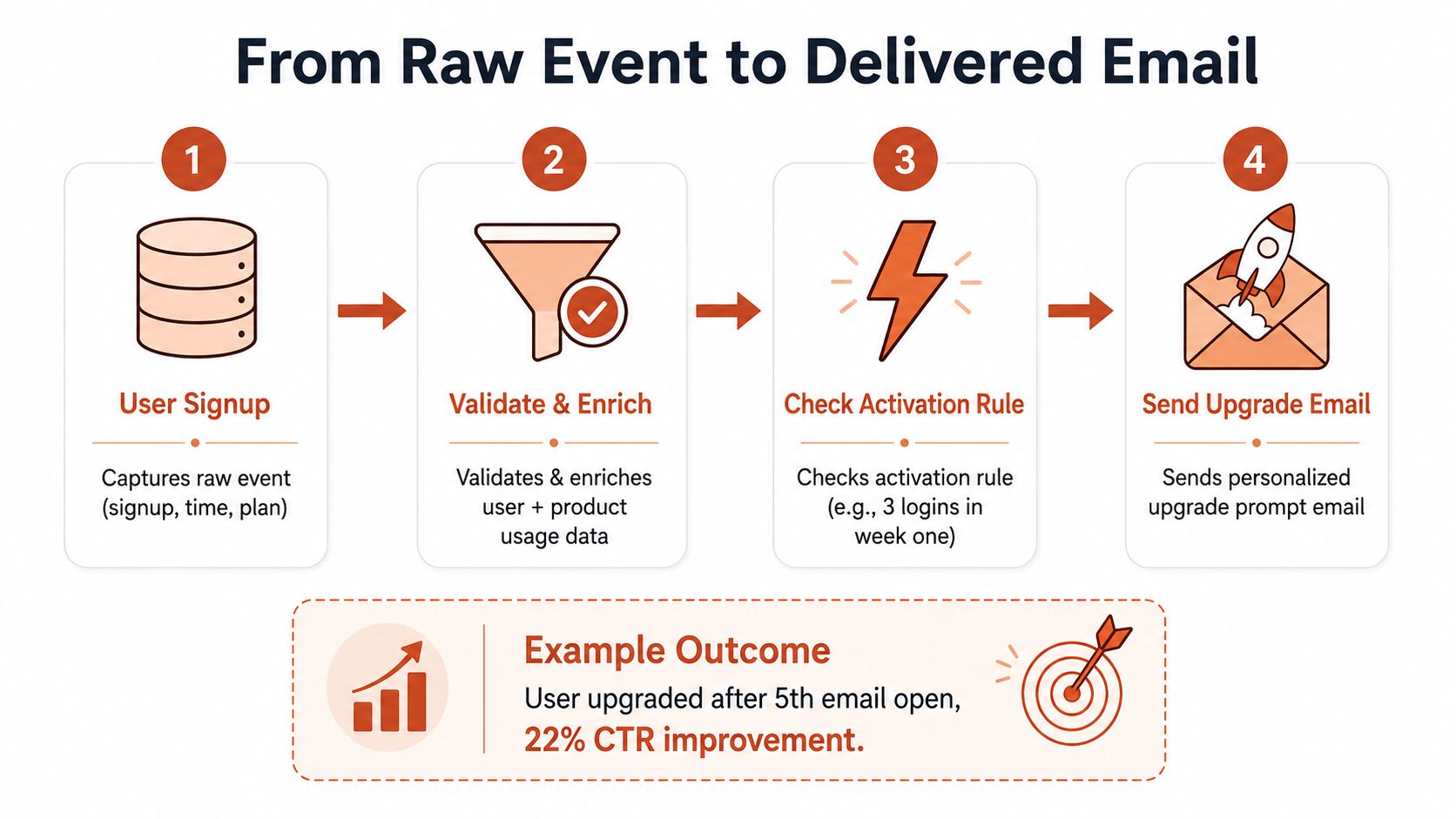
The billing system emits an invoice-created or usage-related event and posts it to an event pipeline. The pipeline validates the sender, normalizes the payload into a consistent schema, and enriches it with account details from the CRM. The resulting record might contain the user identifier, account identifier, current plan, usage value, plan limit, lifecycle stage, and event timestamp.
A routing rule then evaluates eligibility. It checks the plan type, confirms that usage has crossed the threshold, verifies that the account isn't already in a cancellation flow, and checks whether the customer is allowed to receive promotional email. If the conditions match, the pipeline publishes an upgrade trigger for the email platform.
The email platform uses the trigger to render a message with the actual usage context. Instead of saying “You may need more capacity,” the email can explain that the account is approaching its included limit and point to the relevant upgrade path. The copy remains useful because the event supplies the reason for sending.
Production safeguards
Error handling matters more than a polished diagram. The endpoint should record rejected payloads, preserve enough context to debug them, and avoid sending when required fields are missing. Idempotency prevents duplicate emails when a provider retries the same event. A stable event identifier or carefully designed deduplication key lets the system recognize that it has already processed the state change.
Measurement should follow the entire path. Track whether the event arrived, whether it passed policy checks, whether the email was delivered, and whether the account completed the intended upgrade action. Compare outcomes against a defined holdout or an earlier operating baseline, and keep the eligibility rule unchanged while you learn. That approach separates creative performance from routing errors.
The walkthrough is simple by design. An intricate architecture still fails if a duplicate event sends three messages, a cancellation rule is missing, or the email references a value that the billing system calculated differently from the product.
Why Activation Breaks Between Insight and Action
Many teams believe they have activation because customer data sits in a warehouse and analysts can build a cohort. Customers still receive generic emails because a cohort isn't an action. It becomes activation only when a production system can evaluate eligibility, apply policy, and execute the next step.
The confidence gap makes this visible. 33% of marketers say they feel confident activating their data, compared with 41% who feel confident analyzing it, and 37% identify poor integration between analytics and activation tools as their top barrier, according to the marketing data activation gap report. The same report says only 24% have achieved personalization at scale. These findings point to an execution problem, not a shortage of dashboards.
Three failure points
Read-only insight is the first. An analyst creates a valuable cohort, but nobody publishes it as a trigger or syncs it to a system that can act. The segment becomes a report that marketers revisit manually.
Missing policy is the second. A lifecycle marketer may know that customers in a cancellation flow shouldn't receive an upgrade prompt, but the sending system doesn't enforce that rule. Without suppression logic, a relevant message becomes an awkward one.
Unclear ownership is the third. Engineering owns the event, data owns the model, growth owns the journey, and nobody owns the complete path. Each handoff looks reasonable in isolation, but the customer experiences the delay.
Data volume doesn't prove activation. A defined signal must reach a permitted action within a latency the journey can tolerate.
This is why a smaller event system can outperform a larger warehouse for one lifecycle use case. If the team can reliably detect “created account but hasn't completed setup,” check consent and suppression status, and send the correct email, it has solved an activation problem. More rows won't fix an unowned trigger.
Operationalizing Activation Without Rebuilding Your Stack
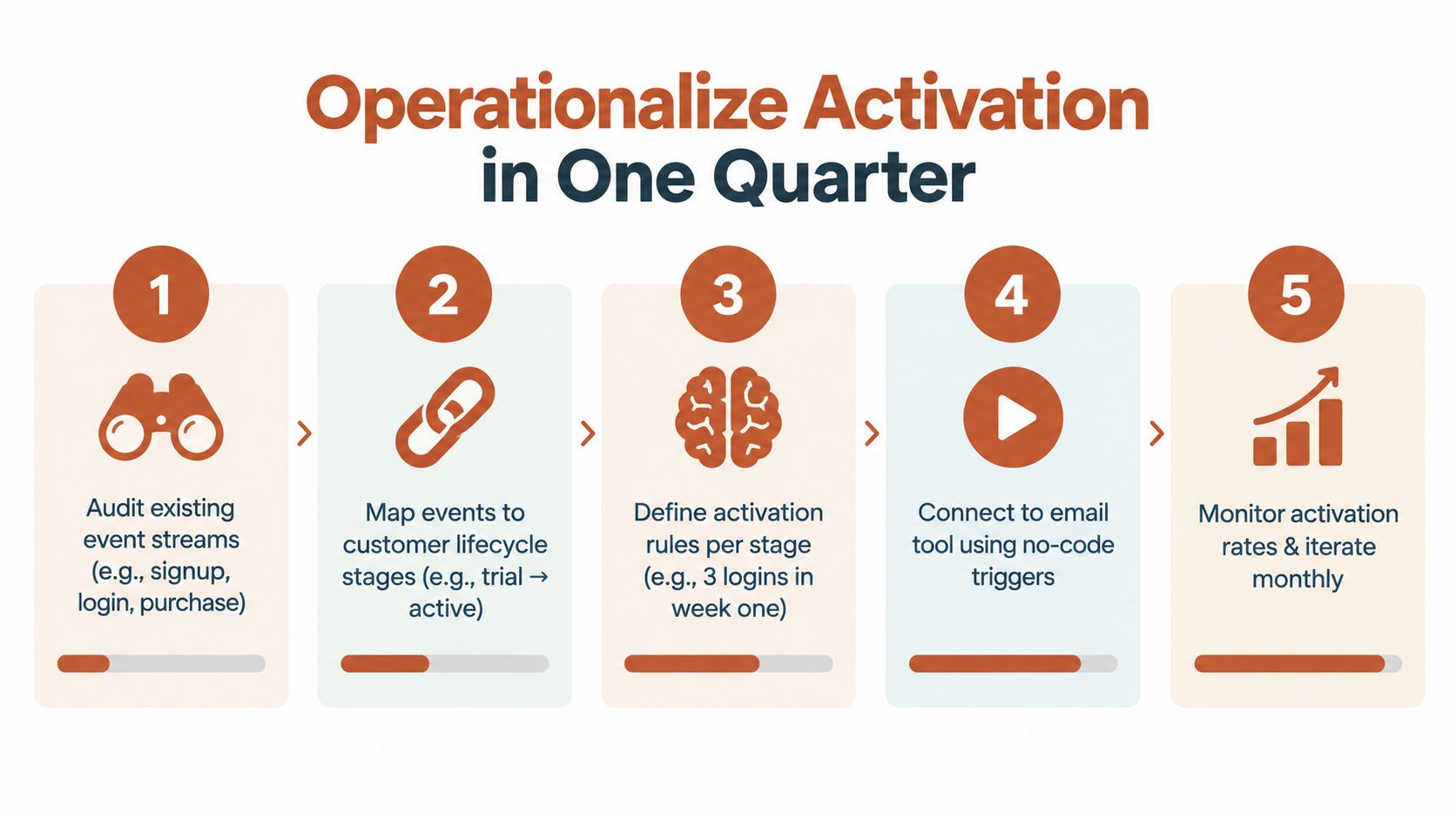
A small SaaS team can build an activation practice with its existing product events, billing system, CRM, and email platform. Start with the journey that has a visible customer problem and a clear next action. Avoid turning the project into a platform migration.
A focused operating checklist
-
Audit current events. List the events your product and billing tools already send, including signup, login, purchase, plan change, and cancellation. For each one, write the lifecycle decision it could support.
-
Connect critical state changes. Add a webhook endpoint for billing and other systems where timing matters. Validate payloads, standardize identifiers, and log failures before you build elaborate enrichment.
-
Create a small trigger library. Pair an event or condition with a sendable property. Examples include “trial ends in three days,” “created an account but not a project,” and “reached a plan usage threshold.” Every trigger needs eligibility, suppression, and exit rules.
-
Ship one journey. Activation nudges are a practical starting point because the missing behavior is usually easy to describe. A SaaS lifecycle map can include events such as connected data source, created first project, and invited teammate, with an intervention for new users who haven't activated within 3 days, as described in this data-driven lifecycle marketing strategy.
-
Close the feedback loop. Measure event receipt, trigger acceptance, delivery, engagement, and the target product action. Review the journey regularly, then update the event definition, copy, or rule based on where users stop progressing.
Keep the stack proportional
You don't need a CDP to send a useful activation email. An event API, a webhook handler, a dependable email tool, and clear ownership can be enough for an early-stage product. A CDP becomes more relevant when identity, governance, destinations, and channel coordination exceed what your current systems can manage.
Document the trigger in ordinary language. State what happened, who qualifies, what must suppress the message, what property the email uses, and what event ends the journey. That document gives product, engineering, marketing, and support a shared contract.
For measurement design and retention analysis beyond individual journeys, this SaaS customer analytics guide provides useful context. If you want an operational option that connects product and payment events to lifecycle programs, Mara drafts and runs event-driven emails with approval controls, existing integrations, behavior-based segmentation, and reporting through its sending platform.
Mara helps software teams turn product and billing events into approved welcome, activation, expansion, re-engagement, churn-save, and win-back journeys without adding a separate data team. Visit Mara to connect your existing events, review the proposed lifecycle programs, and start with one customer action you want to improve this week.