Approval Workflow Process Explained with Examples
You've spent the morning preparing a lifecycle email that could help new users reach their first meaningful outcome. The copy is ready, the segment is selected, and an AI assistant has suggested several variations. Then you notice that one version references a feature available only on a higher plan. Another uses an outdated product name. The send is close, but nobody can confidently answer which version is approved, who approved it, or whether the approved version is the one connected to the sending trigger.
That's the problem an approval workflow process solves. It isn't a ceremonial pause before publication. It's a control system that helps a small team move quickly without allowing an unreviewed message, changed asset, or unavailable approver to create an unintended customer experience.
The strongest workflows join three goals: speed, quality, and traceability. They make ownership visible, route work according to policy, hold content in explicit states, and preserve enough evidence to reconstruct the decision later. This matters even more when AI drafts variants, proposes journeys, rewrites underperforming copy, or responds to product and billing events.
The sections that follow build the idea progressively. You'll start with the basic mechanics, then examine the components and records that make a workflow reliable. From there, you'll design one step by step, identify the practices that prevent delays, and apply the model to welcome, activation, retention, and billing emails. The final checklist turns the framework into an operating habit for a founder or lean product team.
Table of Contents
- Introduction to Approval Workflows That Protect and Accelerate Work
- What an Approval Workflow Process Is and How It Works
- The five mechanics behind the process
- Core Components and Stages of a Reliable Approval Workflow
- The control objects
- The normal progression
- How to Design and Implement an Approval Workflow Step by Step
- 1. Scope what needs approval
- 2. Map stakeholders and backups
- 3. Define rules and thresholds
- 4. Build the state machine
- 5. Test with real cases
- 6. Launch and monitor
- Best Practices and Pitfalls That Make or Break Approval Speed
- Design for absence, not ideal availability
- Reduce review friction
- Lifecycle Email Examples With Approval Controls and Audit Logs
- Welcome and activation
- Churn save and win-back
- Dunning and payment journeys
- Conclusion and Implementation Checklist for Product and Marketing Teams
Introduction to Approval Workflows That Protect and Accelerate Work
A near miss usually starts innocently. A founder asks an assistant to draft a welcome email, a product marketer adjusts the call to action, and a developer connects the message to a signup event. Someone leaves a comment in a document, someone else approves an earlier version in chat, and the campaign enters the sending platform with no single record tying the decision to the final content.
The team may still feel organized. Everyone participated. Nobody intended to bypass review. Yet the workflow has no reliable answer to basic questions: Which content entered review? Which version did the approver see? What policy authorized the send? What happened after the copy changed?
An approval workflow creates those answers through deliberate controls. It defines the request, assigns the right reviewers, establishes decision gates, records outcomes, and blocks the next action until the required condition is met. For lifecycle email, that condition might be a human approval before scheduling, a compliance decision for a regulated message, or a product owner's review of an AI-generated variant.
Practical rule: Approval should control the exact artifact that will be delivered, not merely the general idea behind it.
This distinction gives founders a better choice than “move fast” versus “add process.” A well-designed workflow removes repeated follow-ups, makes queue ownership clear, and prevents reviewers from evaluating stale content. It also gives the team a safer way to adopt automation. An AI system can propose a message or route a request, while a person retains authority over customer-facing decisions that affect trust, revenue, or compliance.
Approval workflows are now treated as measurable control systems rather than purely administrative steps. Common measures include cycle time, stage turnaround, first-time approval rate, revision rounds, rejection rate, escalation rate, approver load, throughput, bottleneck frequency, and audit completeness, as outlined in this guide to approval workflow metrics. Cycle time means the elapsed time from submission to final decision, while audit completeness checks whether every required approval record exists.
That measurement mindset gives you a practical path forward. First, understand the workflow as a state system. Next, define its records, roles, rules, and stages. Then build resilient routing, test real cases, and measure whether the process is becoming faster without weakening control.
What an Approval Workflow Process Is and How It Works
An approval workflow is a state system. A request starts in one state, follows defined rules, and changes state only when an authorized action occurs. For lifecycle email, that means a draft can move into review, wait for a decision, return for edits, or become eligible for scheduling and sending.
The workflow controls both the content and the conditions around it. It identifies who may act, what evidence must be present, which version is under review, and what the system may do next. This creates a control layer for AI-assisted email: AI can draft, classify, or route a message, while approved human decisions govern customer-facing delivery.
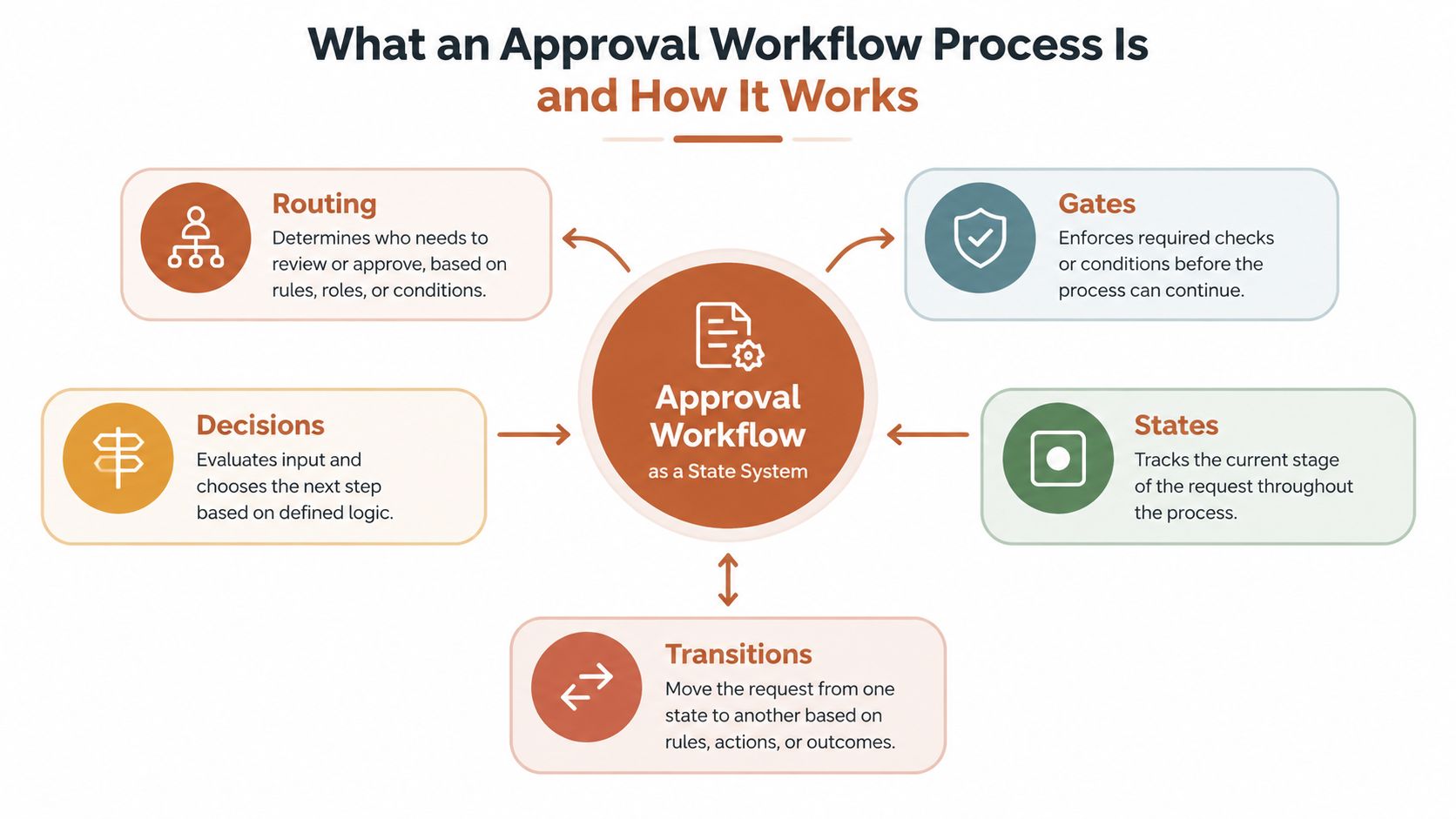
The five mechanics behind the process
Routing assigns the request to the right reviewer. An email with pricing language may require a product owner and compliance reviewer, while a routine onboarding reminder may need only a lifecycle marketer. Backup routes should handle absences, failed assignments, and time limits so one missing person does not stop delivery.
Gates define the conditions for progress. A gate might require a completed evidence package, an assigned approver, valid links, or a successful content check. Until those conditions are met, the request remains blocked.
Decisions turn feedback into a recorded outcome. A comment such as “looks good in chat” does not establish authority or identify the reviewed artifact. “Approved” or “Rejected,” attached to a specific version, creates an auditable decision.
States show the request's current position. Useful email states include draft, in_review, approved, scheduled, and sent. A message in in_review must remain unable to send, even if an automation rule or AI assistant attempts to trigger delivery.
Transitions define permitted movement between states. An approver may move content from in_review to approved, while requested changes return it to draft or edited. The approved state can allow scheduling, but any content change should lock the earlier approval and require a new review.
Version locking prevents a common failure: a reviewer approves one message while the system sends another. The workflow should store the exact subject line, body, links, audience logic, sender identity, and template version associated with the decision.
A practical control sequence is: the system receives a lifecycle email draft, locks the reviewed version, routes it to the assigned approver, waits in an approval state, and permits sending only after an approved transition. Teams building a complete approval workflow process for lifecycle email can connect these controls to event triggers, audience logic, and delivery actions without removing human authority.
Core Components and Stages of a Reliable Approval Workflow
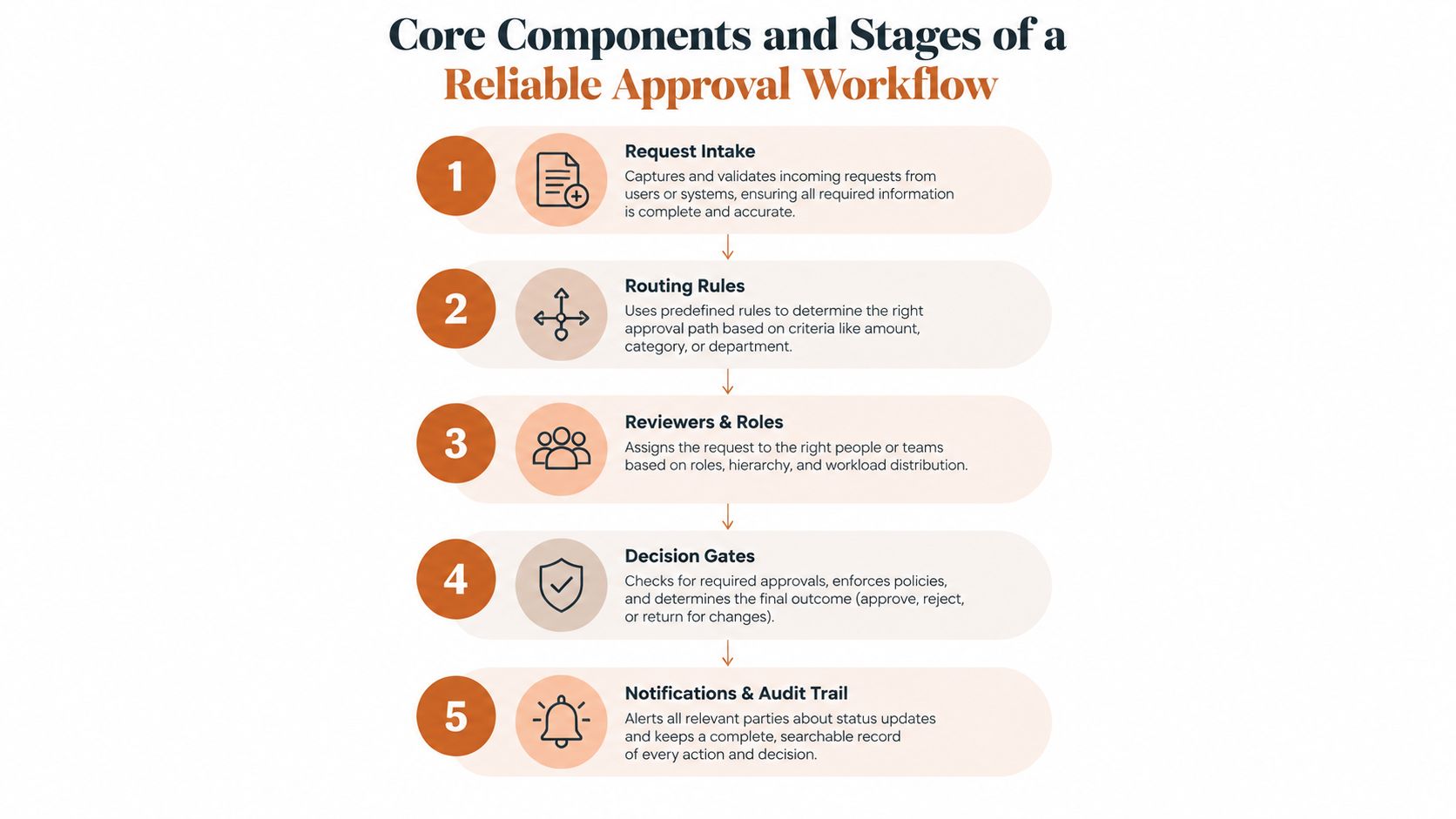
A reliable workflow has two layers. The first layer governs the work itself, including the request, evidence, roles, rules, and outcome. The second layer preserves the record, so another person can understand what happened without relying on memory or scattered messages.
The control objects
Request and evidence package: The request should identify the current request ID, content or document, intended audience, trigger, requested action, and supporting evidence. For an email, that package may include the subject line, body, links, audience criteria, sender identity, template version, and reason for the message.
Roles and delegation: Separate the creator, reviewer, final approver, publisher, and backup approver. A person can hold more than one role in a small team, but the authority for each transition must remain clear.
Routing rule and policy version: Store the rule that selected the reviewer, the role that authorized the step, and any delegation in effect. If a policy changes later, the old decision must still point to the rule version that governed it.
Decision outcome: Require a structured result such as approved, rejected, or edited. Comments should explain the decision, especially when the request returns for changes.
Immutable event history: Capture submission, change, review, approval, rejection, override, reassignment, and dispatch events in time order. This history makes the process replayable during an audit or incident review.
The normal progression
A request begins at intake, where the system confirms that the required fields and evidence are present. It then enters routing, which selects reviewers based on content type, risk, audience, or policy. During review, the approver evaluates the locked artifact and records a decision. An approved request moves to release or scheduling, while a rejected or edited request returns to revision with a reason attached.
Version locking protects the meaning of that decision. If an email changes after review, the system must treat the new version as a new decision object or reopen the review. Otherwise, the record may say “approved” while the approved content no longer matches the content scheduled for delivery.
The audit trail should let a reviewer answer five questions: who acted, what they saw, when they acted, why they acted, and which rule authorized the action.
A defensible record therefore includes the request ID, exact evidence package, version identifier, approver identity, timestamp, outcome, comments, policy, routing rule, role, and delegation context. An immutable event history prevents later edits from rewriting the decision sequence. This is the difference between storing a status and preserving proof.
How to Design and Implement an Approval Workflow Step by Step
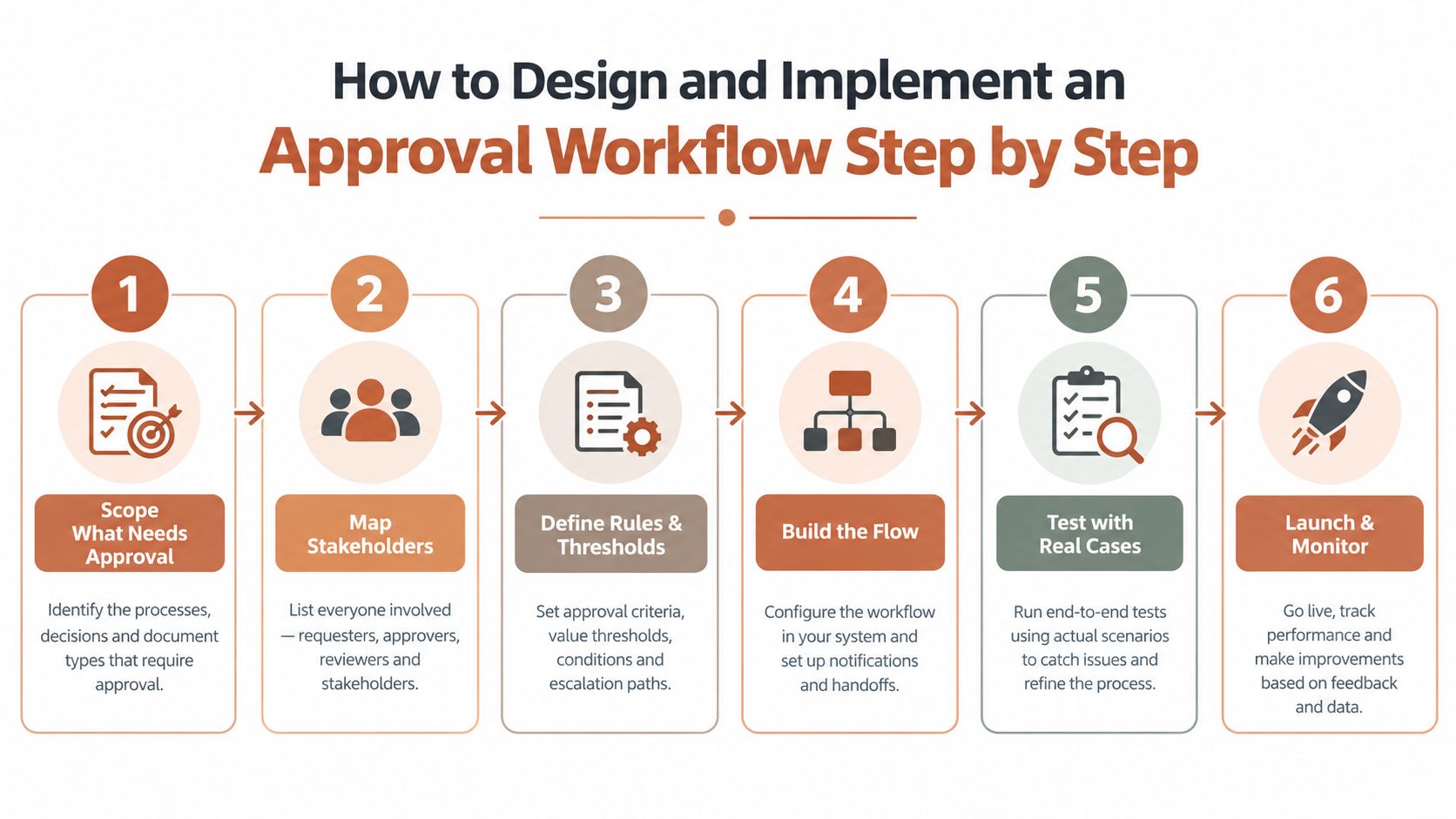
Start with the customer-facing action, not the software screen. If the risk is an AI-generated lifecycle email reaching the wrong audience, the workflow should control the message, audience, trigger, and release event together.
1. Scope what needs approval
List the actions that could affect customer trust, revenue, compliance, or product interpretation. You may require approval for new journeys, material copy changes, pricing references, regulated claims, high-stakes retention messages, and any AI-generated variant that can reach customers.
Keep low-risk work lightweight. A workflow becomes difficult to use when every minor internal change receives the same scrutiny as a new billing message.
2. Map stakeholders and backups
Name the creator, subject matter reviewer, final approver, sender, and backup. Don't assign “marketing” or “the product team” as owners. Assign a person or a defined role with a clear delegation rule.
Unavailable approvers are normal operating conditions, not unusual failures. Set an escalation path, a backup assignee, and a rule for reassignment. The system should record who made the reassignment and under which policy.
3. Define rules and thresholds
Write entry and exit criteria in plain language. For example, a message can enter review only when its audience, links, product references, and sending trigger are present. It can leave review only when the required approver records an approved outcome for the locked version.
Choose the policy deliberately:
- Approval-only keeps the item from sending until a person approves it.
- Draft-only lets the system prepare content without scheduling or dispatching it.
- Auto-send with gates permits automation only for narrowly defined, low-risk conditions.
4. Build the state machine
Use explicit states such as draft, in_review, approved, scheduled, and sent. A revision should move the item out of approved, because the approved record no longer represents the current artifact.
A useful email gateway has one safe rule: only the approved state can trigger dispatch. An item in in_review remains queued, even if its event trigger has already fired.
5. Test with real cases
Test more than the happy path. Submit a new draft, edit it during review, reject it, reassign it to a backup, let a deadline pass, and attempt to send before approval. Confirm that every event is timestamped and that the final record identifies the exact version.
Test integrations at the boundaries. Product events may arrive from Stripe, Polar, webhooks, a direct Events API, Clerk, Supabase, or custom instrumentation. The workflow should preserve the link between the event, audience selection, message version, approval, and send.
Use the following video as a practical companion while you map the states and transitions:
6. Launch and monitor
Begin with a narrow journey and review the queue frequently. Measure cycle time, stage dwell time, queue age, first-pass completion, throughput, SLA breaches, and exception rates. APQC's definition of cycle time includes active work and waiting, so don't measure only the minutes a reviewer spends editing.
Ad hoc approval processes average 6.2 days with 3.5 revision rounds, while connected workflows average 1.5 days with 1.3 revision rounds, according to workflow approval metrics guidance. The practical lesson is to reduce handoffs, remove unnecessary layers, and make status visible rather than asking reviewers to work faster.
Best Practices and Pitfalls That Make or Break Approval Speed
Fast workflows aren't loose workflows. They're precise about ownership, status, deadlines, and exceptions. Fragile workflows often look collaborative at first, but they make every participant reconstruct context from email, chat, documents, and memory.
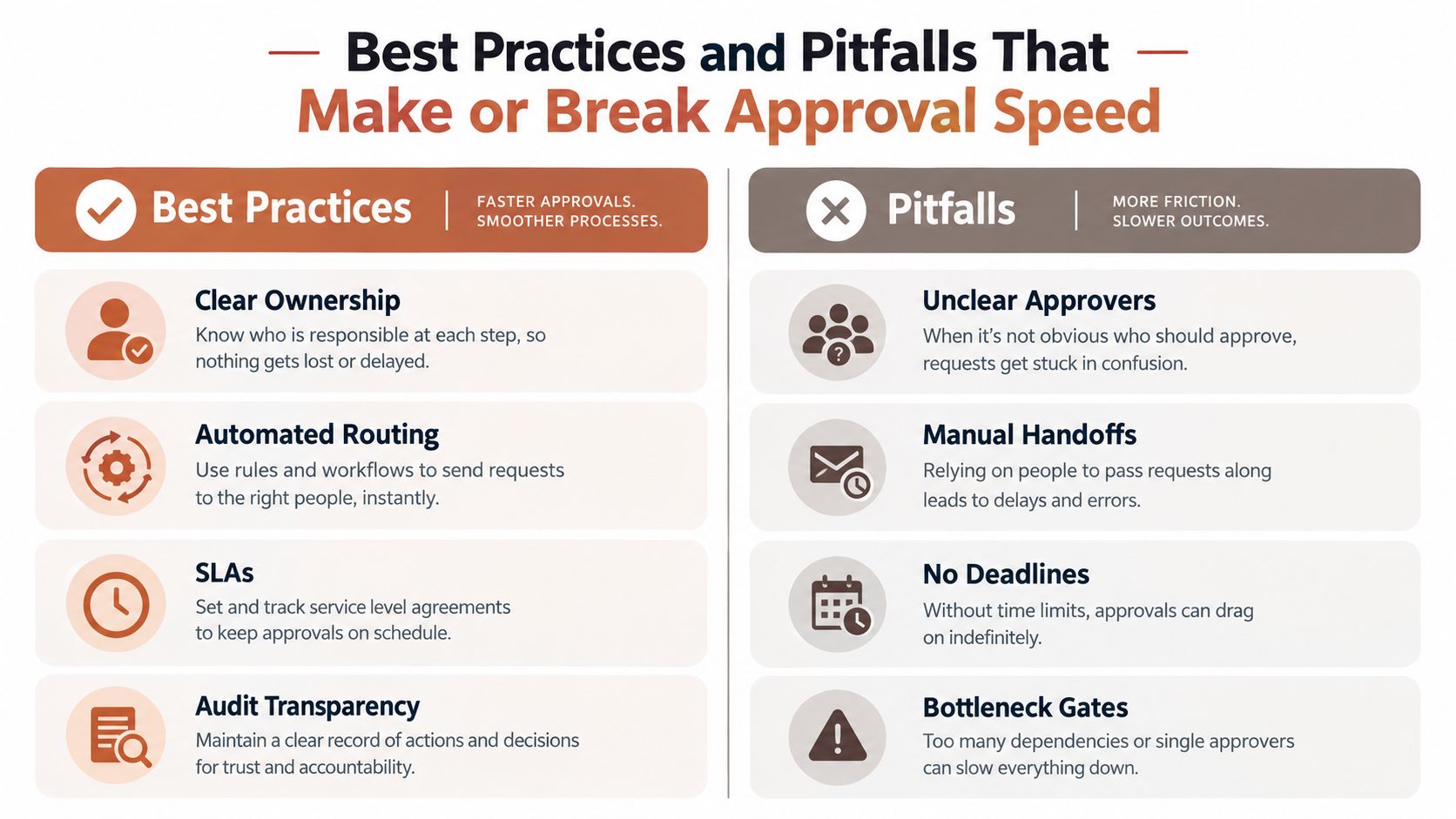
| Healthy practice | Fragile alternative |
|---|---|
| Clear ownership: One named person holds final decision authority. | Unclear approvers: Everyone can comment, but nobody owns the outcome. |
| Automated routing: Rules send the request to the right role. | Manual handoffs: A creator forwards files and hopes the next reviewer sees them. |
| Defined deadlines: Each stage has a due time and escalation path. | No deadlines: The request sits in an inbox until someone remembers it. |
| Audit transparency: The system records version, identity, outcome, and timing. | Bottleneck gates: A hidden dependency blocks release without explaining why. |
Design for absence, not ideal availability
A workflow that works only when the primary approver is online is incomplete. Add backup assignees, delegation limits, escalation notices, and an owner who can resolve conflicts. Neutral guidance on document approval identifies missing escalation paths, backup assignees, and unclear ownership as common reasons approval stalls, as described in this document approval workflow guidance.
Avoid automatic approval by silence unless the risk and policy support it. For customer-facing lifecycle email, silence may mean illness, a time-zone difference, an unread notification, or a broken integration. Those situations shouldn't become permission to send.
Reduce review friction
Keep feedback attached to the artifact and separate suggestions from the final decision. A reviewer should be able to mark a specific line, request a change, and see whether the new version has returned for approval. A concise email closing guide for 2026 can also help teams standardize final sign-off language and reduce ambiguity in customer-facing messages.
The biggest source of drag is usually not one slow person. It's excess waiting created by too many handoffs, redundant approvers, unclear entry criteria, or a status that nobody can see. Use automated email workflows to reduce mechanical coordination, but keep the authority boundaries explicit.
Lifecycle Email Examples With Approval Controls and Audit Logs
Consider a welcome journey triggered by a new account. An AI system drafts the first message, proposes a subject line, and selects a product action based on the signup context. The message enters in_review, where a human checks the product reference, audience, links, tone, and timing.
The message remains in ON_APPROVAL status while it waits. The valid transitions are straightforward: APPROVED allows dispatch, REJECTED stops the message, and EDITED sends it back for revision. Only the approved state should trigger delivery, which creates a clear boundary between preparation and sending.
Welcome and activation
A founder may approve a welcome email after seeing version A. If an editor changes the onboarding instructions afterward, the system must create or mark version B as requiring review. The approval record should remain tied to version A rather than applying to the changed content.
For activation emails, the same control protects product accuracy. A message triggered by a feature event can wait for approval before the first program or email is sent. The audit record can capture who approved the template, which version was reviewed, and which audience received the eventual message. Teams working across legal, product, and marketing can use this email marketing compliance guidance to keep review requirements connected to the customer communication itself.
Churn save and win-back
Retention messages need more context than a generic promotional email. A churn-save variant may reference a customer's usage pattern, plan, or recent support interaction. The workflow should show the generated content, the input evidence, the selected audience, and the reviewer responsible for release.
If the system rewrites an underperforming variant, that rewrite is a new artifact. It can be routed for approval under the same policy, while the previous version remains available in the event history. Human review stays focused on whether the message is appropriate for the customer and whether the generated context is accurate.
Dunning and payment journeys
Dunning messages carry a different risk. They may mention an overdue payment, a failed renewal, or a change in account access. Use a stricter gate for the content and audience, and prevent the sending system from treating a billing event as permission to bypass approval.
Mara is one example of an AI email marketer that drafts lifecycle messages, proposes journeys from product and payment events, supports approval-only, auto-send, and draft-only policies, and sends through the Molted platform. Its role in this model is not to replace the decision-maker. It prepares and routes work while the workflow records the human approval required for release.
Conclusion and Implementation Checklist for Product and Marketing Teams
An effective approval workflow process doesn't force teams to choose between control and momentum. It makes momentum safer by turning unclear handoffs into visible states, defined ownership, version-linked decisions, and replayable records.
Use this checklist before activating a lifecycle program:
- Policy: Decide whether the journey is approval-only, draft-only, or eligible for gated auto-send.
- Scope: Identify which messages, audiences, triggers, and AI-generated changes require review.
- Ownership: Assign a creator, reviewer, final approver, publisher, backup, and escalation owner.
- States: Define the allowed path from
drafttoin_review,approved,scheduled, andsent, including rejection and edit loops. - Version control: Lock the artifact entering review and reopen approval when the content, audience, or trigger changes.
- Audit record: Store the request ID, evidence package, version, approver identity, timestamp, decision, comments, policy, routing rule, role, and delegation.
- Safety gate: Ensure only the approved state can trigger dispatch.
- Measurement: Track cycle time, stage dwell time, queue age, first-pass completion, SLA breaches, exceptions, and audit completeness.
- Review habit: Inspect the queue and event history regularly, then remove recurring handoffs or unclear rules.
For an indie SaaS founder, this is enough to start without building an elaborate bureaucracy. Choose one important journey, define its states, assign a backup approver, test an edited version and a rejected version, and verify that the final log proves exactly what was sent.
Mara drafts lifecycle emails and proposes journeys from product and billing events while keeping approval controls, explicit workflow states, and audit history around customer-facing sends. Visit Mara to see how it can fit an approval-controlled lifecycle email process for your product team.