Tool Integration Guide for Lifecycle Email That Works
You've got Stripe handling payments, Clerk identifying users, your product emitting events, and an email platform waiting for someone to turn that data into a journey. A new customer completes signup, but the welcome email arrives late. A failed payment triggers a generic campaign instead of a useful dunning message. Someone cancels, replies with a detailed objection, and the response sits unread in a shared inbox.
That isn't an email-copy problem. It's a tool integration problem with missing ownership, weak event contracts, and no controlled path from signal to send. Reliable lifecycle email connects product behavior, billing state, identity, content generation, approval, delivery, replies, and performance monitoring into one operating loop.
Table of Contents
- Why Tool Integration Makes Lifecycle Email Work
- The lifecycle loop
- Prerequisites and Connecting Your Event Sources
- Choose the event path that matches the signal
- Mapping Events to Journeys and Behavior Based Segments
- Build journeys around observable moments
- Use recency and negative conditions deliberately
- Configuring Approval Sending and Variant Testing
- Make approval a state machine
- Test variants without surrendering control
- Testing Handling Replies and Monitoring Performance
- Test the path, not just the payload
- Troubleshooting Governance and Next Steps for Reliable Integration
- Use a recovery checklist
Why Tool Integration Makes Lifecycle Email Work
A founder can usually describe the desired journey in plain language. “Welcome new users, help them reach the first useful action, promote features they haven't tried, and intervene when payment fails.” The difficulty starts when those moments live in different systems.
Stripe knows about checkout and failed invoices. The product knows whether a user completed onboarding or used a core feature. Clerk or Supabase may hold the identity mapping. The email platform knows delivery and engagement, but it may not know which account event caused the message. Without integration, teams fall back to broad broadcasts because those are easier to operate. The result is timely information trapped in separate tools and messages that arrive without context.
The European Union's 2025 enterprise data shows why this work belongs in the operating model, not in a one-off technical backlog. 46.45% of EU enterprises used ERP software, 28.51% used CRM software, and 16.28% used business intelligence software, while 79.02% reported having a website, according to the State of Enterprise Integration report. ERP adoption ranged from 41.08% among small enterprises to 88.71% among large enterprises, which reflects a practical reality: larger companies already depend on connected systems, while smaller teams often feel the friction more directly because one person owns the whole customer experience.
The lifecycle loop
Think of every journey as a controlled sequence:
- An event occurs. A user signs up, completes onboarding, tries a feature, cancels, or encounters a payment failure.
- The system resolves identity. The event maps to the right person, account, subscription, locale, and consent state.
- A journey evaluates conditions. It checks what happened, what hasn't happened, and whether the user is already in another flow.
- Content is drafted or selected. The message reflects the product's current language and the user's situation.
- A sending policy applies. The message is held for approval, sent automatically under defined rules, or saved as a draft.
- Delivery and replies feed learning. The system records outcomes, handles responses, and informs the next iteration.
That's the difference between connecting tools and operating an integrated lifecycle program. A practical guide to streamline your system integrations is useful here because the hard work isn't making two APIs talk. It's defining how data moves, who owns decisions, and what happens when a dependency fails.
Mara can sit alongside an existing newsletter or CRM tool rather than replacing it. Its integration options connect product and payment signals to lifecycle journeys, while the existing broadcast system can continue handling newsletters. This separation lowers migration risk and keeps lifecycle automation focused on behavior rather than forcing every marketing function into one platform.
Prerequisites and Connecting Your Event Sources
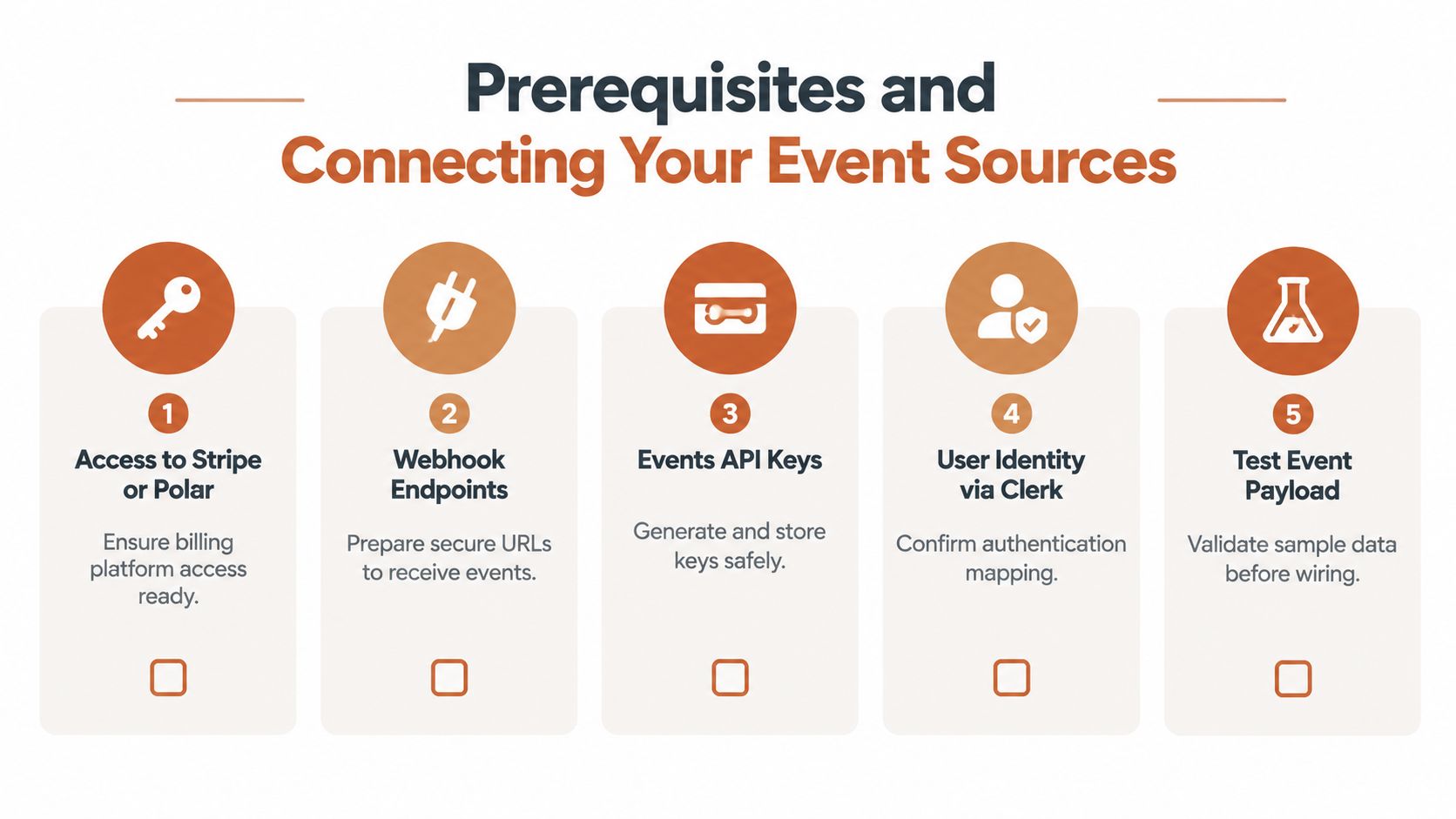
Start with a source-of-truth map before opening a webhook configuration screen. For each field used in a journey, write down the system that owns it, the event that changes it, the identifier used to connect it to a person, and what should happen if the value is missing.
A useful map might assign billing status to Stripe or Polar, authentication identity to Clerk or Supabase, product behavior to your application instrumentation, and message state to the lifecycle platform. Don't let two tools claim ownership of the same status. That's how a cancellation becomes “active” again after a delayed update.
Choose the event path that matches the signal
Payment webhooks are the right starting point for subscription state. Use them for successful checkout, invoice failures, renewals, refunds, cancellations, and other billing transitions exposed by Stripe or Polar. Payment systems are authoritative for payment state, so the email workflow shouldn't infer subscription status from a product login.
Product webhooks work well when your application already emits meaningful events. A completed onboarding checklist, first report created, or team member invited is more useful than a vague “user active” flag. Name events after observable actions, not internal implementation details that may change during a refactor.
A direct Events API gives developer-led teams more control when no suitable webhook exists. Send explicit identify and track operations, preserve the provider's user ID, and include the account or workspace ID when multiple people can belong to one customer.
Before production traffic reaches the endpoint, check these fundamentals:
- Identity mapping: Store a stable relationship between the billing customer, application user, authentication provider, and workspace. Don't rely on email address alone, because addresses can change or belong to multiple accounts.
- Event naming: Use consistent names such as
user_signed_up,onboarding_completed,feature_used,subscription_cancelled, andpayment_failed. Keep event properties predictable. - Idempotency: Assign a unique event ID and make the receiver safe to retry. A repeated webhook must not send a second welcome email or start a duplicate win-back journey.
- Ordering: Record event time and receipt time. A delayed cancellation should not overwrite a newer reactivation event.
- Secrets and access: Keep API keys and webhook signing secrets in a secure secret store, restrict endpoint permissions, and rotate credentials through a documented process.
- Staging validation: Replay realistic payloads, including missing fields, duplicate deliveries, malformed values, and bursts of events. A few successful test records don't prove that bulk imports or burst traffic will behave correctly.
The webhook documentation should be part of the implementation checklist, not something you consult only after an event disappears. Reliable integrations also need explicit service expectations for error rate, response time, and success rate, with alerting, retries using exponential backoff, circuit breakers, and version control as baseline controls, as described in this API integration reliability guidance. External dependencies are probabilistic. Design accordingly.
Mapping Events to Journeys and Behavior Based Segments
Raw events become useful only after you attach them to a customer decision. “Feature used” is data. “The user tried the feature but hasn't reached the outcome it supports” is a lifecycle opportunity.
Start with the event that proves the customer has entered a state, then define the event that proves they've moved forward. Add an exclusion condition so the journey doesn't keep sending after the user has progressed.
Build journeys around observable moments
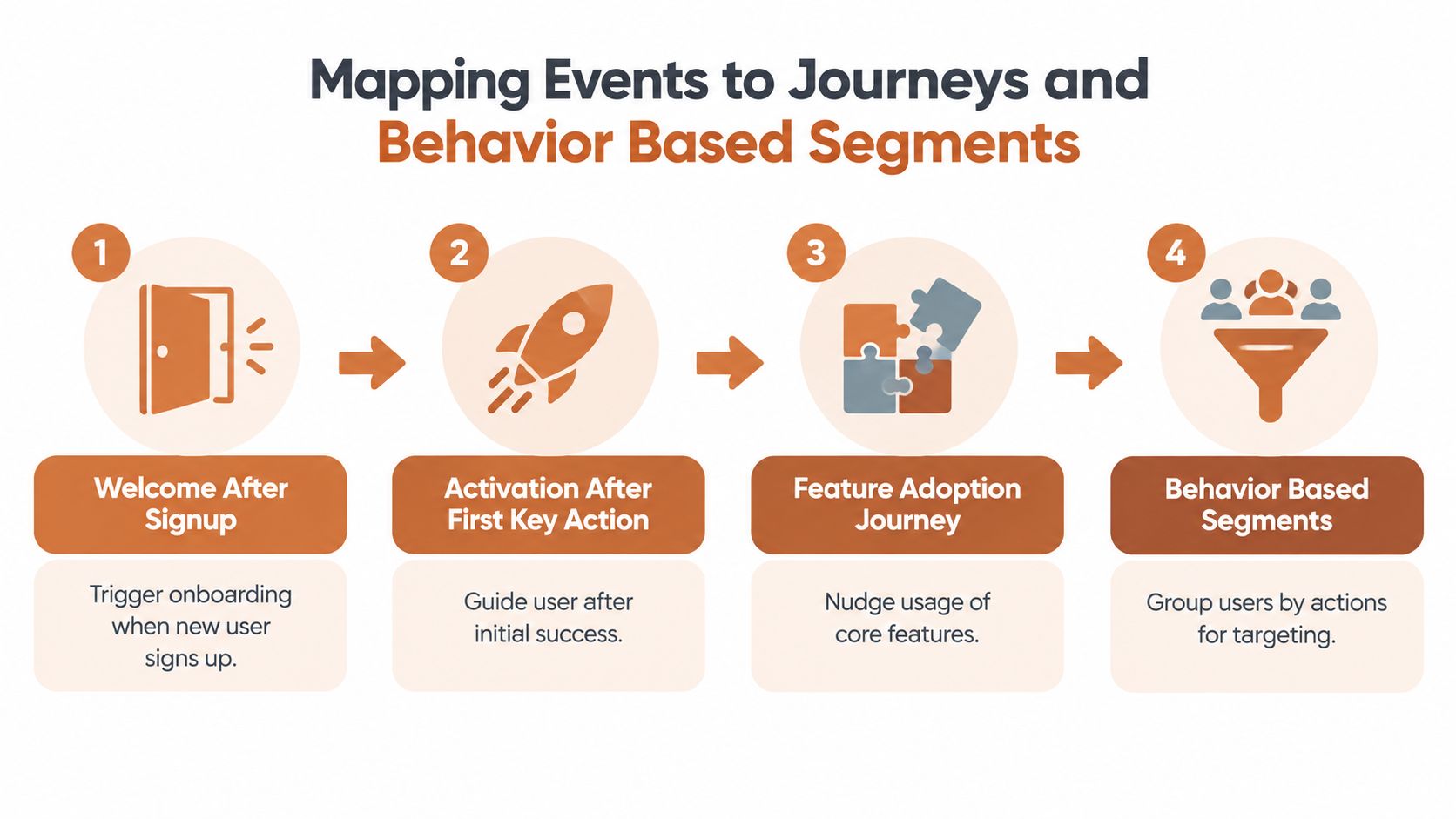
A signup event can begin a welcome journey, but signup alone rarely tells you what message belongs next. Add onboarding progress, product role, and the first meaningful action. If the user completes the key action, move them toward adoption or expansion content instead of continuing introductory education.
An activation journey might use onboarding_completed as its entry event and first_value_action as the success event. A feature adoption journey can begin when someone tries a feature and branch based on whether they return to it. Expansion messaging should depend on genuine usage or account signals, not an arbitrary calendar delay.
Billing events deserve their own treatment:
- Failed payment: Start dunning with a clear explanation, a recovery path, and a pause condition once payment succeeds.
- Cancellation intent: Trigger a churn-save journey that acknowledges the reason where available and avoids sending a promotional message that ignores the customer's complaint.
- Expired subscription: Move the account into win-back only after the cancellation or expiration state is confirmed.
- Renewal or upgrade: Suppress acquisition-style messaging and shift toward adoption, account value, or expansion support.
Behavior-based segmentation groups people by observed actions rather than only by plan or company attributes. The mechanics are straightforward: track events, send them to the email platform, and use rules such as has done X, has not done Y, or did X more than 5 times in the last 30 days, as outlined in this event-based segmentation guide.
Use recency and negative conditions deliberately
A re-engagement segment might include users who have not logged in for 14 days. That condition becomes more useful when paired with a negative condition, such as “has not completed the setup step,” and an exclusion for users who have an open support issue. The email then reflects an unresolved product obstacle rather than treating inactivity as a generic lack of interest.
For each proposed journey, document:
| Decision | Example |
|---|---|
| Entry event | User completes signup |
| Desired outcome | User completes the first key action |
| Suppression event | User reaches activation |
| Time condition | No key action after a defined period |
| Billing guardrail | Don't send if the subscription is inactive |
| Ownership | Product marketing owns copy, engineering owns event integrity |
Prioritize journeys where the event is reliable, the customer need is clear, and the next action is easy to understand. A smaller set of well-instrumented journeys beats a large catalog built on ambiguous events.
This guide to behavior-based segmentation offers useful framing for teams moving away from static lists. The important operational choice is to let segments update as events arrive, rather than making a marketer rebuild a query every time product behavior changes.
Configuring Approval Sending and Variant Testing
A lifecycle agent should earn permission to send. Connecting Stripe, product events, and email delivery doesn't justify automatic dispatch by itself. The safe sequence is draft, review, approval, scheduling, sending, and audit.
Set the default policy to approval only while event mappings and suppression rules are being validated. A draft-only policy is useful when the team wants content proposals without delivery. Auto-send can make sense for narrowly defined, low-risk messages after the event contract, audience rules, and sender setup have been tested.

Make approval a state machine
Treat message status as data, not as a comment in a project channel. Useful states include draft, in_review, approved, scheduled, sent, recalled, and rejected. Each transition should have an actor, timestamp, message version, and reason where relevant.
An audit trail can record project creation, asset uploads, feedback, approvals, rejections, version updates, recalled requests, and final approval in chronological order. That creates accountability for AI-assisted email and makes it possible to answer a basic operational question quickly: who approved this exact version, and what happened before it was sent? The audit trail model for marketing approvals describes this chronological record in practical terms.
Governance frameworks also support role-based permissions, structured approval routing, locked brand and compliance elements, and traceable sends. A stateful queue can intercept outbound email before delivery, request approval through a webhook, then release or discard the message while preserving the state transition in an immutable log, as shown in this email governance overview.
Test variants without surrendering control
Variant testing should change one meaningful variable at a time where possible. Test the framing of a feature benefit, the call to action, the amount of explanation, or the recovery path for a failed payment. Don't let an automated system rewrite every component simultaneously, because you won't know what caused the outcome.
A multi-armed bandit approach can shift more send share toward stronger variants and rewrite underperforming ones. That's useful when journeys receive a steady stream of eligible users, but it still needs guardrails:
- Keep brand constraints locked: Don't allow optimization to alter legal language, sender identity, or required product disclosures.
- Set a review threshold: Require approval for newly generated variants before they enter the active pool.
- Define the success event: A click may be an intermediate signal, while activation, recovered payment, or retained subscription may be the meaningful outcome.
- Preserve history: Store the original, each rewrite, audience exposure, and resulting decision.
Sending from the customer's own domain through Molted keeps delivery connected to the existing sender identity. The practical trade-off is that automation can increase throughput, but governance determines whether that throughput remains trustworthy.
Testing Handling Replies and Monitoring Performance
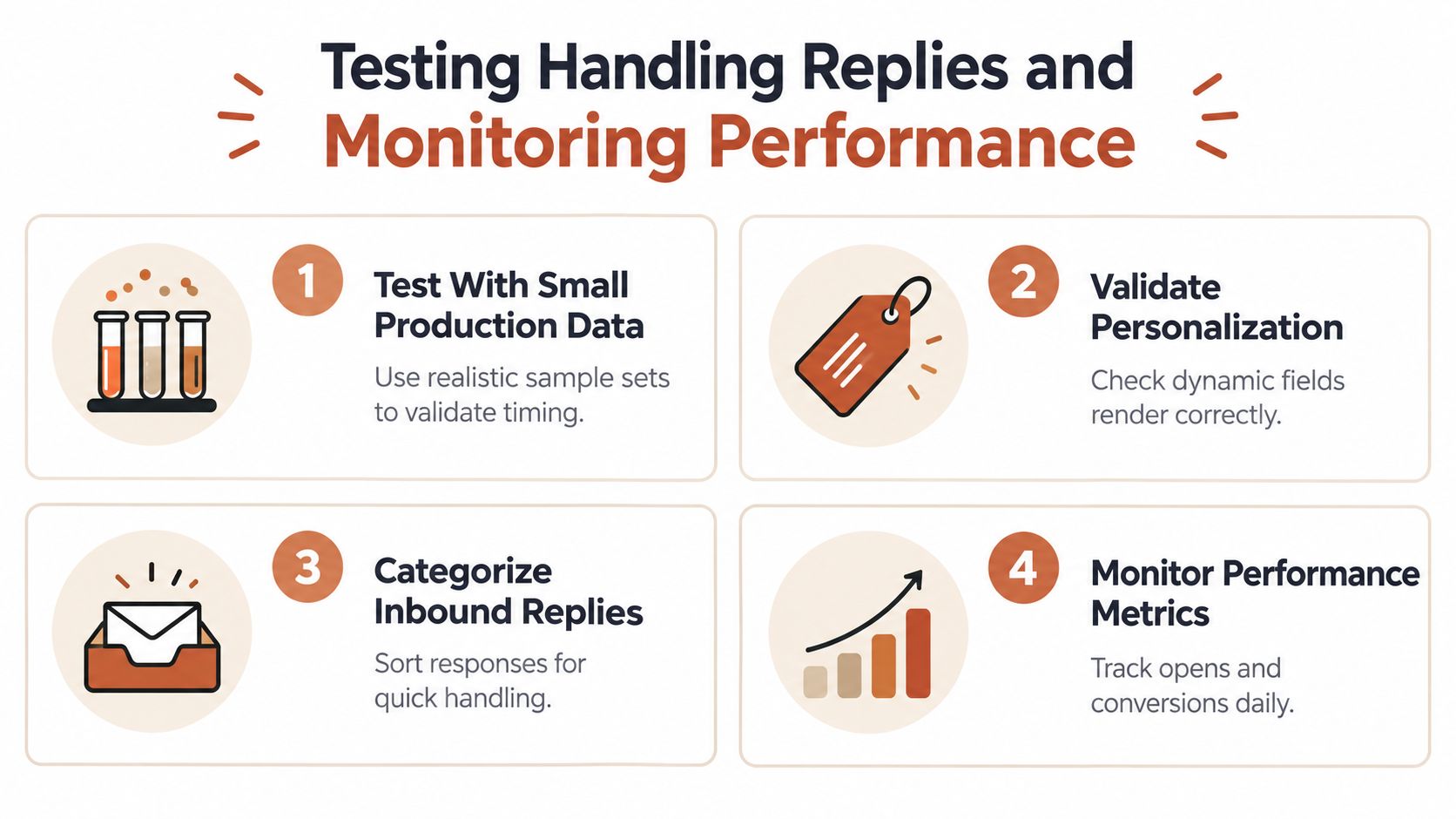
The first production test should be small and realistic, not a synthetic “hello world” event. Use representative payloads that contain the identity fields, product properties, billing state, locale, and suppression conditions your journey expects. Then inspect the rendered message, timing, links, approval state, and final event record.
Test the path, not just the payload
A successful webhook response proves very little. Test the full route from event receipt to segment membership, journey entry, message generation, approval, scheduling, delivery, and outcome capture. Include duplicate events and a delayed event, then confirm that the system remains idempotent and respects the newest customer state.
Replies need their own workflow. Categorize inbound responses into practical groups such as positive intent, confusion, cancellation request, billing issue, support request, and unsubscribe. An AI system can draft a suggested reply, but a person should review sensitive responses, especially cancellation objections, payment disputes, or messages that imply a service failure.
Operational rule: A reply is not just engagement data. It's a customer signal that can change the next journey decision.
Weekly reporting should answer plain-language questions:
- Which journeys are producing useful actions?
- Where are users entering but failing to progress?
- Which variants should remain active?
- Which messages are generating replies that require product or support follow-up?
- Are suppressions working when a customer changes state?
- Did event volume or identity quality change after a product release?
Monitor both message behavior and system health. Delivery failures, webhook retries, queue delays, missing properties, and unexpected audience growth often explain a performance change better than copy does. Keep a clear pause condition for every journey, such as a broken event contract, a billing-state mismatch, an unusual reply pattern, or a sudden increase in failed delivery.
Lifecycle email can produce disproportionate value when it targets a real customer state. One retention benchmark reported that automated flows represented 5.3% of sends yet generated about 41% of total email revenue, while campaigns represented 94.7% of volume, according to retention and lifecycle benchmarks. The same benchmark reported average monthly churn of 3.27% across more than 1,200 subscription sites, including 2.41% voluntary churn and 0.86% involuntary churn, with consumer DTC subscriptions near 6.5% monthly churn. Those figures don't guarantee a result for your product, but they do support prioritizing retention, win-back, and dunning over another generic broadcast.
Troubleshooting Governance and Next Steps for Reliable Integration
Most integration failures aren't dramatic. A webhook endpoint returns successfully, but the receiver drops a field. A user is identified by email in one tool and provider ID in another. A duplicate event enters the same journey twice. A product release changes the name of a feature, while the email copy continues describing the old interface.
Start troubleshooting with observability across the entire path. Log the event ID, source, received time, processing result, identity match, journey decision, message version, approval state, delivery result, and reply classification. Alert on repeated failures and unusual delays, not only on total outages. Integrations can fail after deployment, so a green dashboard limited to endpoint uptime isn't enough.
Use a recovery checklist
- Trace one customer: Follow a known event from its source through the journey and message record.
- Compare identities: Verify the mapping between Stripe or Polar, Clerk or Supabase, your application, and the email recipient.
- Replay safely: Reprocess a failed event using its original ID and confirm that idempotency prevents duplicate sends.
- Check versions: Compare the current event schema, journey rules, template, and product language after every significant release.
- Review approvals: Inspect whether the sent message matched the approved version and whether a recalled message was blocked.
- Pause before guessing: Stop a journey when the source-of-truth map or suppression logic is uncertain.
Tool sprawl requires a portfolio decision, not another connector. Consolidate systems that duplicate identity, journey logic, or reporting. Keep tools loosely coupled when they serve distinct responsibilities, such as Stripe owning billing and a newsletter platform owning broadcasts. The test is operational: does the boundary reduce duplication and audit effort, or does it force people to switch between tools for every decision?
Integration complexity is a major adoption barrier. A 2026 operations survey reported that 59% of operations leaders cited integration complexity as the top reason technology investments underdeliver, while 47% cited user adoption and 89% gave at least one reason their investments hadn't fully delivered value, according to the Skills, Tools and Services research survey. Engineers also reported that switching between tools hurts productivity, while open-source tools often remain only partly connected to workflows.
For AI agents, basic connectivity isn't orchestration. A 2026 industry report found that more than 4 in 5 IT leaders expected AI-agent proliferation to create more complexity than value because of integration challenges and silos, with organizations reportedly managing 957 applications while only 27% were connected, according to the Global State of IT Automation report. A separate SMB study reported 46.0% of respondents said AI tools operated in isolation, 44.7% said data was scattered without clear ownership, and only 10.4% said their platform supported fully orchestrated workflows. For a lifecycle agent, approval gates, auditability, identity resolution, recovery, and reply handling are part of the integration itself.
Begin with one high-confidence journey, document its event contract, add monitoring before launch, and expand only after the send, reply, and recovery loop works. That roadmap keeps your team from accumulating connectors that technically function but operationally create more work.
Mara connects product and payment events to lifecycle journeys, drafts emails in your company's voice, supports approval-only sending, tests variants, and drafts replies for review. Visit Mara to evaluate an approval-controlled integration loop for welcome, activation, retention, dunning, and win-back email.