Customer Lifecycle Journey Mapping for SaaS Growth
A trial starts, the user creates an account, and then silence. The product team sees a few logins, marketing sends a generic onboarding sequence, sales checks the CRM when someone remembers, and customer success notices the problem only after the account is already at risk. Everyone is active, but nobody owns the moment when the customer should reach value.
That's the operating problem customer lifecycle journey mapping should solve. A useful map doesn't merely decorate a workshop wall with stages and emotions. It connects customer behavior to product, billing, support, and messaging decisions, then gives someone responsibility for improving each transition.
Table of Contents
- Why Customer Lifecycle Journey Mapping Matters for SaaS
- The revenue case for better timing
- The map as an operating system
- A Proven Methodology to Map the Lifecycle Without Guesswork
- Define the goal and collect evidence
- Visualize stages, friction, and emotion
- Validate, assign, and refresh
- Common Pitfalls That Make Journey Maps Fail and How to Avoid Them
- Compare the map to customer reality
- Link every stage to action
- Mapping SaaS Stages From Acquisition to Churn With Event Triggers
- Acquisition and activation need different jobs
- Retention, expansion, and recovery depend on context
- Turning Your Map Into Automated Journeys That Ship
- Build the event layer before the message layer
- Prioritize by signal quality and business risk
- Prioritized Next Steps to Keep Your Lifecycle Map Current
Why Customer Lifecycle Journey Mapping Matters for SaaS
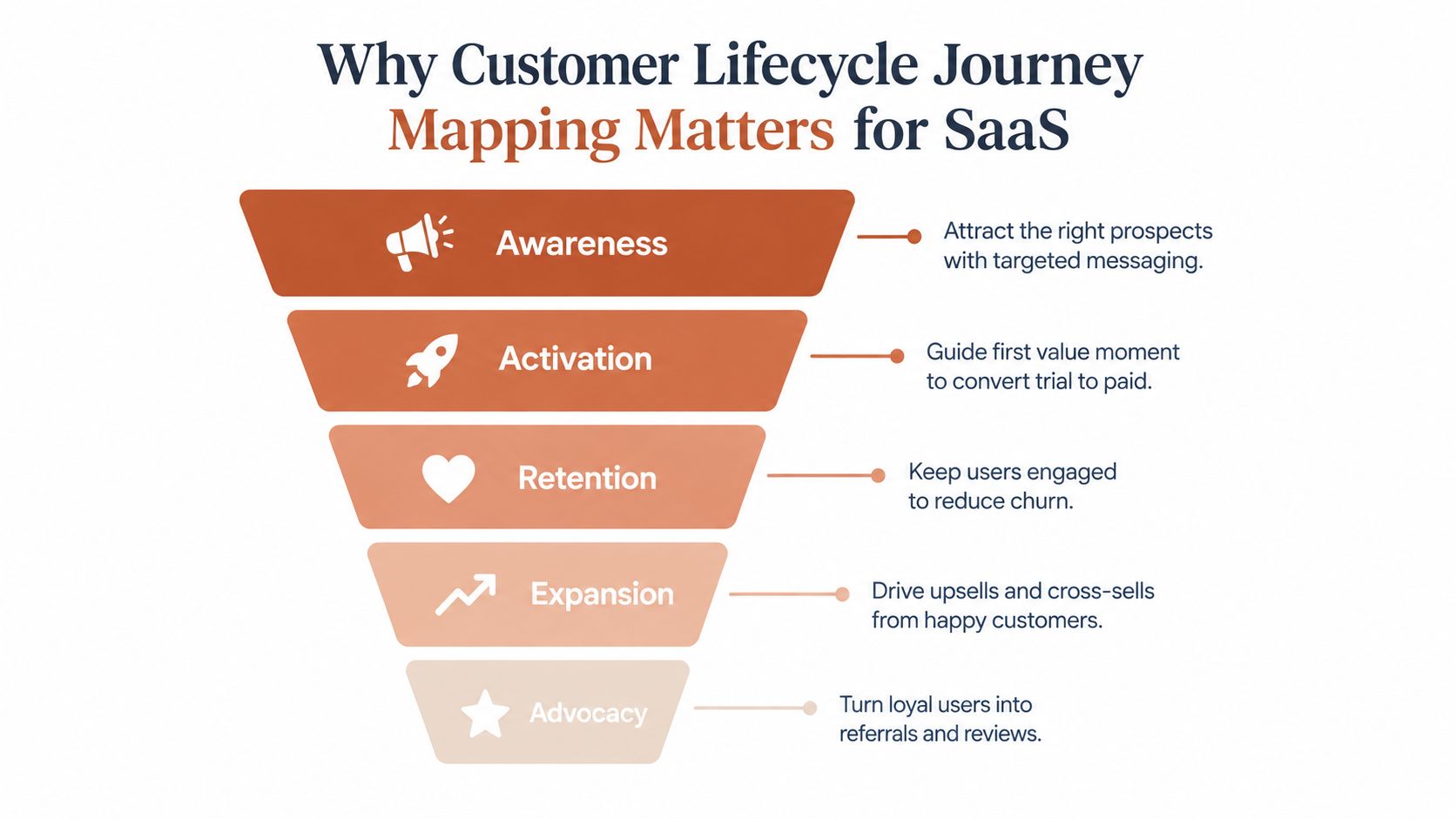
SaaS journeys rarely move in a clean line. A prospect may discover a product through an advertisement, return through organic search, speak with sales, invite a colleague, abandon setup, and come back after a support conversation. Once the account becomes paid, the journey continues through adoption, renewal, expansion, payment recovery, or churn.
A lifecycle map makes those transitions explicit. Modern programs commonly treat awareness, activation, retention, expansion, and loyalty as measurable stages instead of abstract concepts. That shift reflects the history of the discipline. Customer journey mapping became more formalized during the 1980s and 1990s, with one historical account tracing an early use to 1985 and identifying a 1998 milestone when OxfordSM applied journey mapping to Eurostar's brand and mission. The 2000s brought more emphasis on personas as websites and social media multiplied touchpoints, while the 2010s made mapping more data-driven through big data, analytics, and A/B testing, as described in this history of customer journey mapping.
The revenue case for better timing
Suppose a trial user has created a workspace but hasn't completed the configuration that makes the product useful. A generic email about features is poorly timed. An event-driven message that recognizes the missing setup step can answer the actual obstacle, link to the relevant help, and give the user a reason to return.
Structured lifecycle programs have measurable commercial implications. Research compiled by Martech Zone reports that nurtured leads generate 20% more sales opportunities on average, while purchases from nurtured leads are 47% larger than purchases from non-nurtured leads. Companies that excel at lead nurturing produce 50% more sales-ready leads at 33% lower cost, according to the same lifecycle marketing statistics. These figures don't prove that every email sequence will work, but they show why timing, follow-up, and stage-specific relevance deserve operating attention.
The map as an operating system
For a small SaaS team, the map should answer four practical questions:
- What changed: Which product, billing, support, or marketing event moved the customer into a new state?
- What happens next: What should the customer experience after that event?
- Who owns the transition: Which person or team reviews performance and fixes friction?
- How do we know: Which KPI shows progress, delay, or failure?
That structure turns lifecycle mapping into a shared operating system. Product owns activation events, marketing owns message logic, customer success owns risk signals, and finance or operations owns payment recovery. The map becomes valuable when those responsibilities produce shipped changes, not when the diagram looks polished.
A Proven Methodology to Map the Lifecycle Without Guesswork
Start with the business decision, not the canvas. A map built to “understand the customer” is too broad to guide action. Choose a concrete objective such as improving trial activation, reducing renewal risk, increasing adoption of a high-value feature, or recovering failed payments. Define the stage transition that matters and the business outcome attached to it.
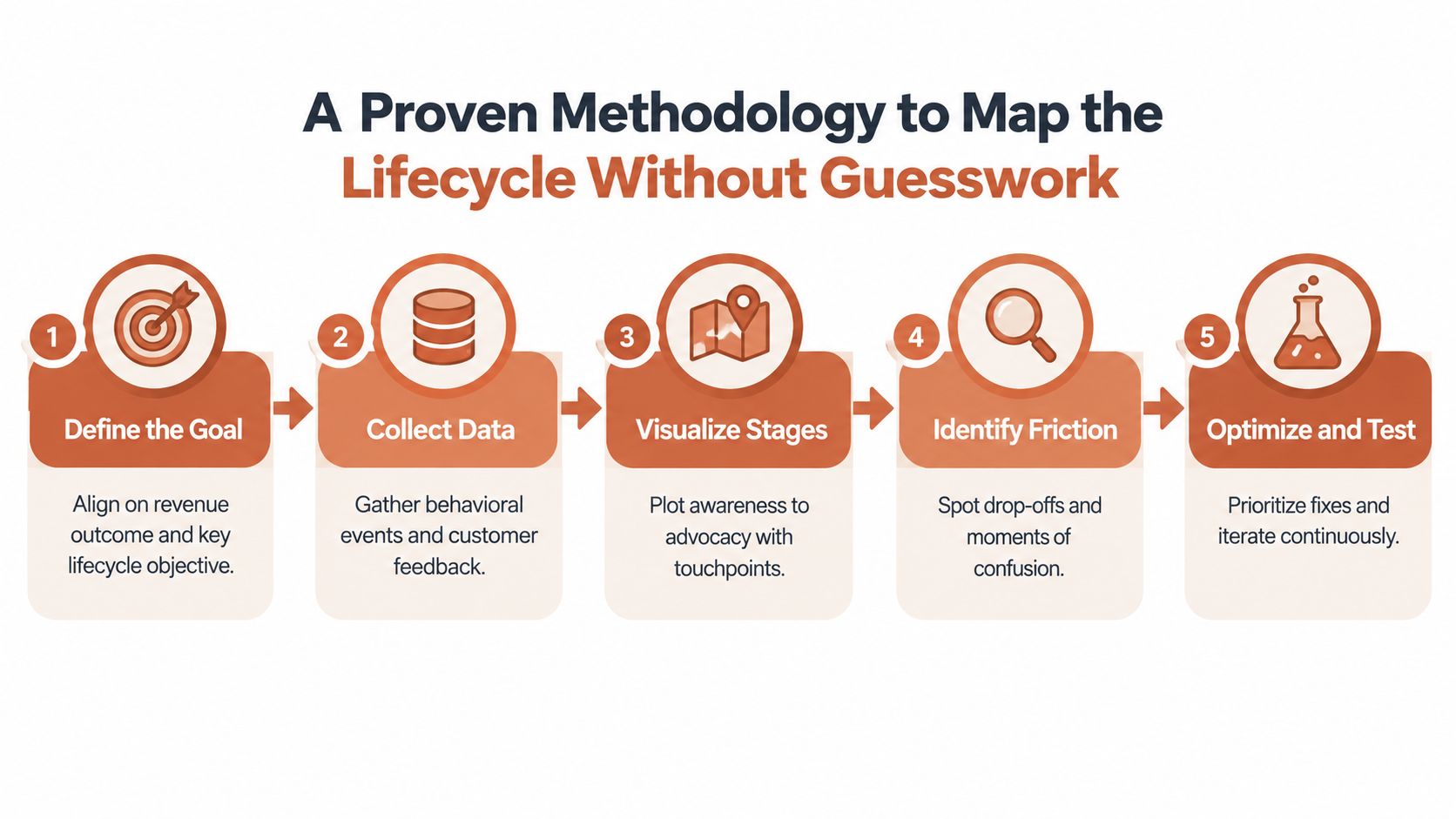
Then document the current state. The practical workflow has five phases, define the goal, collect behavioral and feedback data, visualize stages and emotions, validate with stakeholders, and iterate continuously, as recommended in guidance on ineffective customer journey maps.
Define the goal and collect evidence
Write the target transition in observable language. “Activation” might mean a workspace has been configured, a team member invited, and a core workflow completed. Don't define it as “the user understands the product,” because that cannot trigger a reliable journey.
Collect the events that can confirm or disprove your assumptions:
- Product behavior: account creation, setup completion, invitations, feature use, errors, and return activity.
- Commercial behavior: trial start, plan selection, upgrade, renewal, cancellation, and payment status.
- Human feedback: support tickets, sales notes, customer interviews, replies to lifecycle emails, and cancellation reasons.
- Channel interactions: advertisements, website visits, email clicks, sales conversations, product usage, and support contacts.
A data-driven marketing workflow can help teams organize these inputs when ownership is spread across acquisition, product, and retention channels. The data-driven marketing solution is useful context for thinking about how evidence should connect to decisions rather than sit in separate reports.
Visualize stages, friction, and emotion
Map the customer's perspective, including what they're trying to accomplish, what they do, what they see, and where they hesitate. Add emotions only when you can connect them to a concrete moment, such as confusion during integration setup or anxiety after a payment failure. “Users feel frustrated” isn't enough. “Users stop after receiving an integration error and open a support ticket” gives a team something to investigate.
Include happy paths and deviations. In B2B SaaS, the buyer, administrator, daily user, and finance contact may follow different paths. A single linear map can hide the handoffs that determine whether the account adopts the product.
Validate, assign, and refresh
Bring marketing, sales, product, customer success, support, and operations into validation. Ask each team where the map conflicts with what customers do, then resolve disagreements with event data and customer feedback rather than seniority.
Every stage needs a named owner and a small set of metrics. Useful measures include stage conversion rate, average time in stage, and drop-off rate per stage, all of which reveal different failure patterns. A low conversion rate points to broad friction, long time in stage suggests delay, and high drop-off identifies where customers disappear.
Practical rule: Treat the map as a living artifact. Refresh it after a major product, pricing, channel, or billing change, and review whether the events still represent the customer's real path.
The output shouldn't be a static journey poster. It should be a maintained operating record with a goal, evidence, stage criteria, owners, triggers, KPIs, and a clear next action.
Common Pitfalls That Make Journey Maps Fail and How to Avoid Them
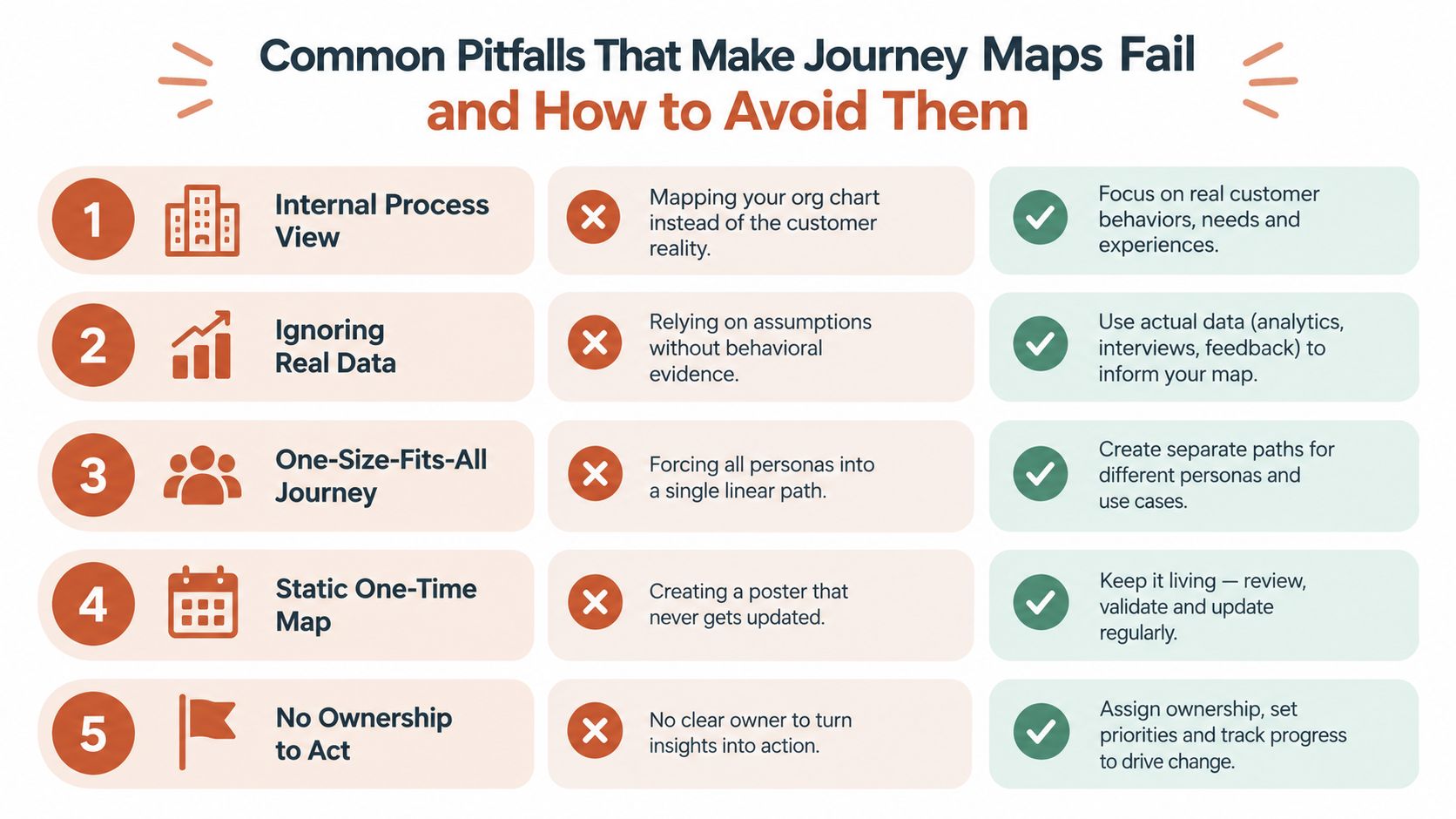
A map can be accurate in appearance and useless in practice. The most common failure is replacing customer evidence with internal assumptions. Teams draw the path they designed, arrange departments around it, and call the result a customer journey.
The scale of the problem is significant. Multiple industry sources report that 83% of customer journey maps fail to drive real improvement, while Gartner-referenced coverage says 82% of companies have journey maps but fewer than half use them effectively, as documented in this journey mapping failure analysis. These figures should prompt an audit, not a panic response. The useful question is whether your map produces decisions.
Compare the map to customer reality
An internal process view shows who sends the email, approves the refund, or handles the ticket. A customer view shows what the person is trying to do, what blocks progress, and whether the next step is clear. Both matter, but they answer different questions. Use a service blueprint when backend handoffs are the suspected cause, and use the lifecycle map to preserve the customer's perspective.
Audit the map against actual paths. Look for missing interactions across the website, sales process, product, billing, and support. Check whether customers can move backward, pause, or enter through a different route. A map that contains only the happy path won't explain dormant accounts or repeated setup attempts.
Link every stage to action
Weak maps use emotional labels without evidence, list touchpoints without owners, and stop at “opportunity.” Strong maps connect each friction point to an intervention and measurement plan.
Use this diagnostic checklist:
- Evidence check: Can you point to an event, conversation, support pattern, or customer observation behind each major assumption?
- Touchpoint check: Does the map include product, billing, sales, email, website, and support interactions where they affect progression?
- Metric check: Does every stage have a conversion, time, or drop-off measure?
- Ownership check: Can one named person approve and ship the next change?
- Refresh check: Is there a review date after product, pricing, or customer-path changes?
The map shouldn't force every customer into one path. Segment by lifecycle stage and behavior, then preserve meaningful differences between trial users, activated accounts, expansion candidates, and customers showing churn signals. Lifecycle segmentation groups customers by where they are in the journey, with practical stages including awareness, first purchase, post-purchase, repeat purchase, and loyalty, as explained in customer lifecycle segmentation guidance.
Mapping SaaS Stages From Acquisition to Churn With Event Triggers
A SaaS lifecycle becomes actionable when each stage has an entry event, a desired next action, and a message job. Start by listing interactions across advertisements, email, website visits, sales conversations, product usage, billing, and support. Then identify the moments of truth that determine whether the customer progresses or stalls.
Behavior should lead segmentation. A company size or industry label can provide context, but it won't tell you whether an account has completed setup, invited colleagues, or stopped using the feature it paid for. Behavioral segmentation groups customers by what they're doing and when, which enables targeted journeys without repeatedly building manual queries, as described in this behavior-based lifecycle segmentation overview.
| Lifecycle Stage | Example Event Trigger | Journey Job |
|---|---|---|
| Acquisition and awareness | Ad click, website visit, form submission, or sales conversation | Confirm the problem fit, explain the next step, and capture useful context |
| Trial or first purchase | Trial started, account created, or subscription activated | Set expectations and move the customer toward the first value moment |
| Activation | Key action completed, workspace configured, or teammate invited | Reinforce progress and guide the next action that makes the product useful |
| Feature adoption | Target feature used, integration connected, or workflow repeated | Explain the feature's job, remove friction, and encourage a relevant use case |
| Expansion | Seat usage rises, usage approaches a plan boundary, or an additional team shows interest | Present a credible upgrade or cross-sell based on observed need |
| Re-engagement | Login frequency falls, a key workflow stops, or an account becomes dormant | Restore relevance with a specific task, benefit, or support offer |
| Churn save | Cancellation started, negative feedback submitted, or usage drops sharply | Diagnose the reason, offer an appropriate intervention, and protect the relationship |
| Win-back | Former customer returns to the site or responds to a reactivation message | Reconnect the changed need with a clear reason to reconsider |
| Dunning | Payment failed, card expired, or invoice remains unresolved | Explain the payment issue, provide a recovery path, and prevent avoidable interruption |
Acquisition and activation need different jobs
Acquisition messaging earns attention and establishes fit. Activation messaging helps the customer complete a meaningful product action. Combining them produces the familiar mistake of sending promotional content to a user who is still blocked by setup.
For a sales-assisted motion, event triggers should also include human handoffs. A completed form might create a sales task, while an account that reaches a product milestone can qualify for outreach. Teams that need to supplement digital signals with direct prospecting can use a resource on hire cold callers as part of a broader outbound process, but the lifecycle map should still record the handoff and its outcome.
Retention, expansion, and recovery depend on context
A feature-adoption message should follow an observed need, not a calendar date. If a team has configured the product but hasn't used a capability central to its use case, explain that capability in the context of the workflow already underway. If seat usage grows or another team begins evaluating the product, expansion messaging can reflect the behavior that created the opportunity.
Payment events deserve their own lane. Failed-payment recovery, or dunning, is commonly estimated to account for 20 to 40 percent of total SaaS churn, and disciplined dunning processes are reported to recover 50 to 70 percent of it, according to failed-payment recovery research. That makes billing instrumentation more than an accounting concern. A failed payment should trigger a coordinated sequence, suppress irrelevant promotional messages, and give the customer a clear path to resolve the issue.
For a deeper framework on how stages relate to one another, see this guide to customer lifecycle stages. The map becomes operational when every row has a trigger that your systems can emit and a message job that a real owner can review.
Turning Your Map Into Automated Journeys That Ship
Small teams shouldn't automate the entire lifecycle at once. Start with the journeys where the event is reliable, the customer need is obvious, and the handoff has a clear owner. Welcome and activation sequences are common starting points, followed by feature adoption, failed-payment recovery, re-engagement, and churn-save programs.
The implementation gap usually appears between systems. Product events live in analytics, payment events live in Stripe or Polar, support context sits in a help desk, and messaging operates in another platform. Without a shared customer identity and consistent event names, an account can receive an activation email after it has already churned, or miss a payment recovery message because billing data never reached the lifecycle system.
Build the event layer before the message layer
Create a small event contract for each journey. Define the event name, required properties, source system, timestamp behavior, audience rule, suppression rule, and owner. For example, integration_connected needs to distinguish a successful connection from an attempted one, while payment_failed needs enough billing context to prevent contradictory messaging.
Behavior-based segmentation should be computed automatically from those events. A segment such as “trial started, setup incomplete, no return visit” is more useful than a manually maintained spreadsheet because it can update as the customer changes state.
Approval controls matter when the system can send messages. Use draft-only or approval-only policies for high-stakes journeys such as churn-save and win-back, then introduce automation only after the triggers and exclusions have been tested. Teams evaluating the market can compare a top lead nurturing software roundup, but the selection should follow the operating requirements, not the size of a feature list.
Prioritize by signal quality and business risk
A practical launch order looks like this:
- Reliable trigger, immediate need: Welcome, activation, and dunning usually fit this category.
- Reliable trigger, behavioral education: Feature adoption and re-engagement come next.
- Complex context, higher review need: Churn-save, win-back, and expansion require richer account information and careful suppression.
- Cross-functional orchestration: Add sales and support handoffs once the core event flow is trustworthy.
Assign a named owner to each journey, a KPI to each stage, and a review cadence. Variant testing can improve copy and timing, but testing won't repair a missing event or an incorrect audience. Review performance in plain language, record what changed, and keep the winning logic only while it still reflects the product.
The customer journey automation guide offers a useful reference for connecting triggers, steps, timing, audiences, and journey-level results. Tools that read product context, generate lifecycle emails, segment from events, and keep approval gates can reduce maintenance work, but they still need clean instrumentation and human accountability.
Prioritized Next Steps to Keep Your Lifecycle Map Current
Treat the map as operational infrastructure. A static diagram becomes stale as soon as the product changes, pricing changes, a new acquisition channel appears, or billing behavior changes. The team should refresh the map when any of those changes can alter a customer's next action.
Use a focused sequence rather than launching a broad transformation:
- Audit the events: Confirm that trial, activation, feature, subscription, cancellation, and payment events fire consistently and identify the account correctly.
- Choose one measurable transition: Pick the stage where customers most often stall and define the action that signals progress.
- Ship one useful journey: Start with welcome, activation, or dunning when the trigger and customer need are clear.
- Assign ownership: Name the person responsible for copy, logic, suppression, reporting, and updates.
- Review weekly: Check who entered, progressed, stalled, converted, replied, or should have been excluded.
- Refresh after change: Revisit the map after product, pricing, billing, or channel changes, then update triggers and message logic.
A monthly cross-functional review keeps the operating system connected to reality. Marketing can flag message fatigue, product can explain changed workflows, support can surface recurring friction, and finance can identify payment patterns that require different recovery treatment.
Don't wait for perfect instrumentation. Mark unknowns directly on the map, fix the highest-risk gap, and keep the first journey narrow enough to learn from. Once a trigger proves dependable and the owner can explain its results, expand the map to the next transition.
Mara helps software teams turn product and billing events into approval-controlled lifecycle emails, including welcome, activation, feature adoption, re-engagement, churn-save, win-back, and dunning journeys. Visit Mara to see how it can connect customer lifecycle journey mapping to messages your team can review and ship.