Customer Journey Automation: A Practical Guide for SaaS
A striking 79% of organizations already automate at least part of the customer journey, while only 10% have fully automated it, according to a 2024 worldwide survey of marketing decision-makers. That gap explains why many SaaS teams feel stuck. They've moved beyond newsletters and manual follow-ups, but their product events, billing signals, email logic, approvals, and reporting still don't operate as one dependable system.
The hard part of customer journey automation isn't writing another welcome email. It's connecting the orchestration layer underneath the email to trustworthy events, clear rules, safe execution, and measurable outcomes. A journey can have excellent copy and still fail if a payment event arrives late, an inactive user remains in the activation branch, or a suppression rule never reaches the sending system.
This guide treats customer journey automation as a lifecycle operations problem. You'll see how the underlying stack works, where programs can break, and which decisions a small SaaS team can make next week.
Table of Contents
- What Customer Journey Automation Actually Means
- The moving parts
- How Widespread Automation Has Become
- A practical maturity map
- The Four Layers Behind Every Customer Journey Automation Stack
- Layer one is the data layer
- Layer two is orchestration
- Layer three is execution
- Layer four is governance and measurement
- Why Journey Emails Outperform Broadcast Campaigns
- Core SaaS Journeys and the Events That Drive Them
- Welcome starts with signupcompleted
- Activation responds to firstkeyaction
- Win-back watches for declining usage
- Dunning follows payment state
- Approval Workflows and Audit Trails That Keep Automation Safe
- Make each transition explicit
- The Four Pitfalls That Quietly Break Lifecycle Programs
- Pitfall one is treating the map as the system
- Pitfall two is using one throttle for every intent
- Pitfall three is counting sends instead of outcomes
- Pitfall four is giving one marketer total ownership
- Choosing a Customer Journey Automation Approach for Your SaaS
What Customer Journey Automation Actually Means
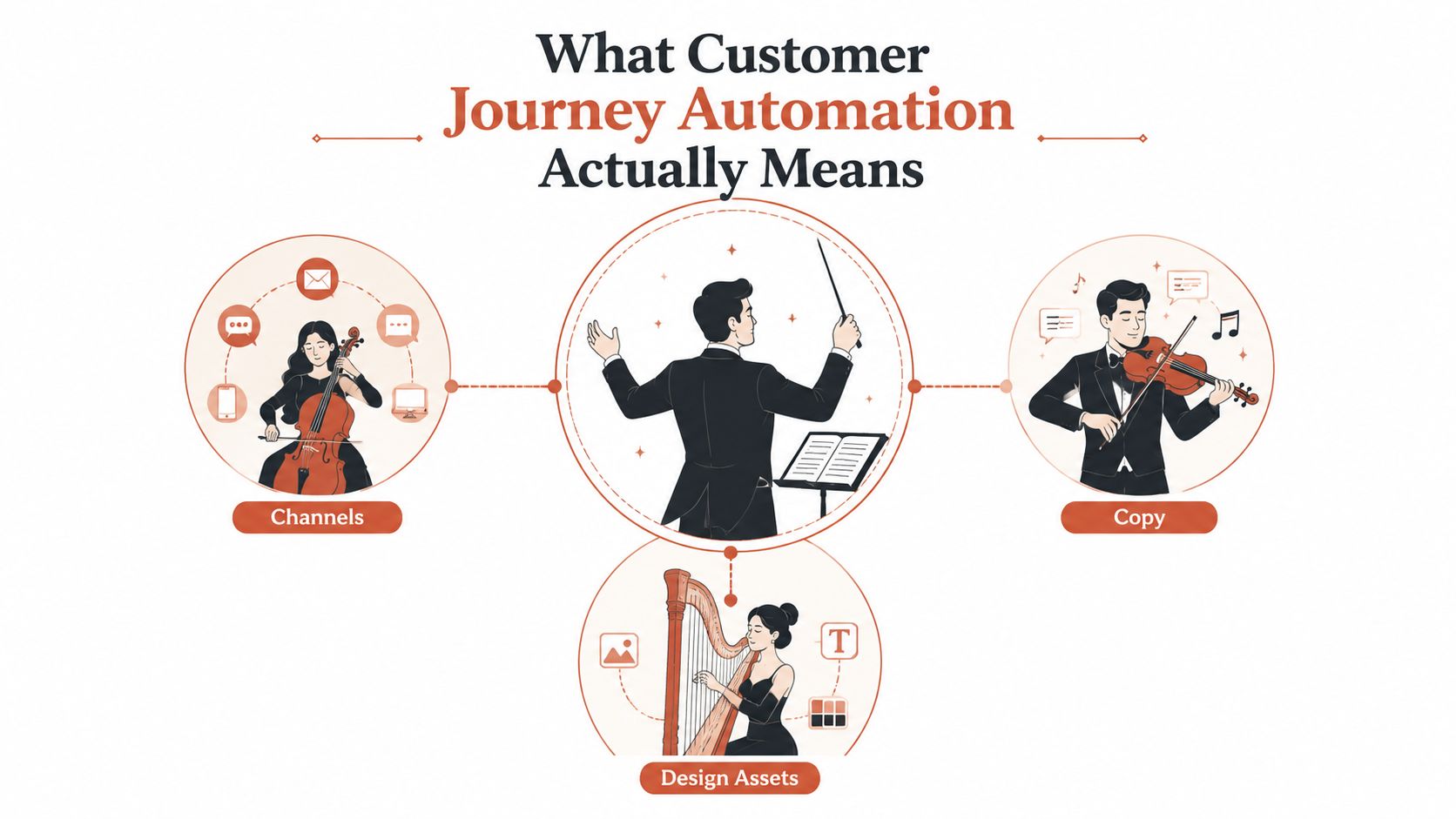
Customer journey automation is the conductor, not the orchestra. Email, in-app messages, push notifications, sales tasks, and design assets are the musicians. The orchestration layer decides who plays, what they deliver, when they deliver it, and which customer signal starts the performance.
Take a self-serve SaaS product. A user completes signup_completed, which creates an account entry and starts a welcome path. If the account creates its first project within twenty-four hours, the system moves it into an activation branch with three emails and an in-app banner. If a trial-day payment fails, the billing signal sends the contact into a dunning path. If the user hasn't logged in for fourteen days, the system starts re-engagement instead.
Those experiences can run from one rule engine that reads product, billing, and CRM events. The user shouldn't receive an activation reminder after becoming active, and a customer with a failed payment shouldn't continue receiving generic product education without a billing-aware message.
The moving parts
A useful journey has five explicit components:
- Events: Product, payment, account, and support signals such as
first_project_created,payment_failed, orlogins_dropped. - Conditions: Rules that inspect plan, role, account status, usage, or prior messages.
- Delays: Timing controls that wait for a meaningful interval or event instead of relying on a fixed calendar.
- Channels: Email, in-app, push, webhook-driven tasks, or other delivery nodes.
- Exits: Rules that remove a person when they activate, pay, reply, cancel, or enter a conflicting journey.
A static drip sequence says, “Send message one, wait, send message two.” Customer journey automation says, “Send the next useful action only if the customer still needs it.” That distinction matters because lifecycle programs respond to live behavior rather than treating every subscriber as if they followed the same path.
Practical rule: If you can't name the event that starts a branch and the event that ends it, you don't have an automated journey yet. You have a sequence with assumptions.
How Widespread Automation Has Become
The adoption data is best understood as a maturity ladder, not a victory lap. The global survey benchmark found that 10% of organizations had fully automated customer journeys, 25% were mostly automated, 44% were partially automated, and 21% had no automation. In other words, 79% had automated at least part of the journey, but only a minority had reached end-to-end execution.
For an early-stage SaaS team, those categories translate into operating realities. A partially automated company may have a welcome email, a trial reminder, and a payment alert, but each may come from a different system with separate ownership. A mostly automated company has connected more behavioral branches, yet still depends on manual approvals, engineering support, or spreadsheet-based reporting. Fully automated teams treat the journey engine as a managed operating layer, with event definitions, versioning, owners, safeguards, and feedback loops.
A practical maturity map
| Tier | Typical Setup | Owner | Risk When Wrong |
|---|---|---|---|
| Batch | Broadcast campaigns from a marketing platform | Marketing generalist | Broad irrelevant sends |
| Triggered | A few behavioral or transactional emails | Marketing plus engineering | Conflicting messages |
| Orchestrated | Product, billing, CRM, and channel events connected | Lifecycle or growth lead | Branch and data failures |
| Managed | Versioned journeys with approvals and experimentation | Cross-functional lifecycle team | Larger operational blast radius |
A small team should identify its current tier before buying another visual builder. Moving from batch to triggered automation may require a few reliable events and an owner. Moving from triggered to orchestrated automation requires identity stitching, API connections, suppression logic, and QA. The final tier adds process discipline, not just more software.
The right next step isn't “automate everything.” It's removing the single manual handoff that currently blocks a customer from reaching the right next action.
The Four Layers Behind Every Customer Journey Automation Stack
A dependable stack has four layers. You can build each one with modest tools, but skipping a layer creates failures that appear later as “bad email performance.”
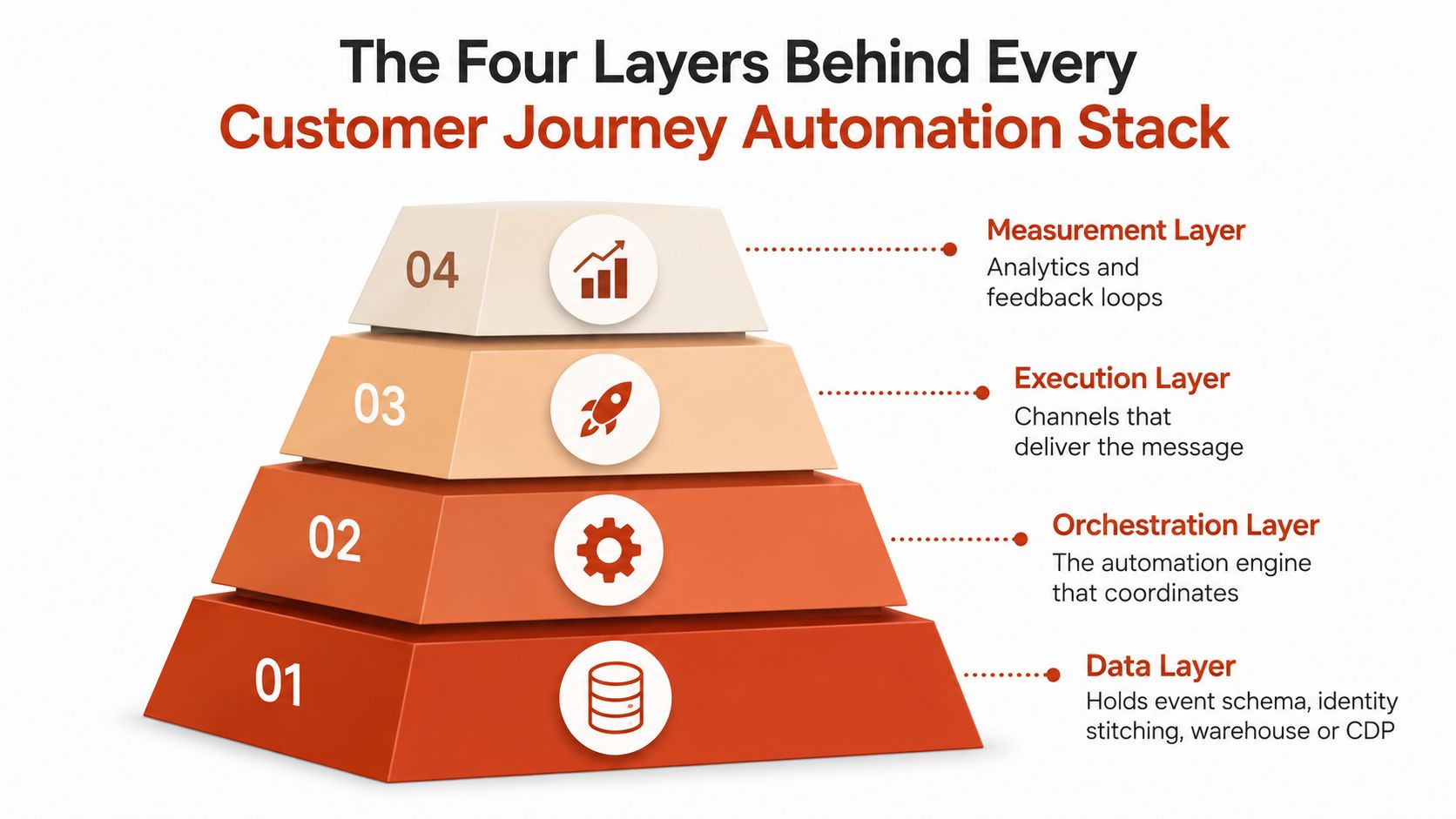
Layer one is the data layer
Start with an event schema that engineers and marketers interpret the same way. An Indie B2B SaaS team might maintain a customer table keyed by workspace_id, an events table containing first_project_created and payment_failed, and an identity graph connecting the user, account, and billing record.
That identity graph prevents a common error: the product knows a user by user ID, the billing system knows the subscription by customer ID, and the CRM knows the account by workspace. The orchestration engine needs a reliable relationship between all three.
Layer two is orchestration
This layer stores the decisions. It contains triggers, conditions, branches, delays, frequency limits, and exits. A visual journey builder can handle the main logic, while a webhook listener or managed database table can receive events that change a customer's path.
Keep the rule logic readable. “If first_project_created exists, exit activation” is safer than a vague engagement score that nobody can explain during an incident.
Layer three is execution
Execution connects the engine to email, in-app messages, push, and webhook-driven outbound tasks. Each channel should behave like a callable node with a templated payload, delivery status, and failure response.
A channel failure shouldn't look like a customer failure. Store whether the engine made the call, whether the provider accepted it, and whether the customer completed the intended action.
Layer four is governance and measurement
Governance includes approval states, journey versions, suppression lists, access controls, and audit logs. Measurement closes the loop with branch-level outcomes, such as activation, repeat usage, recovered revenue, or cancellation prevention.
Microsoft's Approvals audit documentation shows the value of recording events such as approval creation, viewing details, approval, rejection, cancellation, sharing, attachment, and reassignment. A lifecycle system needs the same mindset.
For a deeper look at connecting marketing decisions to operational data, see this data-driven marketing solution guide.
Why Journey Emails Outperform Broadcast Campaigns
A journey email earns its place by responding to intent. A broadcast campaign earns its place by reaching a list on a schedule. That difference affects both revenue efficiency and click behavior.
One benchmark summary reports USD 0.11 average revenue per recipient for standard email campaigns versus USD 3.65 for abandoned-cart flows, with automated lifecycle flows generating up to 30 times more revenue per recipient in that comparison. The same lifecycle email benchmark source reports that automated emails drove 37% of email-generated sales while representing 2% of total email volume.
For a SaaS team, the comparison might be a monthly product newsletter versus an activation message sent after a user creates an account but fails to complete the first key action. The newsletter reaches people whether or not they need help. The activation message reaches a user at the exact point where the product has evidence of friction.
Triggered messages also show stronger click performance in benchmark summaries. Automated or triggered emails reached about 5.31% CTR versus 2.62% for standard campaigns, while ecommerce flow data reported 5.58% click rate for automated flows versus 1.69% for campaigns, with flows also showing higher open rates in the cited comparisons. These figures come from the event-triggered email benchmark summary.
| Metric | Broadcast Campaign | Journey Email |
|---|---|---|
| Trigger | Calendar date or campaign launch | Product, billing, or account event |
| Audience | Broad list or static segment | Behavioral and contextual segment |
| Message timing | Same schedule for many recipients | Delay based on customer state |
| Primary use | Newsletter or announcement | Activation, retention, dunning, or win-back |
| Optimization question | Did people receive it? | Did the customer advance? |
Segmentation strengthens the effect. A Klaviyo segmentation benchmark found 16.17% average unique open rate for highly segmented sends versus 9.95% for unsegmented lists, and 1.99% CTR versus 0.92%. The operational lesson is simple: segment by behavior and context before increasing send volume.
Before blaming a journey for weak delivery, run an email blacklist check and review suppression, bounce, and sender health signals. Better orchestration can't compensate for messages that never reach the inbox.
Core SaaS Journeys and the Events That Drive Them
The most useful journey designs start with a specific event and a measurable customer outcome. The copy comes after the branch logic.
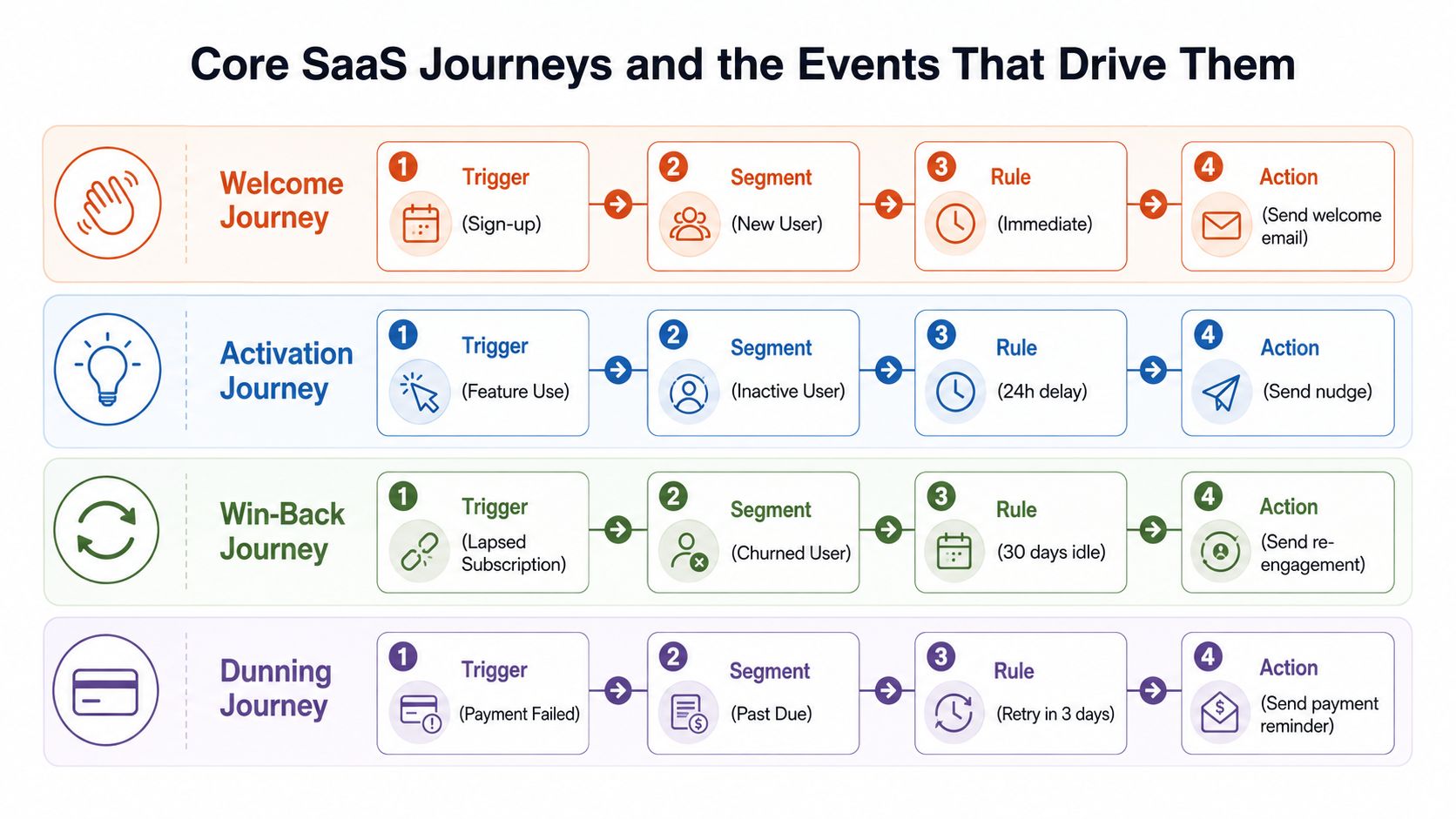
Welcome starts with signup_completed
A new account triggers signup_completed. The system checks whether the user is a founder, developer, administrator, or another role, then sends an immediate welcome message with the next useful action for that role.
A developer may need a setup path or API starting point. An administrator may need an invitation prompt. The journey exits when the user completes the first meaningful product action, so an active customer doesn't keep receiving introductory material.
Activation responds to first_key_action
Suppose the product's key action is creating a project. The event first_key_action moves the user from general onboarding into activation. If the event hasn't arrived after a delay, the journey can send a nudge, follow with an in-app banner, and then offer a human help route.
A trial_day_3_inactive condition can create a different branch from a user who has logged in but hasn't completed the key action. The KPI is activation rate, not the number of onboarding emails delivered. For implementation guidance specific to software companies, use this email marketing for SaaS guide.
Win-back watches for declining usage
A win-back path can begin when logins_dropped_70_percent is true or when a subscription becomes inactive. The segment should distinguish a former paying customer from a trial user, and the message should use the account's prior product context rather than a generic “we miss you” appeal.
The success measure is movement in the retention curve, such as renewed usage or a returned subscription. An exit fires when the account logs in, replies, upgrades, or opts out.
Dunning follows payment state
subscription_payment_failed starts a billing-aware journey. The system checks plan, account owner, invoice status, and previous attempts before sending a payment reminder. It can route a high-value account to a customer success task while keeping a self-serve account in an automated recovery path.
Stripe documents that after retries, a subscription can end as canceled, unpaid, or past_due, depending on the configured end action, while invoices continue to be generated in each state. Those explicit branches make Stripe's Smart Retries documentation useful when defining dunning exits and escalation rules.
Approval Workflows and Audit Trails That Keep Automation Safe
Approval controls aren't a sign that automation failed. They're how a small team keeps a fast system from becoming an invisible publishing machine.
A practical lifecycle queue uses distinct states: draft, in_review, approved, scheduled, sent, and archived. Each state has an owner and a permitted transition. A marketer can draft the journey, a second reviewer can inspect the copy and branch conditions, an authorized person can approve it, and the system can schedule, send, and archive the approved version.
Make each transition explicit
The reviewer should verify the triggering event, audience conditions, delay, exit criteria, links, sender identity, and suppression rules. For a failed-payment journey, that review should also confirm that the message doesn't offer an invalid remedy or contradict the account's billing state.
An audit entry can store the actor, timestamp, change diff, and linked journey version. That record turns “who changed this?” from an investigation into a searchable answer.
An implementation pattern described in this approval-gated AI email workflow guide intercepts outbound email before SMTP delivery, holds it in a stateful queue, triggers approval through a webhook, and then releases or discards the message while recording state transitions in an immutable audit log. The documented pattern includes actor, timestamp, IP address, and message hash.
For a lean team, the process can stay lightweight. One person drafts, another triggers the journey on a test account, watches the first send, checks suppression, and approves the version. The searchable history also makes onboarding safer because a new marketer can see what changed and why.
Use this email marketing compliance resource to make compliance checks part of the workflow rather than a last-minute legal review.
The Four Pitfalls That Quietly Break Lifecycle Programs
Pitfall one is treating the map as the system
Journey maps go stale as soon as product behavior changes. A feature rename, altered event payload, or new billing state can invalidate a branch while the diagram still looks correct.
Correction: Put event definitions in version control. Rebuild the map from the current schema during each planning cycle, then test the actual event path with a controlled account.
Pitfall two is using one throttle for every intent
Activation reminders and billing notices have different urgency, audience expectations, and operational consequences. Sending them through one undifferentiated stream makes it harder to diagnose a soft-bounce loop or protect important transactional communication.
Correction: Separate streams by intent. Give billing recovery, activation, product education, and win-back their own suppression logic, reporting, and escalation rules.
Pitfall three is counting sends instead of outcomes
A sent email is an execution event, not a business result. Open rates can help diagnose delivery and subject-line problems, but they shouldn't stand in for activation, retention, or recovered revenue.
Track the outcome that matches the journey:
- Activation: Whether the user completes the key product action within the defined window.
- Retention: Whether usage continues after the onboarding period.
- Win-back: Whether dormant accounts return or recover a subscription.
- Dunning: Whether failed payments become successful or require human intervention.
Pitfall four is giving one marketer total ownership
One person shouldn't own copy, logic, data mapping, and QA without a second set of eyes. Solo ownership hides mistakes because the creator already knows what the journey was supposed to do.
Correction: Require a second reviewer to trigger the journey independently, inspect the first delivery, and verify the suppression list before approval. That small control catches silent regressions without turning every email into a committee project.
Choosing a Customer Journey Automation Approach for Your SaaS
Tool selection gets easier when you map the decision to the four stack layers. Don't begin with a vendor demo. Begin with the failure you can't tolerate and the work your team can realistically own.
First, locate the behavior data. Does it live in product analytics, Stripe or Polar, your CRM, a warehouse, or several places? Your orchestration layer must reach those sources without creating a weekly engineering queue. If a payment failure arrives only after a manual export, dunning automation isn't operationally ready.
Second, decide who owns the writing and branching. Marketing may own the voice, product may own activation definitions, and customer success may own churn-save offers. A visual builder can be useful when non-engineers need to edit timing and copy, but only if the data contracts and approval controls remain clear.
Third, define the worst failure mode. A mistimed feature announcement is inconvenient. A wrong refund offer, an incorrect billing notice, or a message sent after an opt-out can create a much larger problem. That answer determines whether versioning, approval states, suppression lists, and audit trails are optional conveniences or hard requirements.
Fourth, estimate the journey portfolio. If you expect welcome, activation, feature adoption, expansion, re-engagement, churn-save, win-back, and dunning programs, choose an approach where adding another branch doesn't require rebuilding the stack.
| Evaluation Question | What to Look For | Risk If Missing |
|---|---|---|
| Where does behavior live? | Product, billing, CRM, and webhook access | Stale or incomplete triggers |
| Who owns the journey? | Editable copy and clear branch permissions | Engineering bottlenecks |
| What can go wrong? | Approval states, suppression, and audit history | Unintended sends |
| How will outcomes be measured? | Branch-level attribution and lifecycle KPIs | Send counts mistaken for value |
| How will the portfolio grow? | Reusable events and low marginal setup effort | Every new journey becomes a project |
Mara is one option for software teams that want AI-assisted lifecycle drafting, event-based triggers from product and payment sources, approval controls, and attribution by journey branch. It operates alongside existing newsletter or CRM tooling, using events from sources such as Stripe, Polar, webhooks, and a direct Events API.
The right approach is the one that lets your team launch four dependable journeys this quarter and verify the underlying data by Friday. Start with one event, one outcome, one owner, and one exit rule. Then expand only after the first path behaves correctly in production.
Mara helps software teams draft and run lifecycle journeys across welcome, activation, re-engagement, win-back, churn-save, and dunning, with approval gates before messages send. Visit Mara to connect product and billing events to a safer customer journey automation workflow.