Cross Sell Upsell Email Playbook for SaaS
Your trial users are active enough to understand the product, but not active enough to upgrade. A few customers keep hitting plan limits, support tickets hint at missing capabilities, and renewal dates approach without a clear expansion conversation. Meanwhile, the generic “get more with Pro” email sits unopened, because it asks for a commercial decision before the customer has shown they're ready.
That's the central problem with SaaS cross-sell upsell programs. Expansion rarely works as a broadcast campaign. It works when a product event, billing signal, support interaction, or lifecycle milestone gives you a credible reason to contact someone. The offer should feel like a useful next step, not a promotion pasted onto an unrelated message.
Table of Contents
- Why Most SaaS Expansion Programs Stall
- The signs of a stalled program
- Mapping Behavioral Triggers and Segments
- Start with the expansion signal
- Connect the data you already have
- Separate readiness from eligibility
- Sequencing Messages and Framing Offers
- Match the message to the stage
- Control timing and friction
- Measuring What Actually Matters
- Use comparable denominators
- Build the KPI chain
- Testing Variants Without Wasting Sends
- Test the decision before the decoration
- Optimize for account value, not isolated clicks
- Real Playbook Examples for Indie SaaS
- A stalled-trial activation journey
- A premium-feature adoption journey
- A usage-led expansion journey
- A contextual win-back journey
- Building Expansion Programs That Retain
Why Most SaaS Expansion Programs Stall
A trial user completes a valuable workflow, then disappears. An existing customer keeps using the core feature but never touches the premium capability that could solve an emerging problem. The team responds by sending another upgrade email, even though the recipient has given no recent indication that expansion is relevant.
That pattern stalls SaaS expansion because the program treats a commercial decision like a product announcement. The message lists adjacent features, names a higher plan, and expects customers to connect the offer to a need on their own. Subscription software requires a more specific question: what has this customer started trying to accomplish, and where is the current setup creating friction?
Cross-selling adds a complementary product, service, or capability to the customer's existing setup. Upselling moves the customer to a higher-value plan or version of the product already in use. Both depend on context. A team workspace fits after a customer begins inviting colleagues. Advanced reporting fits after repeated exports or attempts to reach a reporting limit. A higher usage tier fits when billing or consumption indicates that the current plan is becoming restrictive.
For indie B2B SaaS, behavior-triggered email sequences make that context usable without requiring a large lifecycle team. An AI-driven lifecycle tool can watch product events, classify the likely job behind them, and select a message from an approved sequence. The marketer still defines eligibility, offer boundaries, suppression rules, and tone. Automation handles the repetitive event-to-message routing.
One-off blasts erase these distinctions and make results harder to interpret. A click can represent curiosity, confusion, or genuine buying intent. Exposure does not equal acceptance, and acceptance does not necessarily become expansion revenue.
The signs of a stalled program
Look for operational symptoms rather than email metrics alone:
- Generic audiences: The same offer reaches new trials, active customers, dormant accounts, and users approaching renewal.
- Feature-first copy: The message describes plan contents without connecting them to a task the recipient has already attempted.
- No event suppression: Customers receive upgrade emails after churning, downgrading, opening a support complaint, or purchasing the feature.
- Disconnected billing data: Marketing can see clicks but not plan eligibility, usage pressure, or renewal timing.
- Vanity reporting: The team celebrates opens and clicks while accepted offers, expansion ARR, and retention remain unclear.
A behavior-triggered sequence links one signal to one useful message. It may start with an in-app event, continue with a short explanation of the relevant capability, and stop when the customer converts, disengages, or encounters a support issue. AI can help group similar events and draft variants, but it should not decide eligibility from incomplete data or send without suppression checks.
The practical lesson is direct: stop asking every customer to expand. Wait for evidence of readiness, then give that customer a clear, low-friction way to act.
Mapping Behavioral Triggers and Segments
Demographics rarely tell you enough to make a useful expansion recommendation. Company size, role, and industry can help with positioning, but product behavior tells you whether the customer has an immediate reason to buy. Start with events, then create segments around the customer's current job rather than their static profile.
Start with the expansion signal
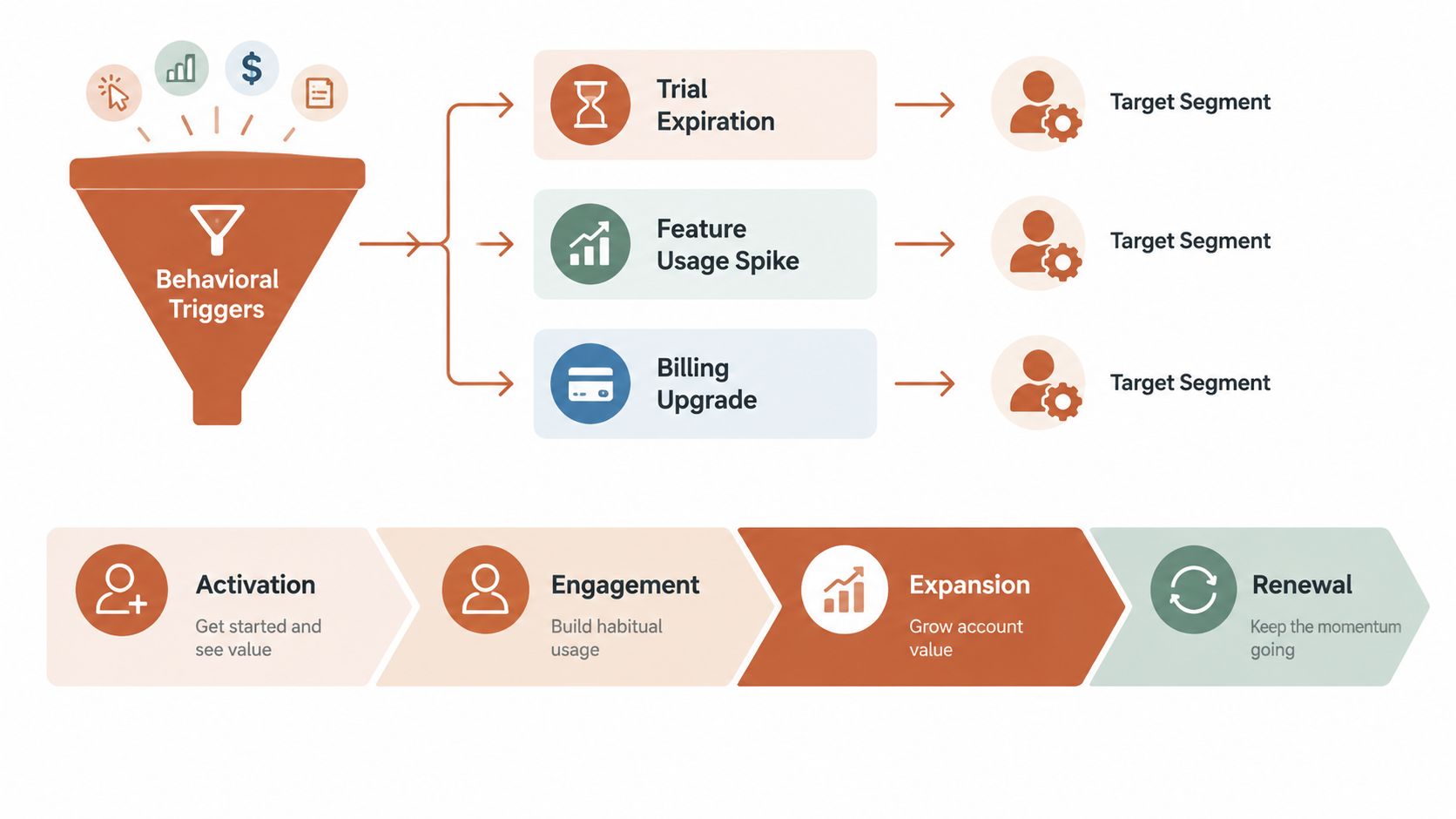
Build an event inventory with four categories:
- Usage events: A user reaches a limit, repeats a high-value action, invites collaborators, creates more projects, or attempts to access a restricted capability.
- Lifecycle events: A trial approaches expiration, activation completes, a customer reaches a meaningful usage milestone, or engagement declines after initial adoption.
- Billing events: A renewal approaches, a payment succeeds, a plan changes, an invoice is created, or consumption suggests that a different tier may fit better.
- Customer context: A support ticket identifies a missing capability, a customer mentions a workflow gap, or an account has unresolved friction.
The signal should answer three questions. What did the customer do? What problem might that action reveal? Which available offer removes that problem without creating a new one?
A feature-usage spike can justify an educational email before a sales email. A repeated attempt to use a plan-restricted feature can justify a direct upgrade path. A support interaction may require resolution first, because pitching during frustration can damage trust even when the recommendation is relevant.
Connect the data you already have
Most early-stage SaaS teams don't need a new warehouse project to begin. Connect payment and product events from Stripe, Polar, webhooks, or a direct Events API, then add user events from providers such as Clerk and Supabase or from custom instrumentation. The integration matters less than the event contract. Each event should include a stable account or user identifier, event name, timestamp, relevant object, and enough context to decide whether an offer applies.
Use suppression rules from the start. Exclude customers who already bought the capability, are in an active downgrade or cancellation flow, have an unresolved high-severity complaint, or have recently declined the same offer. You can calculate behavior-based segments automatically without forcing a marketer to build manual queries. The guide to behavioral segmentation is useful when you're deciding how to turn raw events into lifecycle audiences.
Separate readiness from eligibility
A customer can be eligible for an upgrade without being ready for one. Eligibility comes from the account's plan and billing status. Readiness comes from behavior, timing, and context.
A useful segment definition might read: “Active accounts on the Standard plan that attempted the advanced export workflow, have no open billing issue, and haven't received an expansion offer recently.” That definition gives the email enough context to explain the customer's likely outcome, recommend one action, and avoid irrelevant pressure.
Practical rule: If you can't explain why this customer is receiving the offer in one sentence, the segment isn't ready to ship.
Sequencing Messages and Framing Offers
A lifecycle email shouldn't introduce an offer before the product has earned the conversation. The sequence should follow the customer's progress, not your internal revenue calendar.
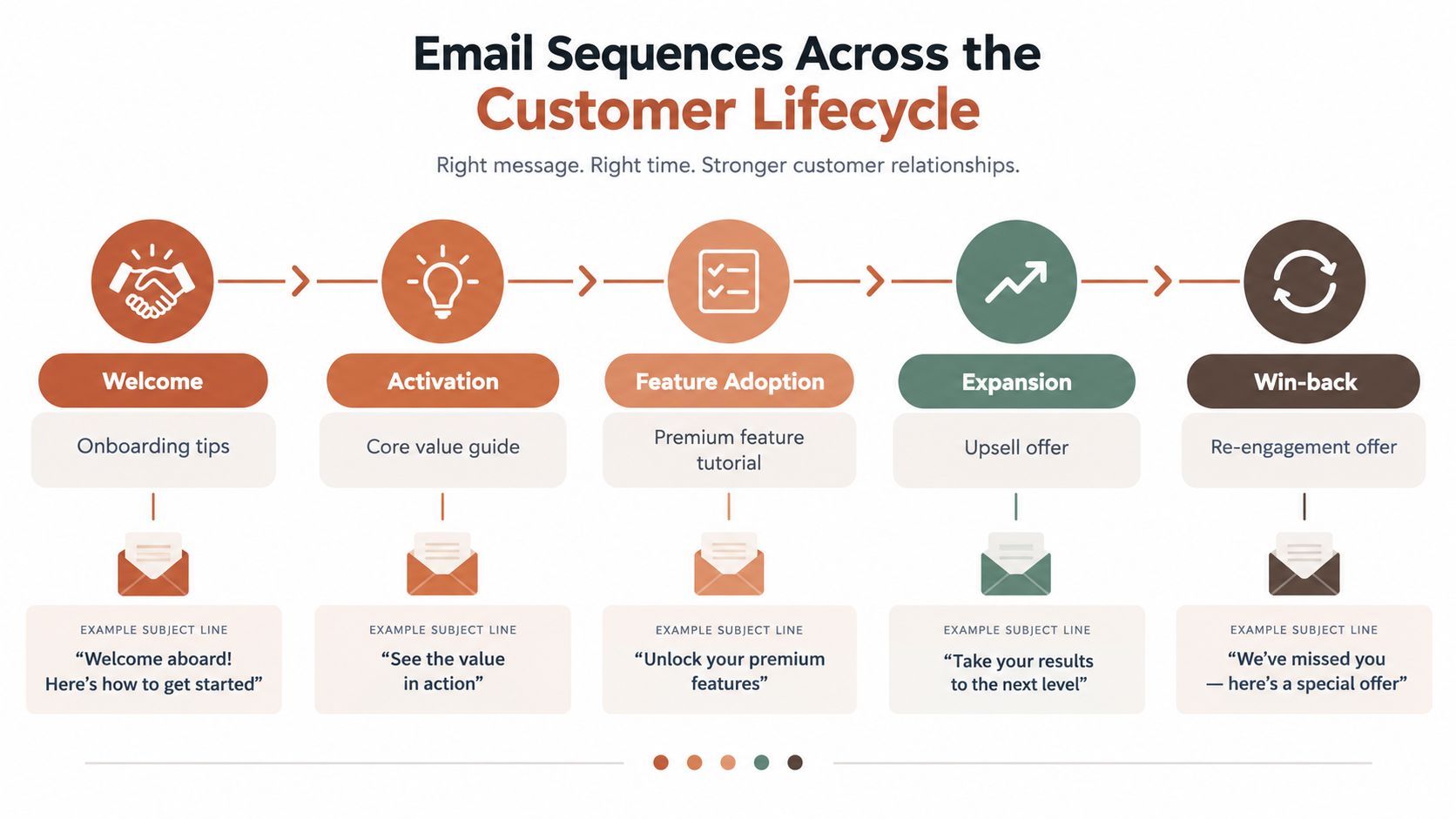
Start with the welcome and activation stage. These emails should reduce uncertainty, show the core workflow, and help the user reach value. Don't insert a premium-plan pitch into an onboarding message unless the recipient has already demonstrated a need that the higher tier solves.
After activation, move into feature adoption. A customer who uses a core workflow repeatedly may be ready to learn about a complementary capability. The first message can teach. The next can show the outcome enabled by the premium feature. Only then should you present an upgrade or cross-sell, unless the trigger itself represents a direct plan restriction.
Match the message to the stage
Use a different job for each stage:
- Activation: “Here's how to complete the workflow you started.”
- Adoption: “Here's a faster or more complete way to achieve the result.”
- Expansion: “Your recent usage suggests this capability may remove the constraint.”
- Renewal: “Here's how the right plan supports the work you're already doing.”
- Win-back: “Here's what changed, and here's a relevant way to return.”
The offer itself should describe an outcome, not a feature inventory. “Add advanced permissions” is weaker than “Give each teammate the right access without managing permissions manually.” The second version connects the product capability to operational work.
Keep the call to action singular. A message that offers a plan comparison, a demo, a guide, a discount, and a reply option forces the customer to choose among your internal goals. Give them one obvious next step, such as “Review your plan,” “Enable team access,” or “See how advanced exports work.”
Control timing and friction
Send after a meaningful event, but don't confuse immediacy with relevance. If a user hits a limit while frustrated, acknowledge the limit and explain the available path. If an account reaches a positive usage milestone, frame the expansion as a way to support momentum. If a renewal is near, give the customer enough time to understand the plan change rather than combining the offer with an urgent billing warning.
For SaaS, triggered email sequences generally create a stronger foundation than isolated promotional sends because they respond to behavior. A 2026 benchmark article notes that triggered sequences materially outperform one-off campaigns in engagement, reinforcing the importance of context and timing (Pedowitz Group guidance on identifying upsell and cross-sell opportunities).
Cadence should follow the customer's state. Send the initial contextual message, allow space for action, then follow up with new information rather than repeating the same pitch. Stop the sequence as soon as the customer upgrades, purchases the add-on, replies with an objection, or enters a state where promotion would be inappropriate.
For additional workflow design patterns, see this resource on email marketing automation workflows.
Measuring What Actually Matters
An upgrade email can earn clicks while producing no expansion. Open rates and click-throughs help diagnose deliverability, message appeal, and friction in the journey, but the operating metric must connect an eligible account to a completed additional purchase.
Define the cross-sell or upsell close rate as the percentage of inbound contacts that complete an additional purchase. This separates exposure from acceptance and gives the team a funnel-stage KPI that connects email activity with commercial outcomes (APQC's cross-sell and upsell close-rate methodology).
Use comparable denominators
Report both decided-only and total-opportunity conversion. Decided-only conversion counts opportunities where the customer made a clear yes or no decision. Total-opportunity conversion also counts no-decision outcomes, including stalled upgrades, unanswered proposals, and accounts that never completed the motion. B2B cross-sell benchmarks often fall in the 30% to 60% decided-only range. Including no-decision outcomes can reduce the result by 5 to 10 points, according to the APQC benchmark.
SaaS and software results vary by motion and sector. APQC reports software averages around 27.6%, with top-quartile performance around 42.3% for the relevant close-rate measure. Use those figures as directional comparison points, not promises. A self-serve feature activation, a sales-assisted expansion, and a renewal-plan change require separate denominators.
Build the KPI chain
| Metric | Average Performance | Top-Quartile Target |
|---|---|---|
| SaaS cross-sell or upsell close rate | 27.6% | 42.3% |
| Decided-only B2B cross-sell conversion | 30% to 60% | Compare within the same motion |
| Total-opportunity conversion | Lower after no-decision outcomes | Reduce stalled outcomes |
The table's SaaS figures and directional B2B ranges come from the APQC cross-sell and upsell close-rate benchmark. Do not apply the decided-only range to a total-opportunity funnel.
For product-led sequences, measure attach rate, the share of eligible customers who add the capability. Pair it with ARPA lift, expansion ARR, and retention behavior. Customer-based cross-sell rate divides cross-sell conversions by total customers. Revenue-based cross-sell rate divides cross-sell revenue by total revenue. These measures answer different questions, so a journey can look healthy on one while adding little revenue on the other (Prospeo's explanation of cross-sell and upsell rates).
A practical dashboard should include:
- Eligibility: How many accounts met the trigger and passed suppression rules?
- Acceptance: How many completed the additional purchase?
- Value: What did accepted offers add to ARPA or expansion ARR?
- Quality: Did upgraded accounts retain, activate the feature, and avoid support friction?
- Stall rate: How many accounts entered the motion without reaching a decision?
For AI-driven lifecycle tools, pass these event fields into reporting: trigger event, segment, offer, message variant, send timestamp, decision state, purchase, and retention outcome. That structure lets the system distinguish a relevant recommendation from an accidental send.
Email analytics can sit beside channel reporting, including LinkedIn analytics tools, but channel engagement should not replace the business outcome. Use an email marketing metrics guide to standardize definitions before comparing behavior-triggered journeys.
Testing Variants Without Wasting Sends
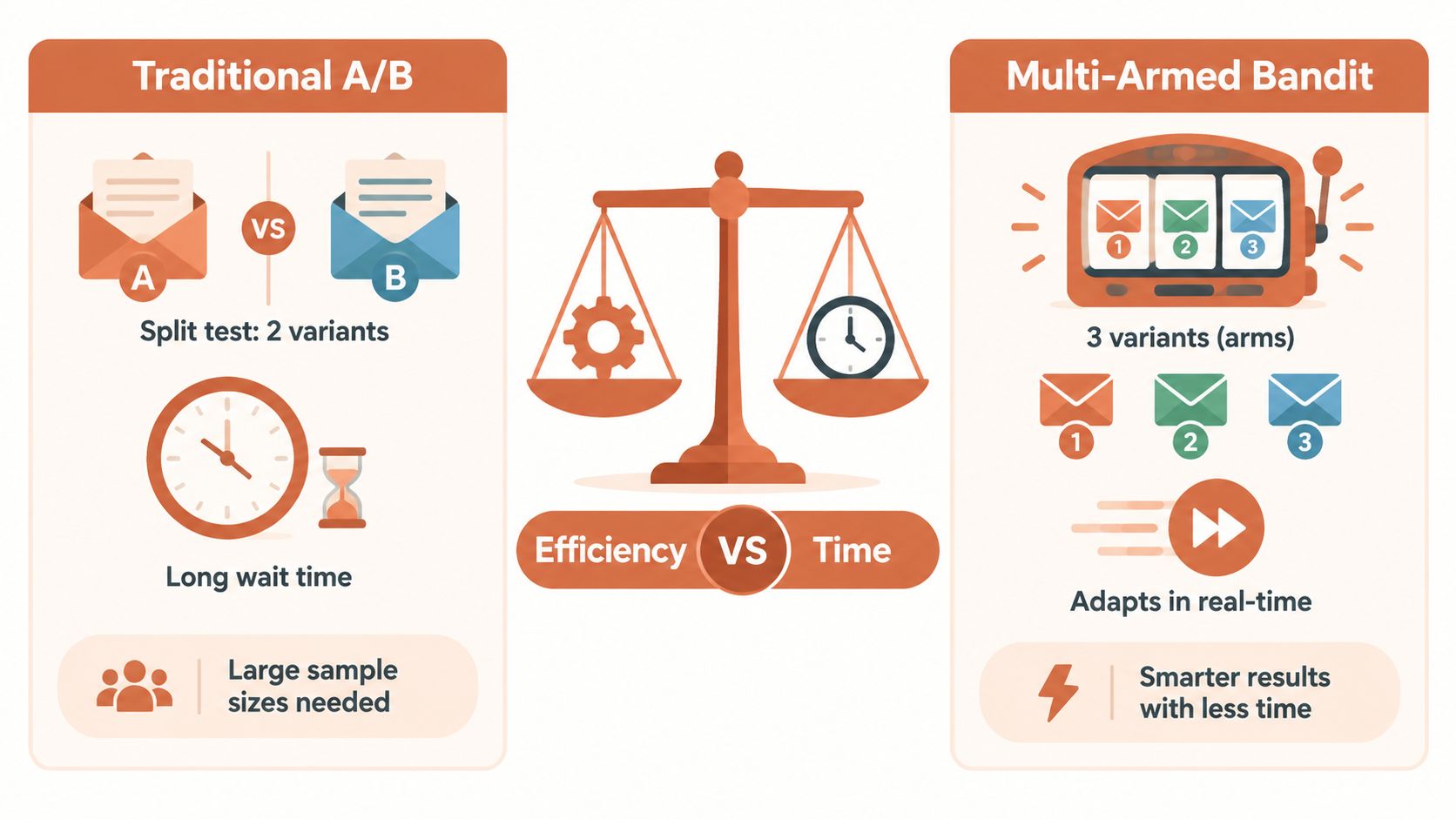
Traditional A/B testing asks you to split traffic, wait for enough observations, declare a winner, and then write the next test. That can be workable for a large newsletter. It becomes slow and expensive for indie SaaS journeys that trigger only when a narrow behavior occurs.
A multi-armed bandit approach lets you launch several message variants, observe performance as sends accumulate, and shift more delivery toward the stronger options while the journey remains active. It doesn't remove the need for measurement discipline. It changes how quickly the program can learn without sacrificing every send to an even split.
Test the decision before the decoration
Test in this order:
- Offer relevance: Does the message recommend the capability that matches the trigger?
- Outcome framing: Does it lead with the customer's task, risk, or constraint rather than plan features?
- Timing: Does it arrive immediately after the signal, after a teaching message, or near renewal?
- Subject line: Does the subject make the context clear without exaggerating urgency?
- Call to action: Does one action make the next step obvious?
- Creative details: Only after the strategic variables work should you spend time on layout and stylistic refinements.
Generate variants around one hypothesis. For a usage-limit trigger, one version might focus on continuity, another on team efficiency, and a third on the specific capability offered by the next tier. Keep the trigger and audience stable so the result says something useful.
Optimize for account value, not isolated clicks
A variant that produces cheap clicks but few completed upgrades isn't a winner. Likewise, an offer can convert well per recipient while lowering total account value if it causes customers to downgrade, request refunds, or disengage from the core product.
Set a primary success event, such as completed upgrade or add-on purchase, then monitor downstream effects. For subscriptions, include plan retention, feature adoption, replies, cancellations, and support sentiment. Stop or rewrite a variant when it generates confusion, objections, or irrelevant demand.
AI can generate subject lines and copy options quickly, but it shouldn't decide whether the offer is ethically or commercially appropriate without guardrails. Give the system the trigger definition, eligible plan states, prohibited contexts, brand voice, and approval policy. Keep manual review for pricing changes, sensitive win-back messages, and journeys that affect a large customer segment.
Testing principle: Automate the repetitive work, not the judgment about whether a customer should receive the offer.
A bandit loop is most useful when it has a clear operating rhythm. Generate variants, launch under approval, shift delivery based on completed outcomes, inspect qualitative replies, and rewrite losing messages instead of endlessly tweaking them. The aim isn't to manufacture more sends. It's to learn which message helps a ready customer act.
Real Playbook Examples for Indie SaaS
A trial user completes setup, returns once, then disappears before reaching the product's core value. That moment is a better starting point for an expansion program than a generic weekly promotion. The strongest indie SaaS journeys begin with one narrow behavior and one commercial hypothesis. They do not combine activation, adoption, expansion, and churn recovery in one automation.
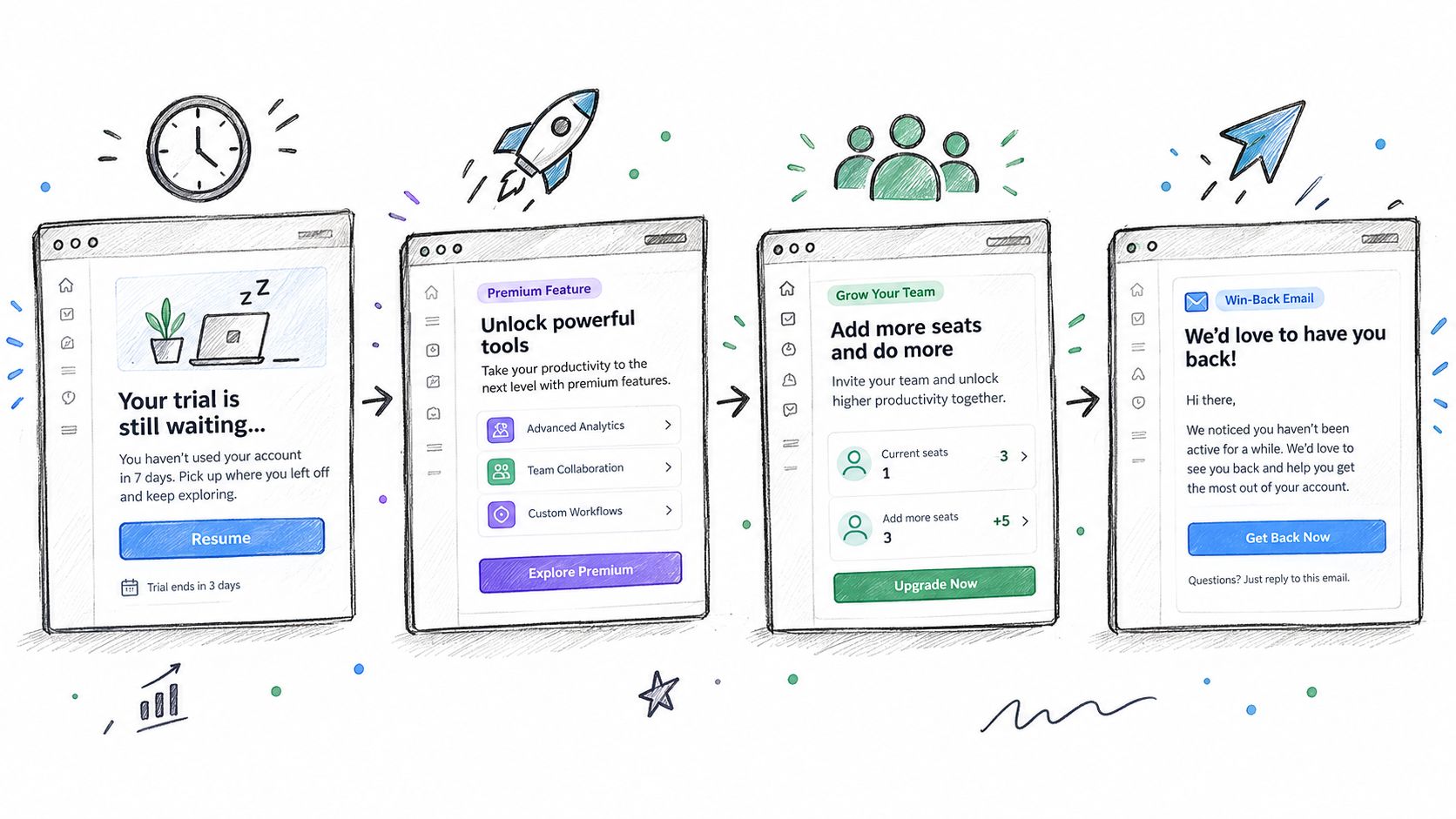
A stalled-trial activation journey
Trigger: The trial user completed an initial setup action but has not reached the core value event.
Treat the first email as a practical rescue. Point to the next action, include one short example, and link directly to the relevant screen. If the user returns and completes the value event, stop the activation sequence and move them into feature education. If they remain inactive, send a second message that addresses a plausible obstacle, such as missing data, unclear setup, or uncertainty about the result.
The offer comes later. An upsell belongs in this journey only after the user has encountered a genuine plan restriction. Until then, the job is to prove value and establish a usable product habit.
A premium-feature adoption journey
Trigger: A customer repeatedly uses a core workflow that has a more advanced companion capability.
Lead with the workflow, not the plan name. Show how the premium capability changes the task the customer already performs, then invite them to try or enable it if their account supports that path. If an upgrade is required, state the relevant plan and connect it to a concrete operational outcome. One capability per email gives the customer a decision they can evaluate. Listing every premium feature creates comparison work without creating intent.
For account-based SaaS, the active user may not control the budget. Invite them to share the capability with the teammate who owns that workflow, and provide a useful explanation they can forward. This creates a cross-sell path without treating every recipient as the economic buyer.
A usage-led expansion journey
Trigger: An account reaches a product or billing event that suggests the current plan may constrain continued use.
Name the observed context in the first email. Explain what the next tier enables, then give one clear route to review the upgrade. Suppress the journey for accounts with open payment issues, cancellation intent, or unresolved support friction. If the customer does not act, follow up with a practical comparison, such as included capacity, workflow access, or administrative control, rather than repeating urgency.
Pricing and timing deserve their own tests. A prior benchmark found stronger results for a mid-range offer and during major retail promotion periods, but indie B2B SaaS teams should not copy those ecommerce conditions directly. Use the broader lesson instead: test offer structure, price point, and timing rather than assuming the plan page will do all the selling.
A contextual win-back journey
Trigger: A churned or dormant account has a known prior workflow, support history, or product change that makes reactivation relevant.
Personalize the message around the customer's previous use. Explain a product change only when it affects the original reason for adoption. Offer a concrete return path, and give the recipient a low-pressure way to explain why they left. A generic “we miss you” email rarely provides enough context to restart a business conversation.
AI-driven lifecycle tools can keep these programs maintainable by reading the product repository, website, and past emails, then drafting messages in the company's voice as the product changes. Keep approval-only mode enabled for new journeys, pricing updates, churn-save emails, and win-back campaigns.
A tool such as Mara can propose journeys from product and payment events, generate variants, shift send share through multi-armed bandit optimization, and maintain an audit trail while sending through the Molted platform. The team still owns eligibility rules, suppression logic, and approval decisions.
Building Expansion Programs That Retain
Expansion should improve the customer's ability to succeed, not merely increase this month's invoice. When satisfaction is high and the recommendation fits the customer's workflow, cross-selling and upselling can support credibility, customer lifetime value, profitability, and retention, a relationship highlighted in Simon-Kucher's analysis of cross-selling and upselling in telecom.
Start with one journey. Connect the product events that reveal readiness, billing events that confirm eligibility, and support context that protects the relationship. Launch a usage-led expansion flow or premium-feature adoption sequence before building a broad promotional calendar. Define the accepted purchase, expansion ARR, attach rate, ARPA lift, retention outcome, and no-decision state before the first send.
Then add controlled iteration. Use approval gates, suppression rules, qualitative reply review, and a testing system that rewrites weak variants instead of allowing stale copy to run indefinitely. The goal is a program that becomes more relevant as it learns, while customers receive fewer irrelevant offers.
Cross sell upsell works best when the customer recognizes the reason for the message before reading the price. That's how expansion becomes part of retention rather than a tax on trust.
Mara runs lifecycle customer emails for software products, from activation and feature adoption through expansion, churn-save, and win-back journeys. It reads your website, repository, and past emails, connects product and billing events from tools such as Stripe or Polar, drafts messages in your voice, and keeps approval controls in place. Visit Mara to explore a practical way to ship behavior-triggered expansion emails without adding a dedicated lifecycle team.