Email Lists for Marketing: A Practical Growth Guide
Your trial signups are coming in, but too many users never reach the first meaningful action. Paying customers miss renewal reminders, failed cards sit unresolved, and churned accounts disappear into a spreadsheet nobody checks. Meanwhile, your team keeps publishing newsletters because the email platform is full of contacts, not because the program is connected to revenue.
That's the wrong operating model. Email lists for marketing should function as a revenue system, connected to product behavior, subscription status, consent, and customer intent. A small SaaS team doesn't need a giant editorial calendar. It needs clean capture, useful lifecycle triggers, disciplined measurement, and a short list of journeys that earn their place in the inbox.
Table of Contents
- Why Email Lists Still Drive SaaS Revenue
- Connect the list to the business
- Acquisition Channels That Build Quality Lists
- Match the capture mechanism to intent
- Compliance Essentials for CAN-SPAM, GDPR, and CASL
- Build the sending baseline
- Protect reputation operationally
- List Hygiene and Deliverability Maintenance
- Run a repeatable monthly review
- Event-Driven Segmentation and Lifecycle Journeys
- Prioritize journeys by revenue impact
- Testing, Measurement, and Optimization Loops
- Use a small testing protocol
- Review the whole system weekly
- Your 30-Day Email List Action Plan
- Week one locks the foundation
- Week two ships the first revenue journey
- Week three creates usable segments
- Week four measures and cleans
Why Email Lists Still Drive SaaS Revenue
Email remains unusually valuable because one permissioned audience can support several stages of the customer lifecycle. Widely cited benchmarks place average email marketing returns at about $36 to $42 for every $1 spent, while some sector reports cite figures as high as $68:1 in the U.S. or $72:1 in e-commerce. These figures vary by business and list quality, but they explain why email still matters when paid acquisition costs rise.
For SaaS, the list has four jobs:
- Capture demand: Turn a product visitor, content reader, webinar attendee, or referral into an identifiable prospect.
- Activate trials: Help new users reach the product moment that makes the trial useful.
- Retain paying customers: Reinforce adoption, explain value, support renewals, and recover failed payments.
- Win back churned accounts: Give former customers a relevant reason to reconsider, based on what they used and why they left.
The fourth job is where static contact databases usually fail. A churned account isn't equivalent to a new lead. A user who never invited a teammate needs a different message from a customer who reached a usage limit and downgraded. Your email platform should know the difference.
Connect the list to the business
Treat each contact as a record with an operating state, not just an address. Useful fields include lifecycle stage, workspace or account ID, plan, trial status, activation events, feature adoption, seat changes, payment status, cancellation date, and consent source. The exact fields depend on your product, but the principle is fixed: message people based on what happened, not merely who they are.
A maintained list also compounds. A useful onboarding sequence can keep working for every new trial, while a paid campaign stops producing when its budget stops. That doesn't make email free. You still pay in tooling, copy, implementation, and sender reputation. It does mean a strong lifecycle asset can keep creating opportunities without repeatedly buying access to the same audience.
Operator rule: If a contact can't be connected to a customer state or a clear permission record, it shouldn't receive an automated sales or lifecycle message.
Performance depends on relevance and deliverability. In 2025, reported median B2B open rates ranged from 36.7% to 42.35%, click-through rates were around 2.0% to 4.0%, and unsubscribe rates were near 0.08% to 0.13%, according to 2025 B2B email benchmarks. The same benchmark set reported global inbox placement of 87.2%. Your program can't influence revenue from messages that never reach the inbox, so segmentation and hygiene belong in the revenue conversation, not in an isolated marketing operations queue.
Acquisition Channels That Build Quality Lists
A qualified contact is more useful than a cheap contact. For an early-stage SaaS team, the practical question isn't “How do we grow the list fastest?” It's “Which two or three sources produce people with a credible path to product value?”
| Channel | Intent Quality | Typical Trial Rate | Blended Cost / Contact | Bandwidth Needed |
|---|---|---|---|---|
| Content-led SEO | High when tied to a product problem | Varies by topic and offer | Compounds over time | Medium to high |
| Product-led freemium signups | High product intent | Usually strongest path to trial | Low marginal cost after product investment | Medium |
| Partner and integration co-registration | Medium to high | Depends on audience fit | Shared effort or partner cost | Medium |
| Webinars | High during active participation | Strong for problem-aware buyers | Moderate production cost | High for a small team |
| Paid social | Broad and variable | Often weaker than product-led sources | Ongoing media spend | Medium |
| Referral programs | Very high | Usually high intent, low volume | Incentive or program cost | Low to medium |
The table intentionally avoids invented rate or cost benchmarks. Typical trial rate and blended cost are operating metrics you should calculate from your own funnel, not numbers to borrow from another SaaS company.
Match the capture mechanism to intent
For SEO, place a short form beside a specific solution page or article. Offer a checklist, teardown, template, or product workflow that helps the reader complete the job they searched for. Pass the source, topic, consent state, and asset name into your email platform, then trigger a short educational sequence tied to that problem.
Freemium signups deserve a different handoff. The product should create the contact record at account creation, attach the workspace ID and plan state, and trigger onboarding from actual product events. Don't send a generic “thanks for signing up” series when the user has already created a project or invited a teammate.
Partner campaigns and webinars can produce strong contacts, but permission must stay clear. Use a co-branded registration form that states who will send follow-up messages and what the attendee will receive. For a useful distinction between a true mailing list and recipient fields used for one-off distribution, see this explanation of mailing list vs CC and BCC. Send the first follow-up from the same identifiable brand the person recognized during registration.
Paid social is useful for reach, but it can fill a database with people who liked the promise and never intended to evaluate the product. Make the landing page do qualification work. Ask for the business problem, route the lead to a relevant asset, and exclude contacts who repeatedly ignore the first sequence from aggressive follow-up.
Referrals generally produce the clearest intent and the smallest volume. Give current users a simple referral link, capture the referred person directly, and trigger a welcome message that references the referral context without exposing private details. Don't spread a lean team across every channel. Pick one compounding source, usually SEO or product-led signup, and one high-intent source, usually referrals, partners, or a focused webinar.
Compliance Essentials for CAN-SPAM, GDPR, and CASL
Compliance begins before the first campaign. Your signup form, consent language, sending identity, preference controls, and suppression process must agree with one another. A contact who asked for product updates shouldn't automatically receive every promotional category unless your consent language clearly covers it.
Build the sending baseline
For CAN-SPAM, commercial messages need accurate header information, nondeceptive subject lines, a clear opt-out mechanism, and a valid physical postal address, according to the FTC's CAN-SPAM compliance guide. The FTC says each separate violating email can trigger penalties of up to $53,088. CAN-SPAM also requires unsubscribe requests to be honored within 10 business days, and it doesn't require prior opt-in in the same way GDPR and CASL generally do.
That difference doesn't make purchased or scraped contacts a sensible growth tactic. Permission quality affects complaints, reputation, and inbox access even where a statute gives senders more flexibility. Keep a suppression list that prevents unsubscribed contacts from re-entering through imports, enrichment, or product syncs.
For any list touching EU residents, GDPR consent must be freely given, specific, informed, and unambiguous. An unchecked opt-in box is acceptable evidence of affirmative action, while a pre-ticked box isn't valid consent, as described in this GDPR and CAN-SPAM compliance guidance. Record the wording, timestamp, source, and category of consent. Make withdrawal as easy as signup, and be prepared to handle access and deletion requests.
CASL requires a stricter consent posture for many commercial messages. Document express consent where required, track the source and scope of implied consent, and avoid treating a business address as a universal exemption. Your legal counsel should confirm how the rules apply to your audience, geography, and message types.
Protect reputation operationally
Authenticate the sending domain with SPF, DKIM, and DMARC through your email service provider's documented setup. Separate marketing preferences from essential service communications, and ensure a marketing unsubscribe doesn't accidentally trigger another campaign.
For broader enterprise data protection tips, keep access limited, document retention decisions, and review which systems copy subscriber data. Mara's email marketing compliance guide also provides a practical reference for preference centers and consent workflows. Compliance isn't paperwork added after growth. It's part of the infrastructure that keeps your list usable.
List Hygiene and Deliverability Maintenance
A list decays even when your acquisition engine works. People change jobs, abandon inboxes, mistype addresses, create aliases, or stop caring about the problem that brought them to your SaaS. List hygiene is therefore a recurring operating cadence, not an occasional cleanup before a major launch.
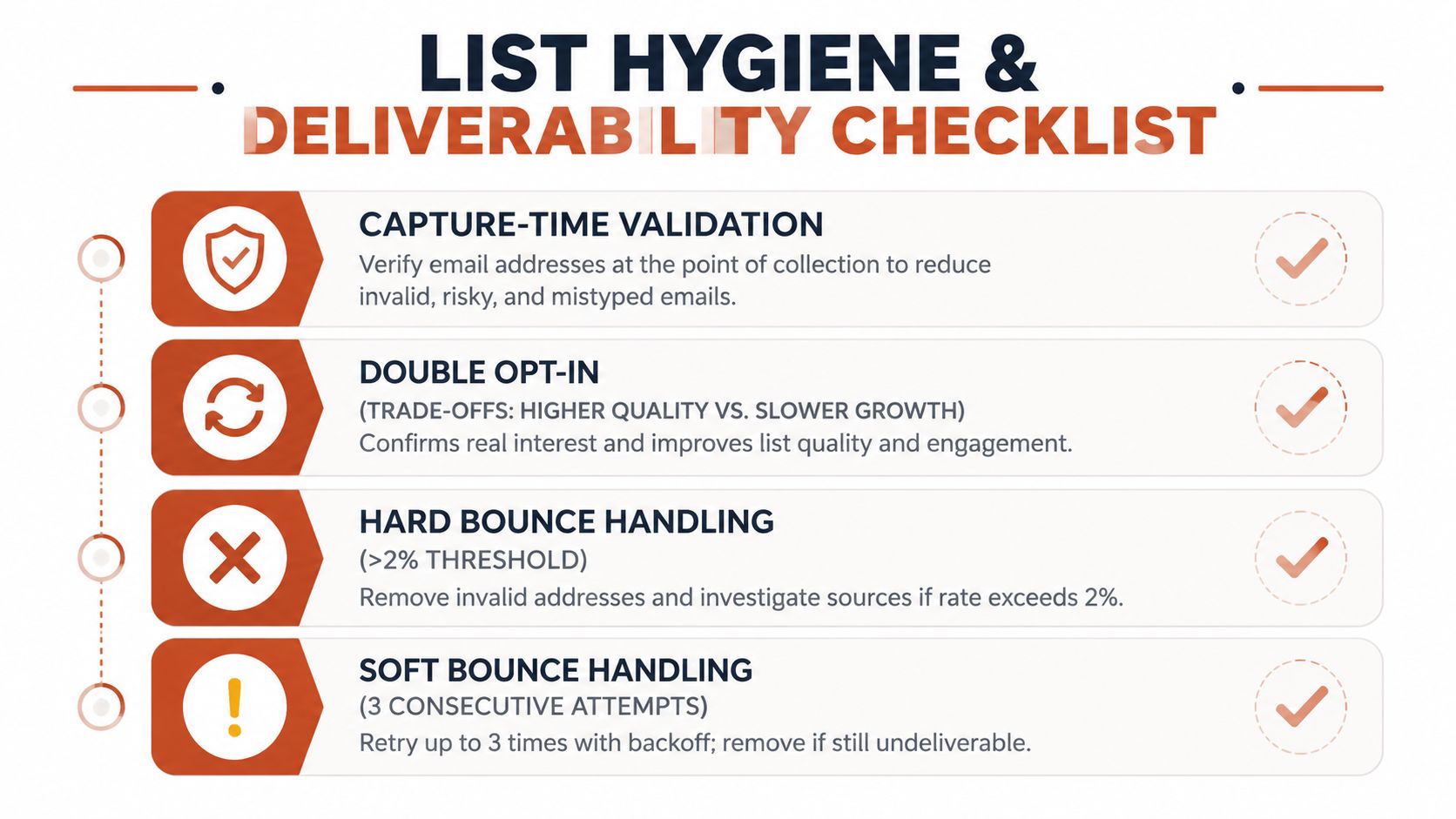
The risk is larger than a few bounced emails. One global analysis of nearly one billion addresses found 19.6% of contacts in active databases could damage deliverability, including 11.7% invalid and 7.9% risky addresses. At capture, 7.6% of submitted emails were already invalid and 4.57% risky, according to the email list quality report. Those figures make verification at the form a sensible control, especially for high-volume signup sources.
Run a repeatable monthly review
Start with capture-time validation. Consider double opt-in where the quality benefit justifies slower list growth, particularly for open forms, content downloads, and markets with high bot activity. Then apply clear handling rules:
- Hard bounces: Suppress them immediately. Don't keep retrying an address that has permanently failed.
- Soft bounces: Retry according to your ESP's guidance, then suppress contacts that continue failing after repeated attempts.
- Role-based addresses: Review addresses such as shared inboxes manually. They can be valid, but they rarely identify one accountable user.
- Dormant subscribers: Flag people after a period such as 90, 120, or 180 days, depending on your sending frequency and product cycle.
- Unsubscribes and complaints: Add them to a permanent suppression process so imports and integrations can't reactivate them.
Use a three-touch win-back sequence for dormant contacts. The first message should remind the person why they joined, the second should offer a preference or frequency choice, and the final message should state that you'll stop sending unless they re-engage. Sunset chronic inactivity rather than protecting an inflated audience number.
One 2025 to 2026 analysis says marketing databases lose about 22.5% of value per year, while another reports that email lists decay by at least 28% annually, as summarized in the linked quality report above. The exact rate varies, but the operating conclusion doesn't: maintenance belongs on the calendar.
Monitor complaint rate, sender domain reputation, authentication, bounces, and inbox placement. Industry guidance cited in 2026 says most mailbox providers expect complaint rates below 0.1% and warn against exceeding 0.3%. Use your ESP's reports for a monthly review, and consult this guide to improve email deliverability when the signals deteriorate.
Event-Driven Segmentation and Lifecycle Journeys
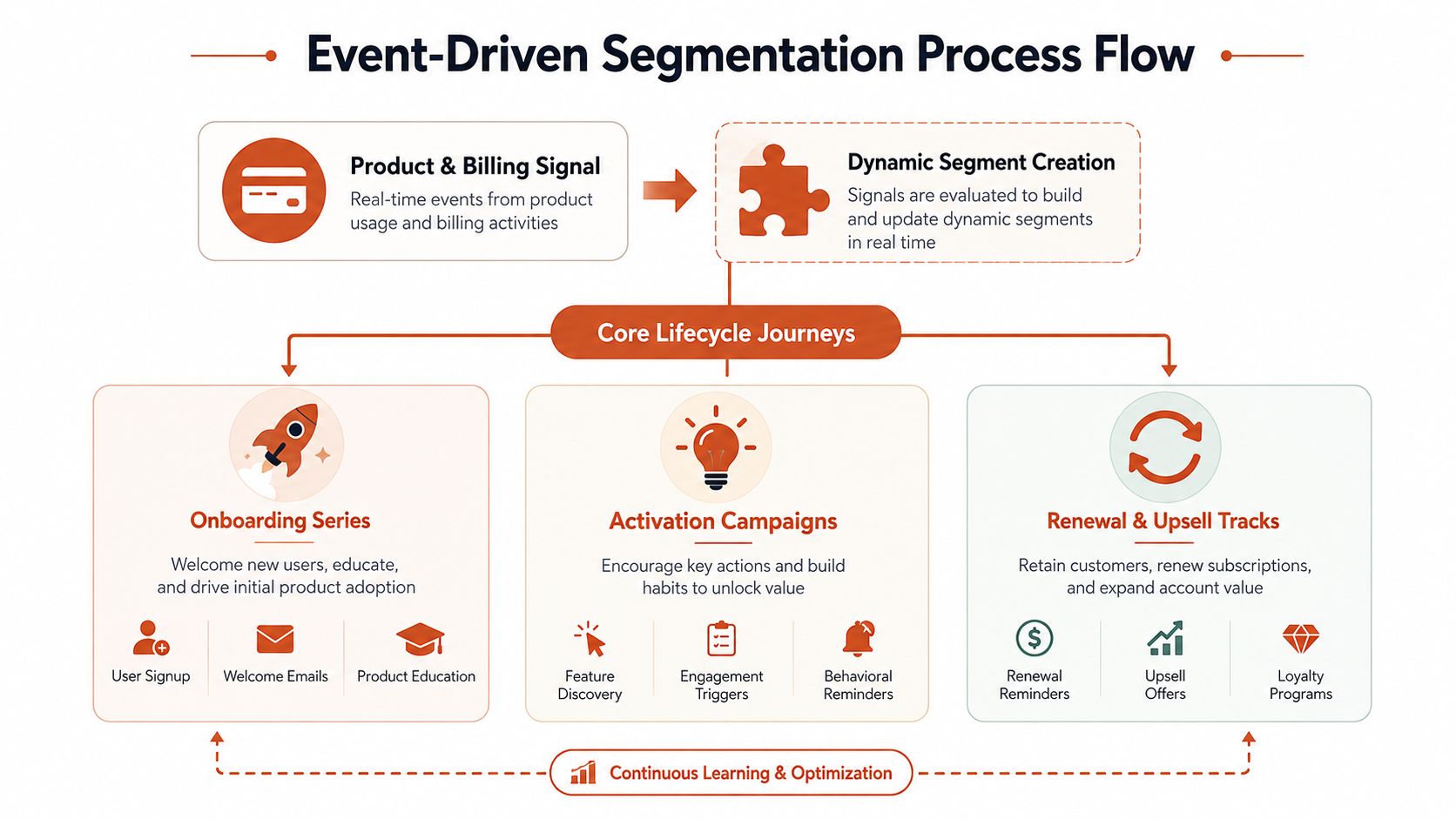
Static cuts such as job title, company size, or industry can help acquisition targeting. They're weaker for lifecycle messaging because they don't tell you what the user needs today. Event-driven segmentation uses product and billing signals to identify the customer's current situation, which makes the message more actionable.
A trial user who created a workspace but hasn't invited anyone needs activation help. A paid account that added seats needs an expansion prompt. A customer whose payment failed needs recovery messaging, not a feature newsletter.
Prioritize journeys by revenue impact
Build a simple event map across the product, billing system, and email platform. Resolve identity through a stable user or account ID, then keep lifecycle stage in one source of truth. Stripe, Polar, webhooks, providers such as Clerk and Supabase, or a custom Events API can feed events, but the email tool shouldn't become a competing billing database.
Prioritize the first journeys using impact and effort:
- Onboarding: Trigger from signup, workspace creation, or the first incomplete setup action.
- Activation: Trigger from missing or completed product milestones, such as creating a project, connecting an integration, or inviting a teammate.
- Usage-based expansion: Trigger when usage, seat count, or feature adoption reaches a meaningful threshold.
- Renewal: Trigger from the subscription schedule and current plan, with content that reinforces realized value.
- Failed-payment recovery: Trigger from payment failure and stop the sequence when billing confirms recovery.
- Churn-save and win-back: Trigger from cancellation, downgrade, or inactivity, then tailor the message to the customer's prior behavior.
The data plumbing should support entry and exit conditions. A recovered payment exits dunning. A completed activation event exits the relevant onboarding branch. A cancellation should suppress promotional upgrade messages while the account enters a save or offboarding path.
For deeper guidance, use these email segmentation best practices as a reference when defining fields, triggers, and exclusions. You can also review what segmentation means in practice before building a complex taxonomy.
Coordinate email with in-app messages. If the product already displays an activation prompt, email should add context, proof, or a direct next step, not repeat the same notification. Set contact-level and account-level frequency controls so one busy workspace doesn't generate overlapping onboarding, upsell, and billing messages.
Testing, Measurement, and Optimization Loops
A lean team should review email as an operating loop, not as a collection of isolated campaigns. Each week, connect three views: deliverability, behavior, and revenue. If one view moves while the others don't, investigate before declaring a win.
Open and click metrics are useful diagnostics, but they aren't the business outcome. For onboarding, track the activation event after message exposure. For trial nurture, track free-to-paid conversion. For upgrade prompts, track expansion revenue. For save flows, track retained accounts and recovered recurring revenue. Keep the attribution rule consistent, such as a defined window after a message or a directly linked journey event.
Use a small testing protocol
Test one meaningful variable per send or journey branch. Subject line, send timing, CTA placement, message length, and product proof can all matter, but changing several at once makes the result difficult to interpret. Start with the journey that has a clear revenue or activation event, not the newsletter with the most subscribers.
Use a simple decision rule:
- Adopt: Keep a variant when it improves the target downstream action without creating a deliverability or complaint problem.
- Iterate: Revise when engagement improves but the product or billing outcome stays flat.
- Discard: Remove a variant when it weakens the target action, increases complaints, or creates operational confusion.
Don't call a winner from a single noisy send. Use repeated observations within the same journey and compare similar audiences. If volume is limited, treat the result as directional and document the next test instead of pretending the evidence is conclusive.
Review the whole system weekly
Your dashboard should combine the source event, email event, and business event. A useful weekly review asks whether new contacts are valid, whether the right users entered each journey, whether messages arrived, and whether recipients completed the action that justified the send.
| Metric | Where It Comes From | Healthy Range |
|---|---|---|
| Activation rate from onboarding | Product analytics joined to email exposure | Set a baseline, then improve by cohort |
| Free-to-paid conversion | Billing data joined to trial nurture | Compare against untreated or prior cohorts |
| Expansion revenue | Billing events tied to upgrade journey | Track incremental revenue by journey |
| Retention or save rate | Cancellation and subscription records | Compare save-flow cohorts over time |
| Inbox placement | ESP or deliverability monitoring | Review against your established sender baseline |
| Complaint rate | ESP and mailbox-provider feedback | Keep below 0.1% and avoid exceeding 0.3%, based on 2026 complaint-rate guidance |
Read replies as qualitative product research. A user who says “I can't find the export button” has supplied a copy and product signal that a click report can't provide. Turn winning messages into documented playbooks with audience, trigger, promise, CTA, exclusions, and measured outcome.
Your 30-Day Email List Action Plan
Don't spend the first month designing a complete lifecycle architecture. Ship the controls and one useful journey, then let real behavior tell you what deserves expansion.
Week one locks the foundation
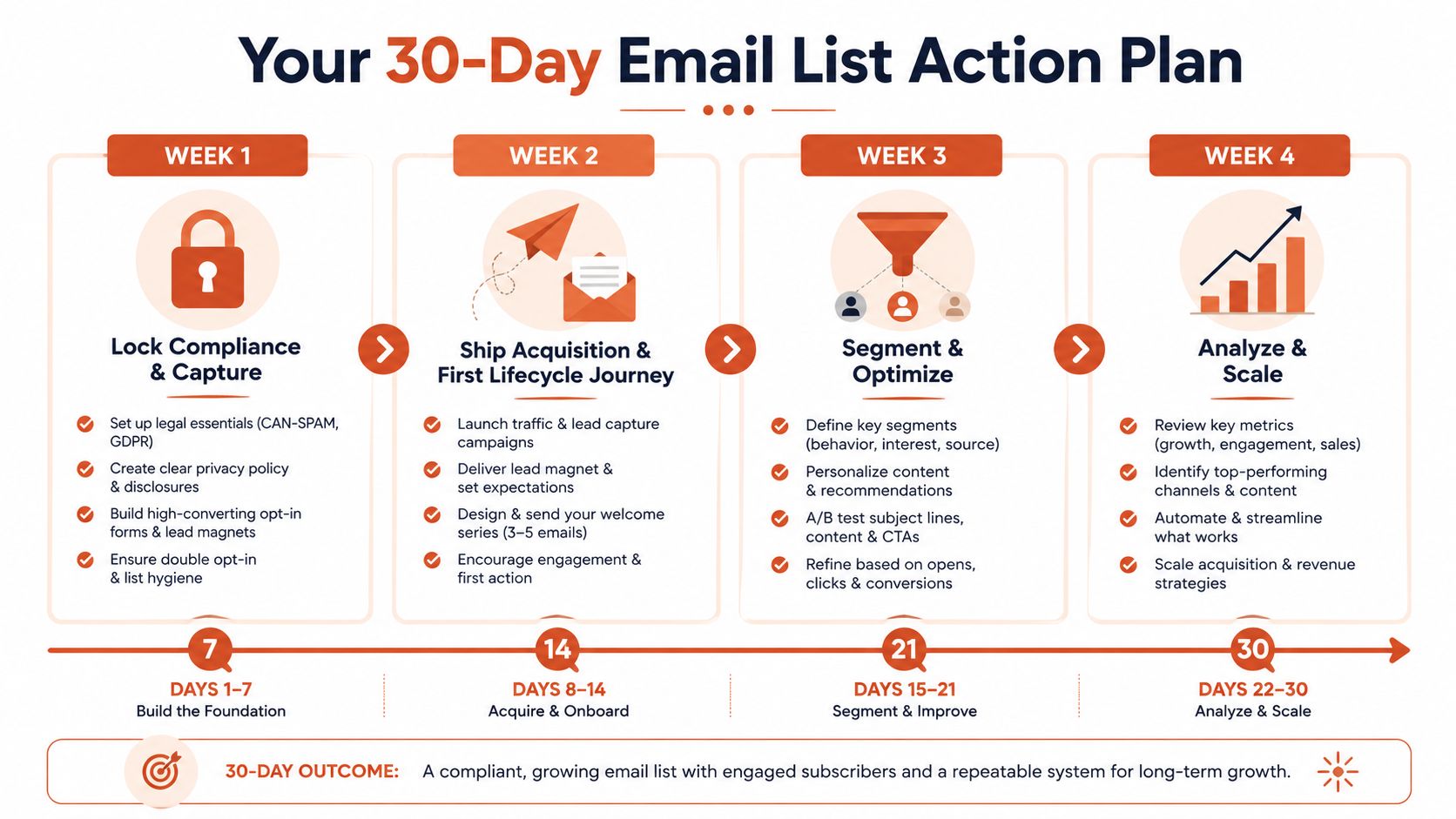
Audit every signup source, consent statement, confirmation email, and unsubscribe path. Add source and consent metadata to the contact record, configure suppression handling, authenticate the sending domain, and test a complete signup-to-email flow. Your checkpoint is simple: one form, one confirmation message, one documented permission record, and one reliable unsubscribe path.
Week two ships the first revenue journey
Choose one acquisition channel and one lifecycle journey. For most product-led SaaS teams, that means a product signup flow paired with onboarding or activation. Define the product event that proves progress, write messages around the next action, connect entry and exit conditions, and test the journey with internal accounts before enabling it for customers.
Week three creates usable segments
Avoid building dozens of segments. Start with lifecycle stage, plan, activation status, engagement state, and billing status. Add exclusions for unsubscribed contacts, failed or suppressed addresses, active support escalations, and users already receiving a higher-priority billing sequence.
Week four measures and cleans
Create one dashboard that joins email exposure to activation, trial conversion, expansion, retention, and suppression signals. Run the first re-engagement sweep for dormant contacts, review complaints and bounces, and record the copy or trigger changes you'll make next.
Judge progress through leading business signals: activated user rate, trial-to-paid conversion from email, recovered or retained accounts, and list churn compared with qualified acquisition. Open rates can help diagnose delivery and relevance, but they shouldn't become the main objective.
For teams that need execution help without adding another full-time lifecycle operator, Mara drafts and runs approval-controlled lifecycle journeys from product and payment events, including welcome, activation, expansion, re-engagement, churn-save, win-back, and dunning programs. It can connect event sources such as Stripe, Polar, webhooks, Clerk, Supabase, and custom instrumentation, while keeping sending on the customer's domain.
The best time to review the first lifecycle results is after the journey has enough comparable observations to guide a decision. Until then, keep the implementation narrow, protect consent and deliverability, and improve the messages that move users toward product value.
If your SaaS team needs lifecycle emails connected to product and billing events, Mara can draft, test, and operate approval-controlled journeys across onboarding, activation, dunning, churn-save, and win-back. Visit Mara to see how a small team can turn its email list into a maintained revenue system without adding another full-time marketer.